Template Writer's Guide
Muppy templates are similar to Helm templates.
They use the Jinja template engine ( Jinja documentation ).
The values of a Muppy Package are templates too. They are rendered before the
configuration templates, which is what lets Muppy update the values from the
Dashboard.
The following variables are available in both the values and the templates:
{
    'namespace': self.namespace_id.name or '',
    'k8s_package_release_obj': self,
    'profile_obj': self.k8s_package_profile_id,
    'package_obj': self.k8s_package_id,
    'obj': the current package_release,
    'k8s_cluster_obj': self.k8s_cluster_id,
    'k8s_template_instance_obj': k8s_template_instance_obj,
    'vault_model': self.env['mpy.vault'],

    'values': ... in configuration file templates only
}
You can inspect the content of the Generic Web App Package while reading this documentation.
Note:
The variables whose suffix is _obj are Muppy objects. You can walk the object graph with
. as the field separator.
To find the field names, use the Muppy GUI in Developer Mode.
Example:
Suppose you need the provider of the kubernetes cluster the package is installed on.
The cluster is available in the template as k8s_cluster_obj.
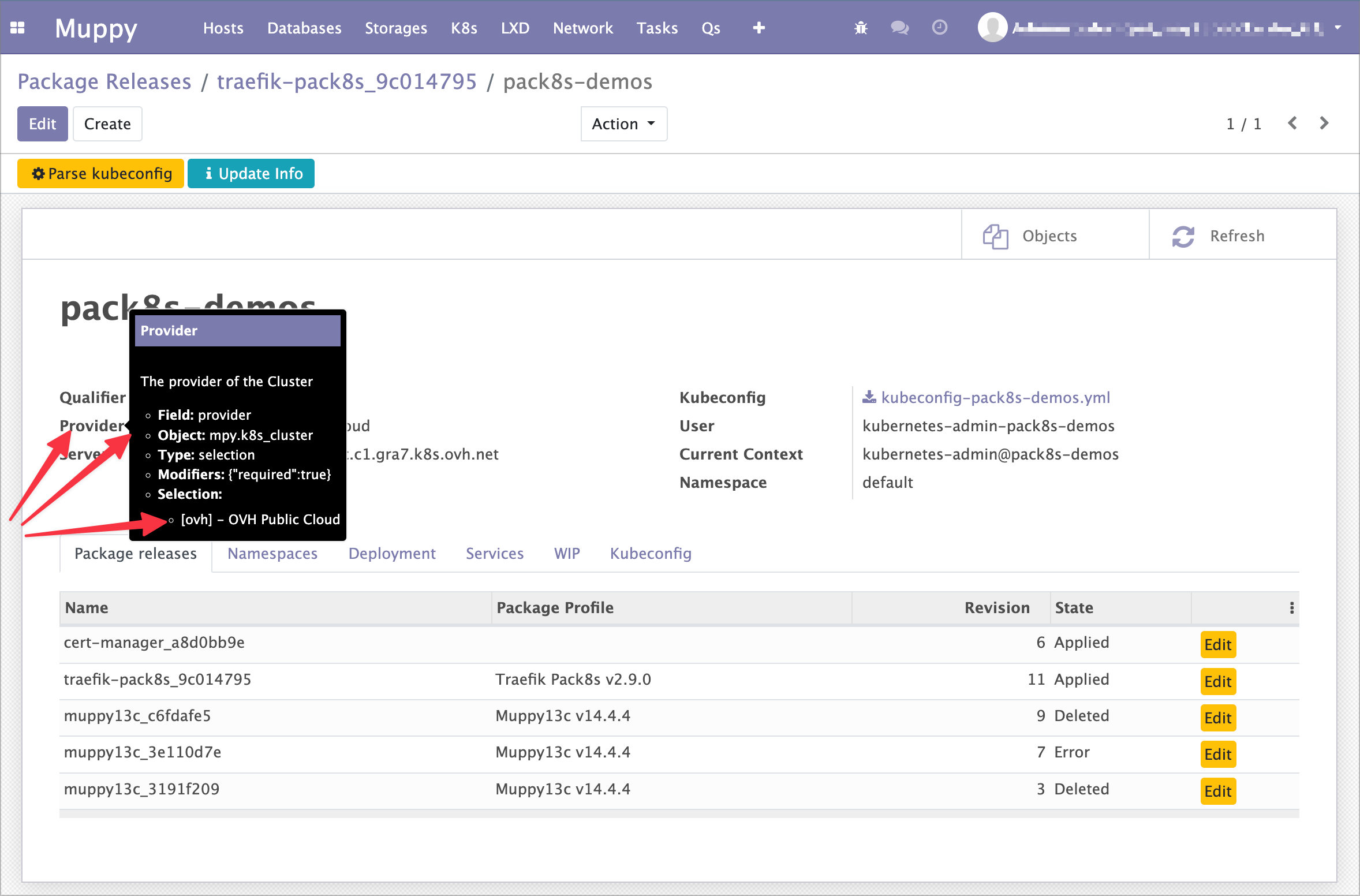
To find the name of the field holding the provider:
- activate
Developer Mode - open the form of a
K8s Clusterobject - hover over the
Providerfield's label and hold still until a black popup appears, as shown below.
Note the field name (the field) in the popup. To reach a cluster's provider from a
template, use {{ k8s_cluster_obj.provider }}.
Tip
You can use . as many times as you like to navigate an object graph.
For example, {{ obj.k8s_cluster_id.provider }} gets a cluster's Provider starting from
a Package Release.
Helpers
The following helpers / filters make templates easier to write:
to_yaml(e.g. {{ values.common_env_vars | to_yaml(offset=8) }} )obj.get_dashboard(code)— reach a dashboardvault_model.get(vault_code)— reach a secret stored in the Vault- Jinja builtin helpers (e.g. indent)
Dashboard helpers
Resources
The Dashboard's resource values are available:
# get_resources_json() helpers allow to inject a complete resource block in a config template.
# # Example:
spec:
  replicas: 1
  ...
  template:
    metadata:
      ...
    spec:
      containers:
      - args:
        - --workers=4
        - --max-cron-threads=0
        env:
        - name: PGDATABASE
          value: cmorisse_xayoni_05f2a290
        envFrom:
        - secretRef:
            name: xayoni-05f2a290-envfile-secret
        image: registry.gitlab.com/cmorisse/appserver-xy/appserver-xy16c:0.11.0-alpha
        name: appserver-xayoni
        resources:
          {{ obj.get_dashboard('redis').get_resources_json() | to_yaml(offset=10) }}

# Of courses resources values can be used individually.
# This is useful to add dashboard support to a helm package using values params
# Example:
    resources:
      requests:
        memory: {{ obj.get_dashboard('redis').resources_requests_memory }}
        cpu: {{ obj.get_dashboard('redis').resources_requests_cpu }}
      limits:
        memory: {{ obj.get_dashboard('redis').resources_limits_memory }}
        cpu: {{ obj.get_dashboard('redis').resources_limits_cpu }}
Annotations
muppy.io/scope:package | namespace(namespaceis equivalent to"helm.sh/resource-policy": keep)