Skip to content

Creating Systemd Units

The Systemd Service Units can be created:

  • Automatically by Muppy; this is the case, for example, with the Create button button found at the top of the PostgreSQL Cluster form.

  • Manually
  • With the Import Systemd Units Wizard

Manually creating a Systemd Service Unit for an existing service

Click the Create button in the Systemd Units list view, then provide:

  1. The id of an existing Systemd Unit
  2. The Host

and click the Create wrapper button button.

The wrapper is created; all that is left to do is click the Refresh button button. Muppy will refresh the Service Unit with the service data, as shown in the following image:
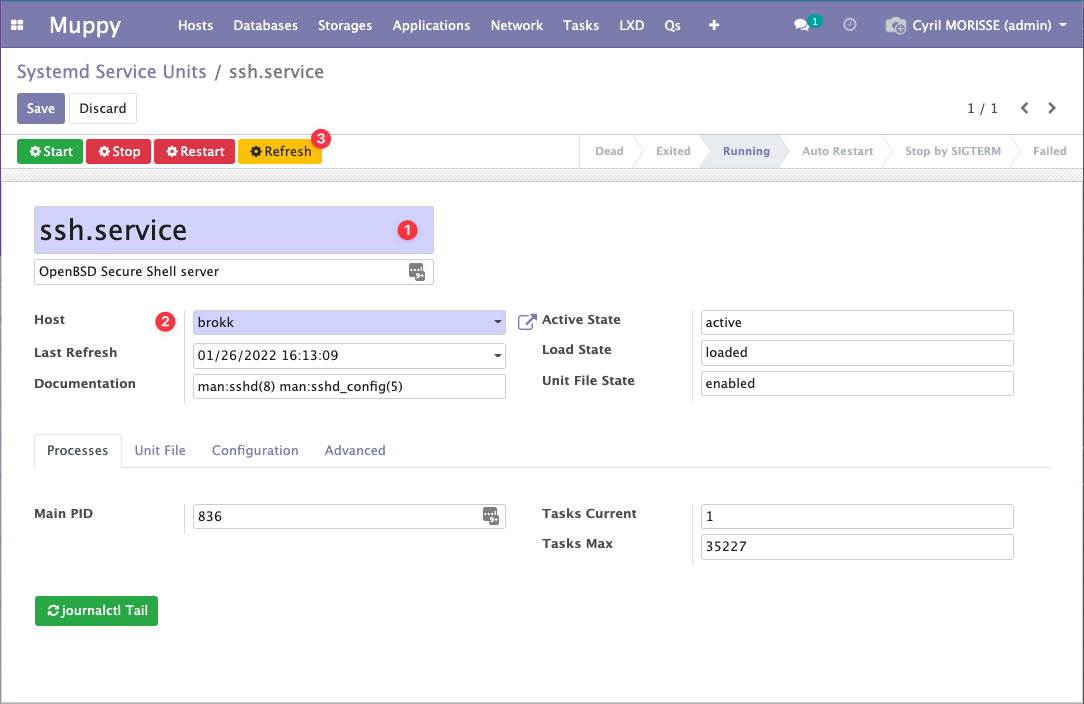
Systemd Service Unit form

Manually creating a Systemd Service Unit from scratch

It is also possible to create a Systemd Service Unit ex nihilo. In this case, provide the name of the unit file you want to create as well as the host, and refer to the Editing Systemd Units page.

Import Systemd Units Wizard

Importing registers in Muppy a service unit that is already installed on a host, so that Muppy monitors and controls it: state, start / stop / restart, journal. Nothing is written on the host.

The Wizard opens from three places:

  • From a Host: the Import Units button at the top of the Services tab of the Host form, on a managed Host. The Host is already set and cannot be changed.
  • From an App Server: the Import Units button of the Systemd tab of the App Server form, after Refresh All. The Host is the App Server's, and cannot be changed.
  • From the menu Muppy / Hosts / Systemd / Import Systemd Units: you choose the Host, among the managed ones.

In Manganese, Import custom Services on the Services tab of an App Server scans and imports the same way, on the App Server's Host.

The Import Units button after Refresh All, on the Systemd tab of an App Server, above the units of its Host

The Import Units button on the Services tab of a Host, above an imported unit and its alias

The Wizard works as follows:

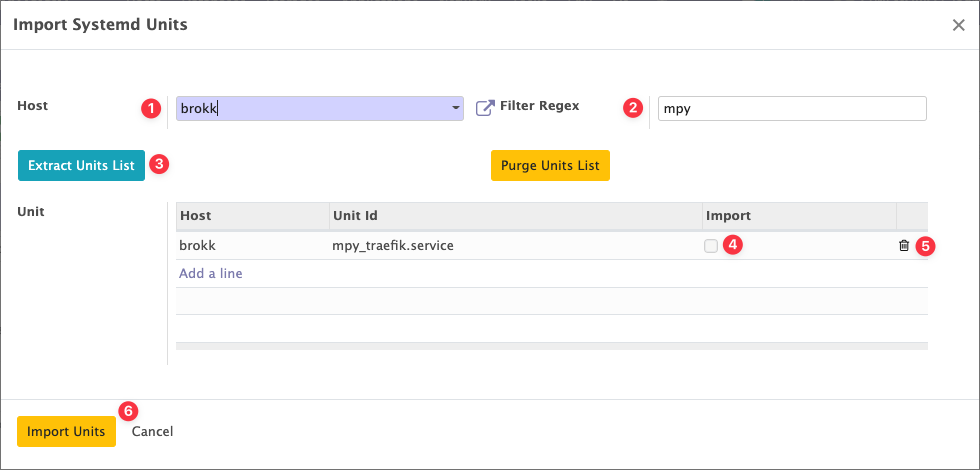
  1. Set the Filter: words separated by |; a unit is listed when its name contains one of them (case-sensitive). It is not a regular expression: every character is taken literally, e.g. mpy_, redis, mongo|redis. The Filter starts at mpy_, the prefix of the units Muppy deploys; leave it empty to list every service unit of the Host.
  2. Click Scan Host. The list is replaced by the service units of the Host whose name matches the Filter, every line checked. It never offers a unit Muppy already knows on this Host, a template (name@.service), an alias, a static unit (only another unit starts it, such as a timer), or a masked unit. When the Host is powered off or does not answer, Scan Host shows why and lists nothing.
  3. Uncheck the units you do not want.
  4. Click Import.

Import Systemd Units Wizard after a scan

Muppy registers each checked unit and reads its state on the Host at once: the unit shows its state and the path of its unit file, wherever that file lives (/etc/systemd/system, or /usr/lib/systemd/system for a unit installed by a package). Importing the same unit twice keeps a single record. An alias of the unit, such as redis.service for redis-server.service, appears as its own line, linked to the unit by Alias Of.

Where you land afterwards depends on where you started: opened from a Host or an App Server, the Wizard closes and the form shows the imported units; opened from the menu, it opens the list of the units of the chosen Host.

An imported unit belongs to the Host, not to the App Server it was imported from: it is listed on every App Server of that Host. Start All, Stop All, Restart All, a deployment and a database restore of an App Server act on the units of its Host whose name matches mpy_*_appsrv_*: an imported unit is left alone, unless its name matches. On a Host shared by several App Servers, those units include the other App Servers' units.

Warning

To stop monitoring an imported unit, click Forget Unit: Muppy deletes its record and leaves the unit untouched on the Host. Remove and Delete Unit File act on the Host, and break a unit a package installed. See Removing a Systemd Unit.

The same scan and import are available to AI agents through the infrastructure MCP, as scan_systemd_units and import_systemd_units on a Host. On a Host that is not open to AI, each call waits for a human approval.