Usage Dashboard of a microk8s node
A node of a microk8s cluster has a Usage Dashboard, like an LXD App Server host. The Usage Dashboard page describes what every dashboard shares: how to open it, the usage snapshot, and the Tunnel, PostgreSQL and Host blocks. This page describes what a node adds:
- the microk8s block, with its Releases and their pods;
- the Proxy, which is the Traefik Release of the cluster;
- the extras of the Host block;
- the two throttling settings.
Which hosts have one
Every node of a microk8s cluster, whatever the state of its cluster: the hosts listed in the
cluster's nodes, or its host while that list is empty. The usage snapshot of a node also
photographs microk8s, in the Facts MICROK8S_USAGE and MICROK8S_KUBELET_CONFIG.
Opening the dashboard
Click Usage in the button box of the K8s Cluster form. The button shows on a single-node microk8s cluster whose node has a Usage Dashboard, and opens the dashboard of that node. The Usage button of the node's Host form opens the same page.

What the page shows
From top to bottom:
- The title band says microk8s node, with the version of microk8s. A host that is both an LXD App Server and a node reads LXD host and microk8s node.
- The diagram: inside the frame of the host, the Proxy, which is the Traefik Release of the cluster, and the microk8s block, with its Releases and its services.
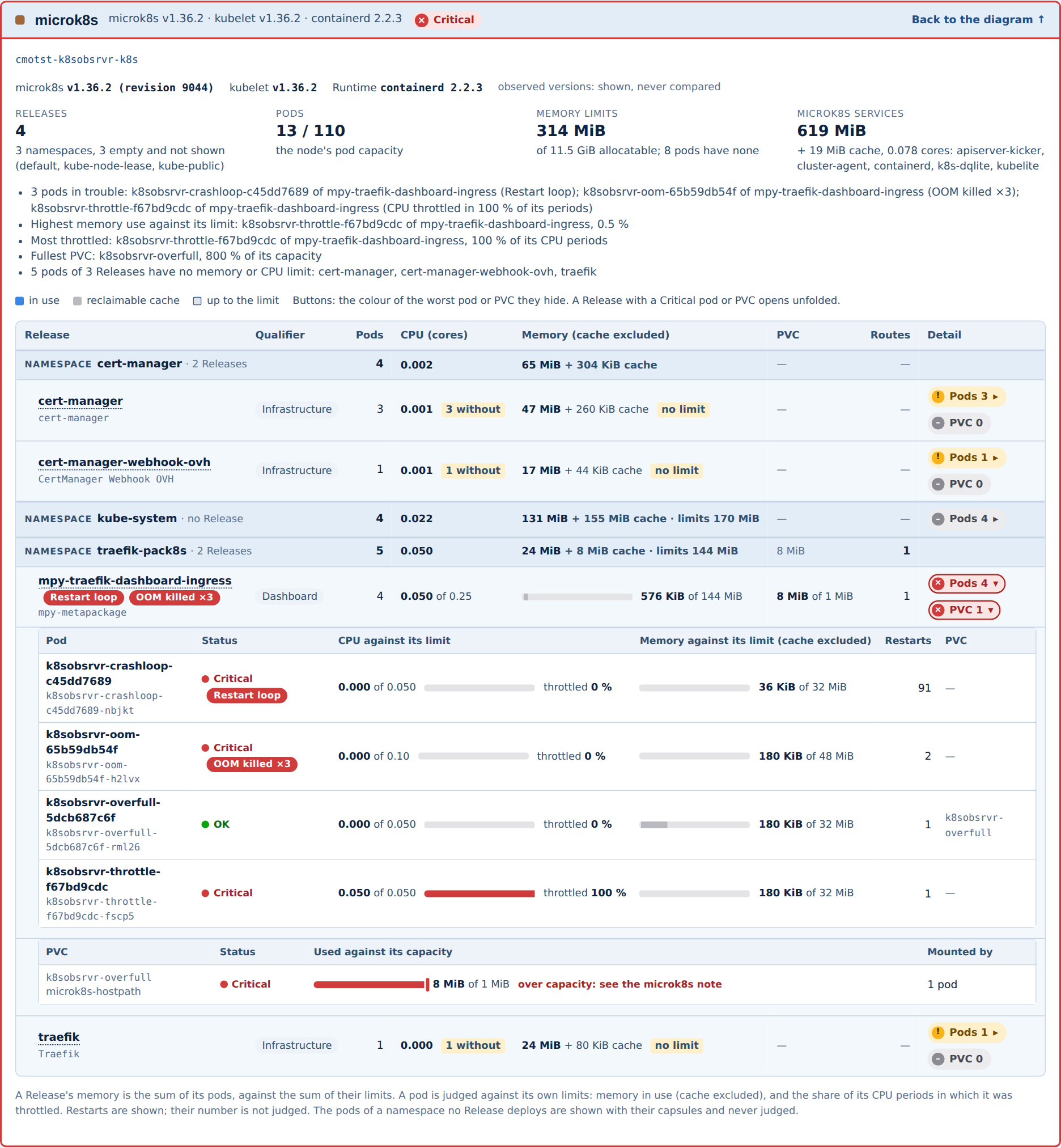
- The microk8s panel: the versions of microk8s, kubelet and the runtime, the counts of Releases and pods, the reasons of its status, then the table of the Releases.
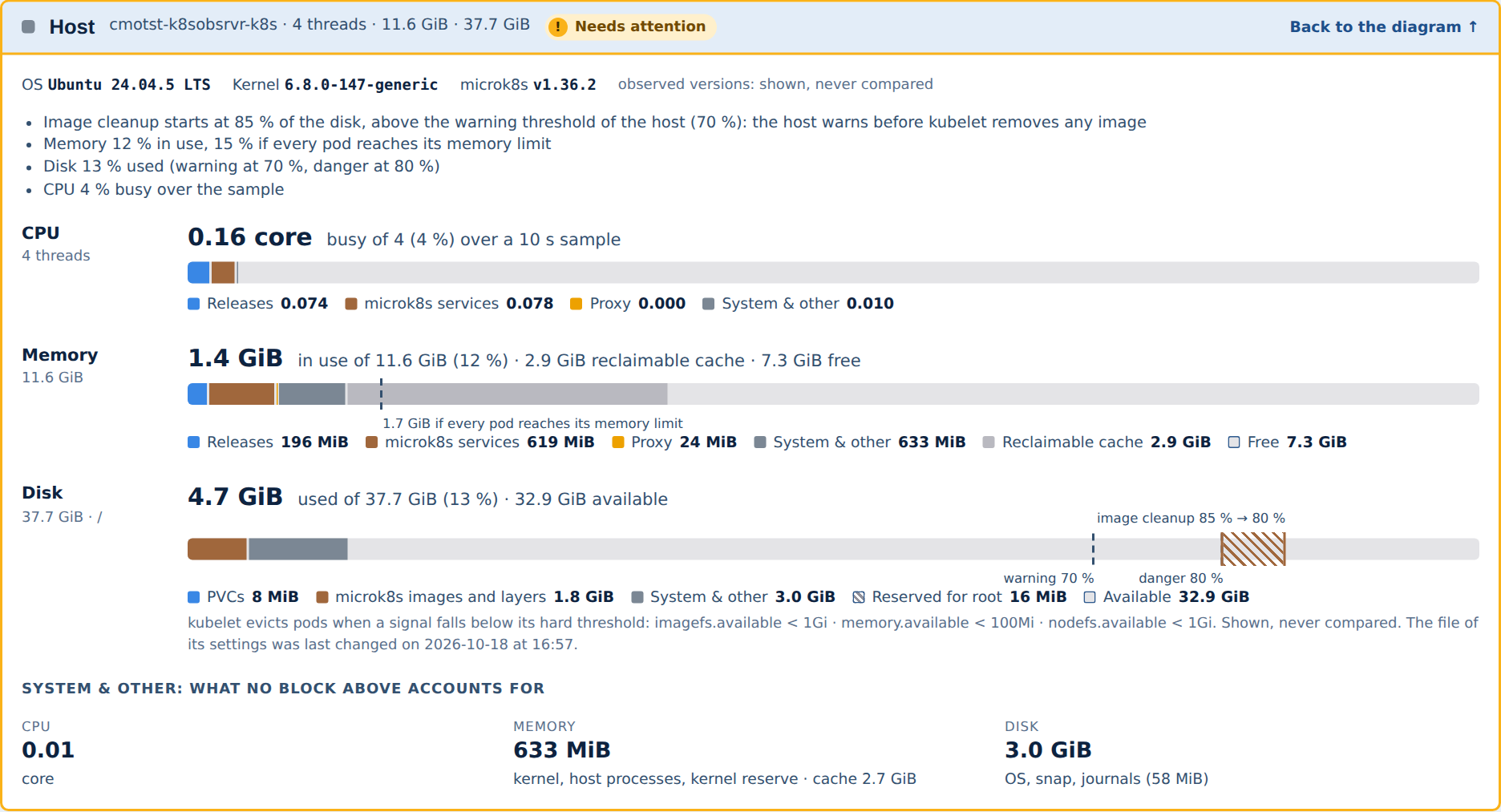
- The Host panel, with the gauges of a node.
- Three collapsible sections: How each status is decided, How each figure is measured, and microk8s: a PVC is not capped by its capacity.
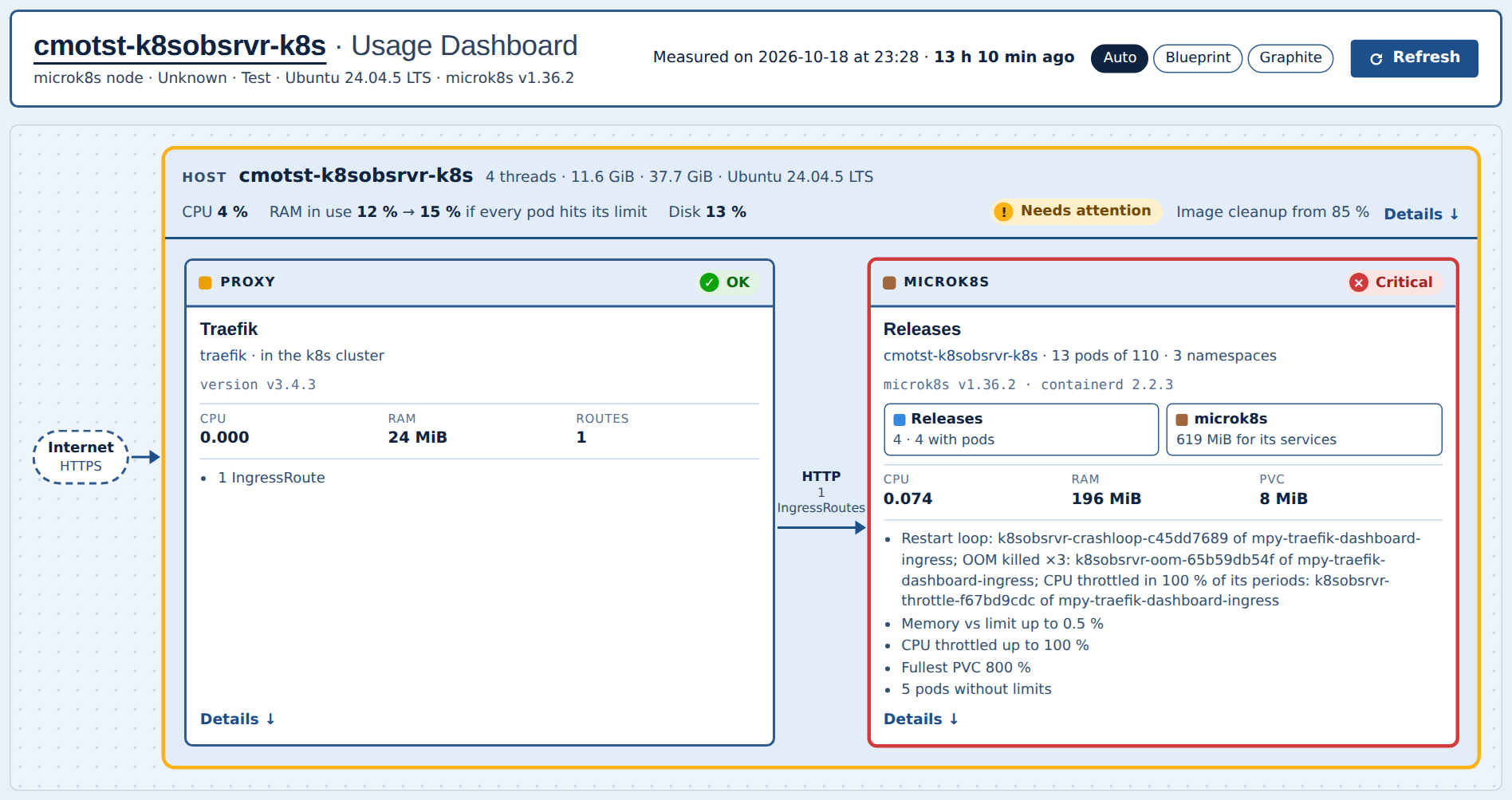
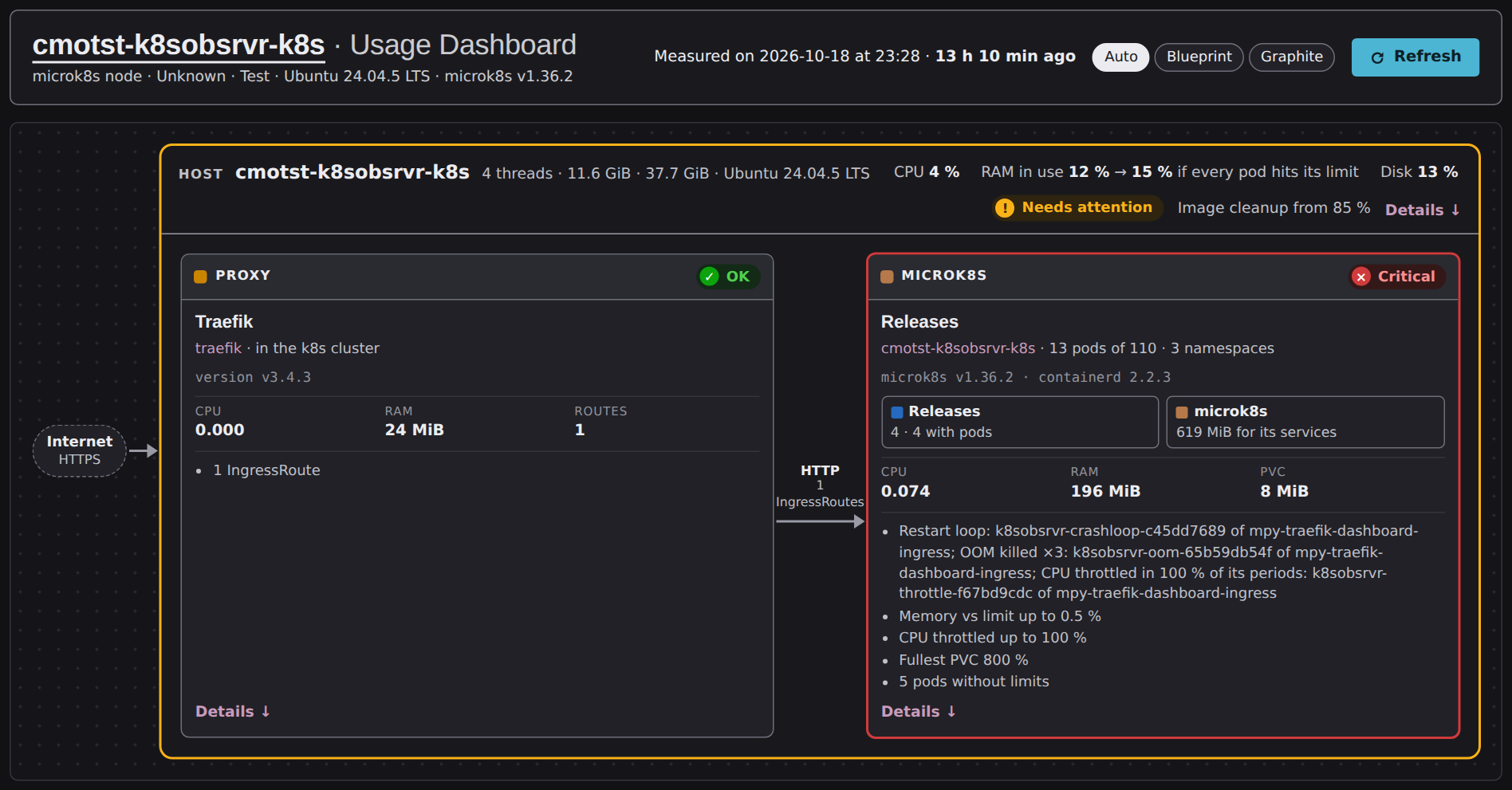
The page changes nothing. The name of a Release opens its form.
Releases and their pods
The Release is the envelope, its pods are the detail:
- The microk8s block shows one row per Release, grouped by namespace.
- The memory, CPU and PVCs of a Release are the sum of its pods, against the sum of their limits.
- A PVC mounted by several pods counts once, in its Release.
- A namespace without any Release, pod or PVC is not shown.
A pod belongs to the Release that the Helm annotation of its resource names, from the pod up
to its ReplicaSet, then its Deployment, StatefulSet or DaemonSet. Without one, it belongs to
the Release its labels name: muppy.io/package-release, app.kubernetes.io/instance,
release, or <release>-<namespace>, the form of the Traefik chart. Muppy looks the Release
up among the Releases of the cluster, by Helm instance name and namespace.
A pod that no Release claims belongs to its namespace: the pods of kube-system, for
instance.
Each Release row has two buttons, Pods and PVC, with the number of what they hide:
- Click Pods to unfold the table of its pods: their status, their CPU and memory against their limits, their restarts and the PVCs they mount.
- Click PVC to unfold the table of its PVCs: their size against their capacity, and the pods that mount them.
- A button takes the colour of the worst of what it hides. A Release with a critical pod or PVC opens unfolded.
Statuses
Only the pods and PVCs of a Release are judged. The other pods show their figures and their capsules, with no status.
| What is judged | Needs attention | Critical |
|---|---|---|
| Memory of a pod | Memory in use, cache excluded, above the warning threshold of its limit; or no memory limit. | Above the critical threshold of its limit. |
| CPU of a pod | Throttled in more of its CPU periods than CPU throttling warning (%); or no CPU limit. | Throttled in more than CPU throttling critical (%). |
| Health of a pod | — | A red capsule: Restart loop or OOM killed. |
| PVC | Filled above the warning threshold of its capacity. | Filled above the critical threshold, or above its capacity itself. |
| Pods and PVC buttons of a Release | The worst of what they hide needs attention. | The worst of what they hide is critical: the Release opens unfolded. |
| microk8s | A pod or a PVC of a Release needs attention. | A pod or a PVC of a Release is critical. |
| Proxy | — | No pod of the Traefik Release runs. |
| Host, in addition to its own rules | kubelet's image cleanup starts above the host's disk warning threshold; or memory would exceed 100 % if every pod reached its memory limit. | — |
A pod without a memory or CPU limit needs attention. Set the limits in its Release to clear it.
The first reason of the microk8s block counts the pods in trouble: every critical pod of a Release, with what makes it critical — a capsule, its memory or its CPU. For instance: « 2 pods in trouble: tscale of test1890b2 (Restart loop); workers of xy-cyril (CPU throttled in 54 % of its periods) ».
The two capsules say what goes wrong in a pod:
- Restart loop: a container waits to restart, or has just exited on a failure after restarting before, and its last recorded exit is at most 10 minutes older than the snapshot. A looping container spends a few seconds stopped at every exit: a snapshot taken then still sees the loop. The age is measured against the time of the snapshot, so a snapshot keeps its verdict. A restart count alone says nothing: a change of microk8s settings restarts every container.
- OOM killed: the out-of-memory killer killed a process of the pod since the pod was
created, or the last exit of a container is
OOMKilled. The count survives the restarts of the containers: the capsule stays until the pod is recreated. It reads OOM killed ×3 for three kills.
Unknown: the last snapshot could not read the microk8s block. The node has no snapshot yet, its snapshot has a format this Muppy does not read, or the last attempt failed the microk8s block: its error is the reason. A part of the snapshot that failed alone, such as the size of the PVCs, is listed as not measured, and the block keeps its status.
The Proxy of a node
The Proxy of a node is the Default Load Balancer Release of its cluster, on the K8s Cluster form:
- its pods give the figures of the Proxy;
- the IngressRoutes of the cluster are its routes;
- it is critical when none of its pods runs;
- its version is shown, never compared.
A cluster without a Default Load Balancer Release shows no Proxy. The task install_single_node_infra_packages sets it to the Traefik Release it installs. A host that is both an LXD App Server and a node keeps the Proxy of its LXD side.
The Host of a node
- Disk: the gauge shows the PVCs, the microk8s images and layers, PostgreSQL, and « System & other ». The band of kubelet's image cleanup runs from its low threshold to its high threshold.
- Projected memory: the memory in use if every pod reached its memory limit. A pod without a limit counts for what it uses.
- Image cleanup: when kubelet starts removing images above the host's Usage warning threshold, the host warns before kubelet frees any space. The Host then needs attention.
- Eviction: kubelet's eviction thresholds are shown, never compared.
microk8s: a PVC is not capped by its capacity
The storage class microk8s-hostpath makes each PVC a directory under
/var/snap/microk8s/common/default-storage. It records the capacity of the PVC and never
enforces it: a PVC grows beyond it until the disk is full.
The dashboard shows such a PVC as critical. An application that writes beyond its capacity breaks on a storage class that enforces it, such as the one of a cloud cluster. Size the PVC for what it holds.
How each figure is measured
Each pod is measured from its own control group, under kubepods, as an LXC is:
- Memory of a pod: in use = its anonymous and shared memory; cache = its file cache minus
that shared memory.
kubectl topshows the working set, which counts the active cache: its figures are higher. - Limit of a pod: the sum of the limits of its containers, init containers excluded. A pod has no limit when one of its containers has none.
- CPU: cores busy over a ten-second sample of its own, taken after the sample of the host.
- Throttling: the share of its CPU periods in which the pod was throttled over the sample. A pod is throttled in a period when it used its whole CPU limit before the period ended.
- PVC: the size of its directory, measured with
du. - Images: the size of containerd's directory, measured with
du. - microk8s services: the control groups of the
snap.microk8s.daemon-*units. - Host gauges: Releases is the
kubepodscontrol group, which holds every pod of the node,kube-systemincluded, minus the pods of the Proxy. microk8s is its services.
kubelet's settings come from two sources: the configuration kubelet runs with, and the file
/var/snap/microk8s/current/args/kubelet with its modification date. When they differ, the
file was changed and microk8s not restarted since. The microk8s panel then reads Changed in
the file, not applied yet, without a status.

Settings
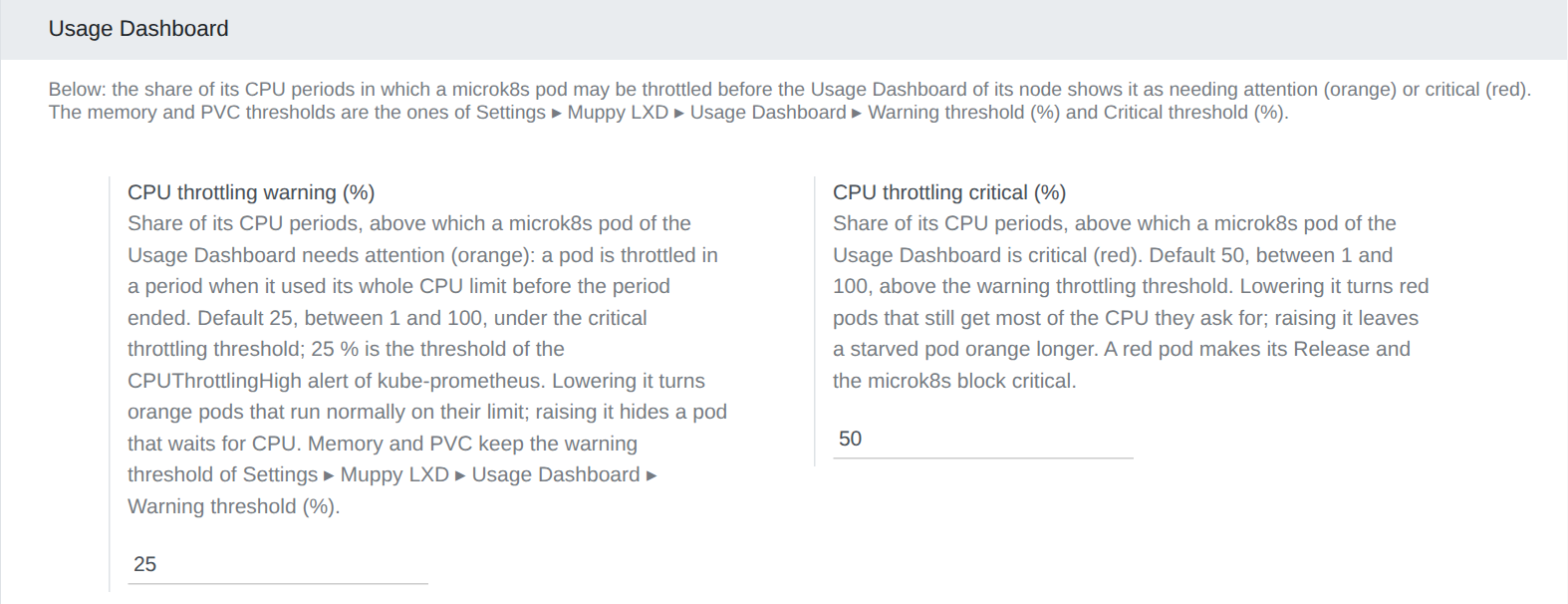
Two settings tune the throttling, in Settings ▸ Muppy Kubernetes ▸ Usage Dashboard:
| Setting | Default | What it does |
|---|---|---|
| CPU throttling warning (%) | 25 | Share of its CPU periods above which a pod needs attention. 25 % is the threshold of the CPUThrottlingHigh alert of kube-prometheus. Lowering it turns orange pods that run normally on their limit. |
| CPU throttling critical (%) | 50 | The same share, above which a pod is critical. A critical pod makes its Release and the microk8s block critical. |
The memory of a pod and the fill of a PVC use Warning threshold (%) and Critical threshold (%), in Settings ▸ Muppy LXD ▸ Usage Dashboard: see Usage Dashboard › Settings.