Protect Your App Servers with Your Own Sunray
Who this page is for. You administer a Muppy instance and want Sunray Zero Trust in front of your App Servers, with a Sunray of your own. Access to the Muppy instance itself is set elsewhere: read Access to Your Muppy Instance. If you are the tenant of an App Server and want to know who can reach it, read Protect Your App Server with Sunray Zero Trust.
The chain
Visitor → Traefik router ──ForwardAuth──→ your Sunray Worker ──→ your Sunray Server
                                                                      │
                                                                      │ polls, Bearer token
                                                                      ▼
                                                    Muppy  /inouk-scp/v1/manganese/
Traefik matches the requested host name, then asks your Sunray Worker whether this visitor may pass. The Worker answers from a configuration your Sunray Server polls off Muppy: the list of protected host names, who is allowed on each, and which addresses pass without being asked.
Muppy publishes that configuration at /inouk-scp/v1/manganese/:
- one entry per name served by an application carrying the Sunray ForwardAuth middleware: the application's own FQDN, its Custom Domain (CNAME) when it has one, and its Code Server;
- for each App Server, its owner and the Manganese admins of its company, as the users allowed on its entries;
- the rules of each App Server's form, on its Access and Code-Server tabs.
The entries are derived, never typed. Only active applications are published: a deactivated one leaves the list, which is how a protected host is withdrawn. The Muppy instance itself is never in this answer.
When a change takes effect
Your Sunray Server reads the endpoint on its own schedule — the Auto-Register: Sync all SCPs scheduled action, every 5 minutes by default. Everything follows from that one read:
- a name that appears in the answer becomes a protected host;
- a name that leaves it — its application deactivated, its Definition detached, its Custom Domain cleared — has its host deactivated, with the users it carried named in the Sunray log;
- an edited CIDR list or public path list is applied.
Press Sync Now on the Configuration Proxy to read the endpoint immediately.
Setup checklist
Do these in order. Steps 1 to 4 make Traefik ask; steps 5 to 7 let Sunray answer.
1. A Sunray Server and its Workers. Run a Sunray Server, and a Sunray Worker the
Traefik servers of your App Servers can reach. Muppy ships App Definitions for both:
sunraysrvr18-main-template for the Server, sunraywrkrfastapiv1-main-template for a
ForwardAuth Worker. The components and their flows are drawn in
Sunray Zero Trust — Data Flows. Note the Worker's ForwardAuth URL:
the Worker writes it in its log at startup.
2. The Traefik server's defaults. On the Traefik Server record, set Default ForwardAuth Middleware to Sunray and Default ForwardAuth URL to the Worker's URL. Every application that activates ForwardAuth inherits both, so a wrong value here is wrong everywhere at once.
3. The Traefik Application Definition. Tick Activate ForwardAuth on each Definition whose applications must be guarded. An application generated by a Definition without it is served in the open.
4. Attach and reconfigure. Attach the Definition to the App Definition or the App Server, then reconfigure the reverse proxy. Until that runs, the middleware exists in Muppy and not in Traefik.
5. Open the Manganese endpoint. In Settings ▸ Sunray Proxy (SCP) ▸ Manganese App. Servers Proxy, check Use a distinct proxy for App Servers and save. Tick Show credentials and press Generate Token. It fills an empty box only, and it must differ from the token of the Connect a Sunray Server to this Sunray Configuration Proxy block, which protects the Muppy instance.
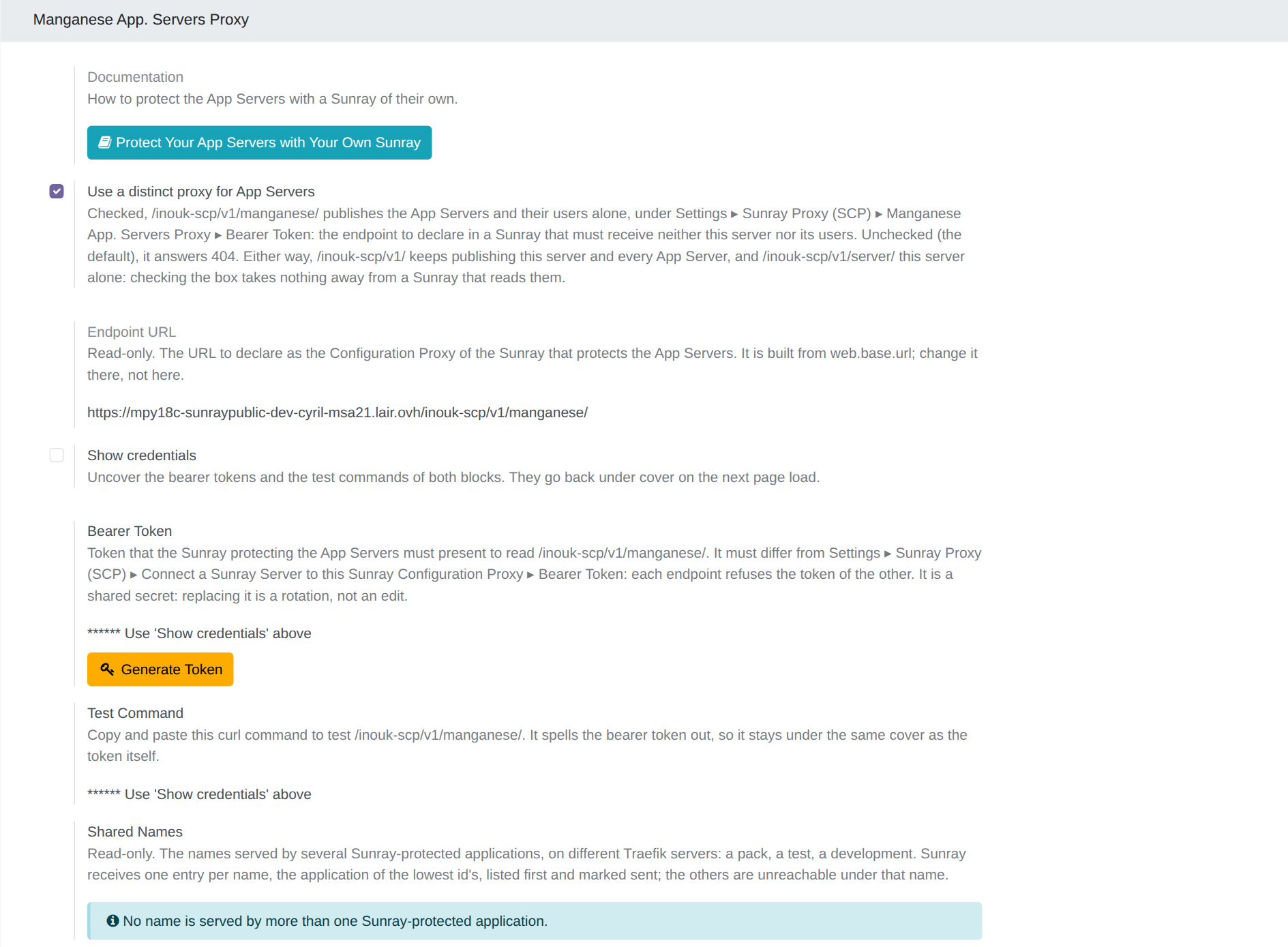
6. Verify what Muppy publishes. The Test Command of the same block is a ready-made
curl, carrying the token. Run it and read the answer:
{
    "version": "1.0.0",
    "protected_hosts": [
        {"fqdn": "myapp-main-prod-acme.acme.muppy.cloud", "rules": [], "allowed_users": ["ops@acme.example"]},
        {"fqdn": "erp.acme.com", "rules": [], "allowed_users": ["ops@acme.example"]}
    ],
    "users": [{"username": "Ops", "email": "ops@acme.example", "active": true}]
}
Every name you expect to be guarded must appear. A name that is missing is a name served in the open.
7. Declare Muppy on your Sunray Server. Under Protected Systems ▸ Configuration
Proxies, create a Configuration Proxy with the endpoint URL of the block —
https://<your-muppy-instance>/inouk-scp/v1/manganese/ — and the Bearer Token of step 5:
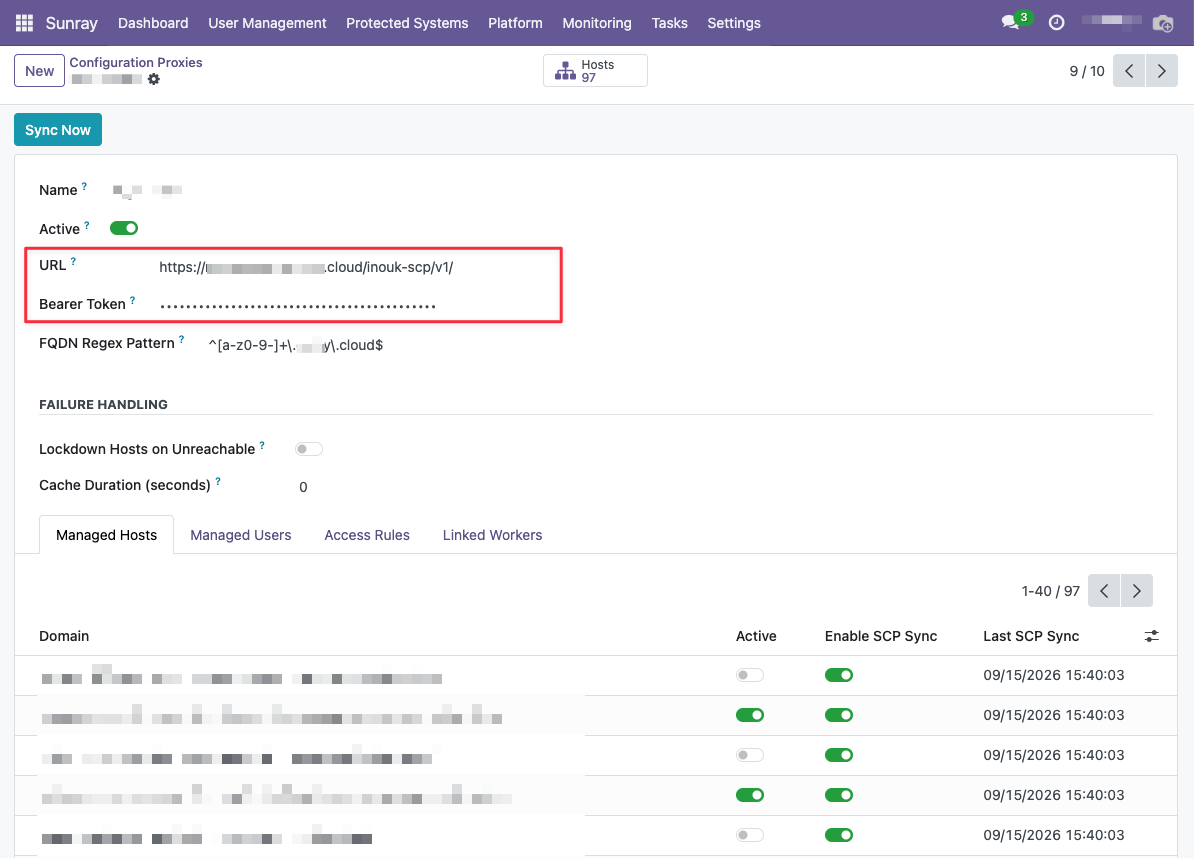
FQDN Regex Pattern narrows which of the published names this proxy takes. Sync Now reads the endpoint at once, and the Managed Hosts tab lists what came back, each row carrying its Last SCP Sync.
Before answering, Muppy checks every rule against what a Sunray Server accepts, and drops — and logs — one that would fail: a rule Sunray rejects stops the synchronisation of every host of the answer.
The three endpoints
Muppy publishes its configuration under three endpoints. You declare
/inouk-scp/v1/manganese/; the other two serve the Sunray that protects the Muppy instance.
| Endpoint | Returns | Token |
|---|---|---|
/inouk-scp/v1/ |
the Muppy instance and every App Server | Bearer Token of Connect a Sunray Server to this Sunray Configuration Proxy |
/inouk-scp/v1/server/ |
the Muppy instance alone | the same |
/inouk-scp/v1/manganese/ |
the App Servers alone | Bearer Token of Manganese App. Servers Proxy, while Use a distinct proxy for App Servers is checked; otherwise 404 |
- Each endpoint refuses any other token (
403). The token protects the endpoint, not the data: a Sunray that reads/inouk-scp/v1/also receives the App Servers. protected_host_fqdnlooks a name up within the endpoint's own hosts; a name of another endpoint answers400.- Checking the box takes nothing away from
/inouk-scp/v1/.
The names an App Server can serve
- The Muppy instance's name is reserved. An application of an App Server or of its Code
Server cannot use the name of the Muppy instance (its
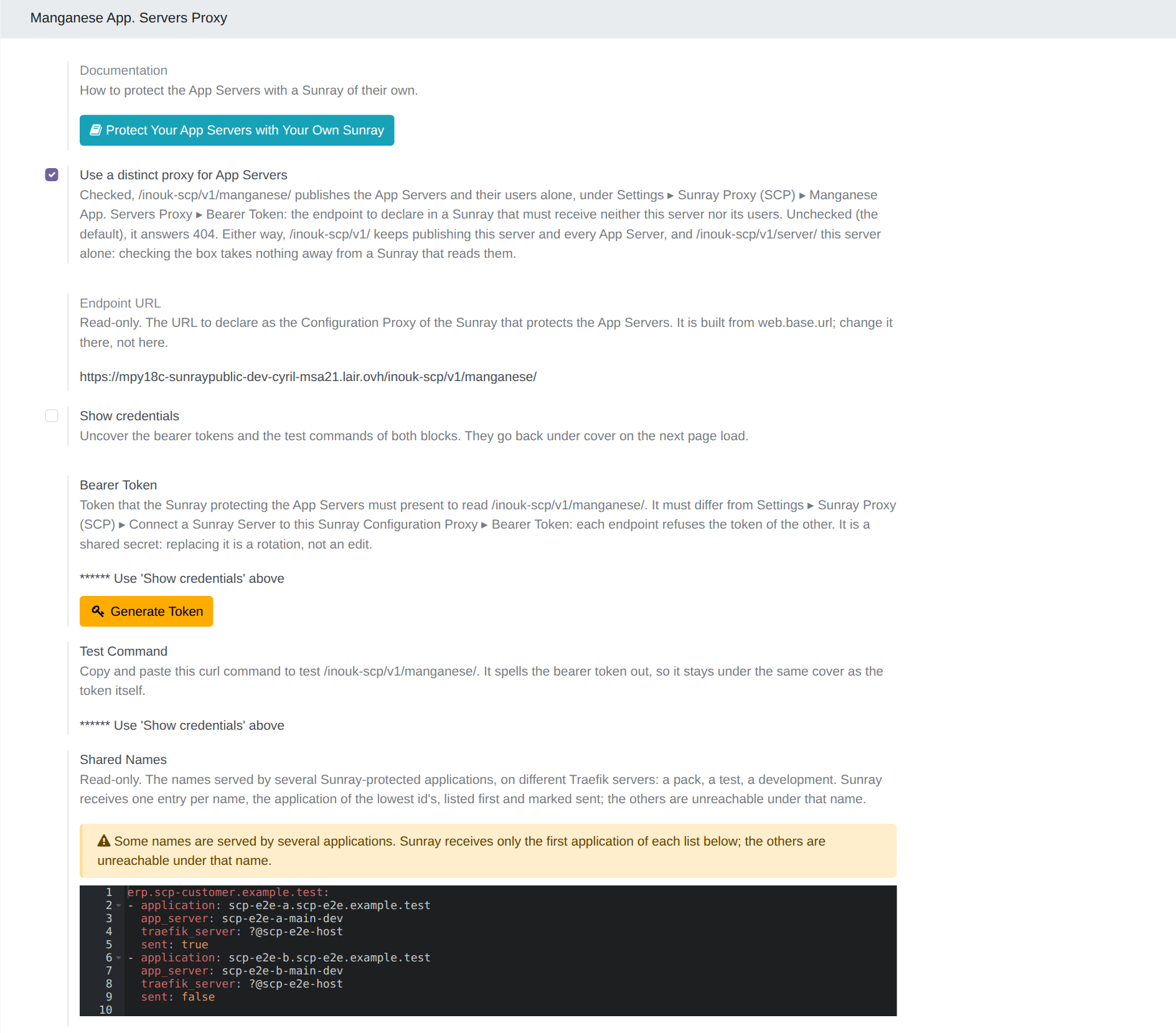
web.base.url), neither as its generated name nor as its Custom Domain, whatever the case or a trailing dot: the App Server would pose as the instance its users log into./inouk-scp/v1/manganese/never publishes that name. - A name served by two applications on two different Traefik servers (a pack, a test) is accepted. Sunray receives one entry for it, the application with the lowest id. The Shared Names setting of the Manganese App. Servers Proxy block lists each such name and its applications, the one sent to Sunray first. On one Traefik server, the Custom Domain is refused.
What each App Server controls
Each App Server sets its own access, on its form. The tenant page describes each control in detail: Protect Your App Server with Sunray Zero Trust.
- Application Allowed CIDRs (Access tab): the addresses that reach the application without a Sunray sign-in. Same syntax, same refusals and same Validation Result as every CIDR list of Muppy.
- Code-Server Allowed CIDRs (Code-Server tab): the IDE's own list, independent of the application's.
- Allow access from everywhere (Access tab): opens the application to everyone; its lists then have no effect.
- Public Paths (Access tab): paths of the application open to everyone — a webhook, a health check, a public API.
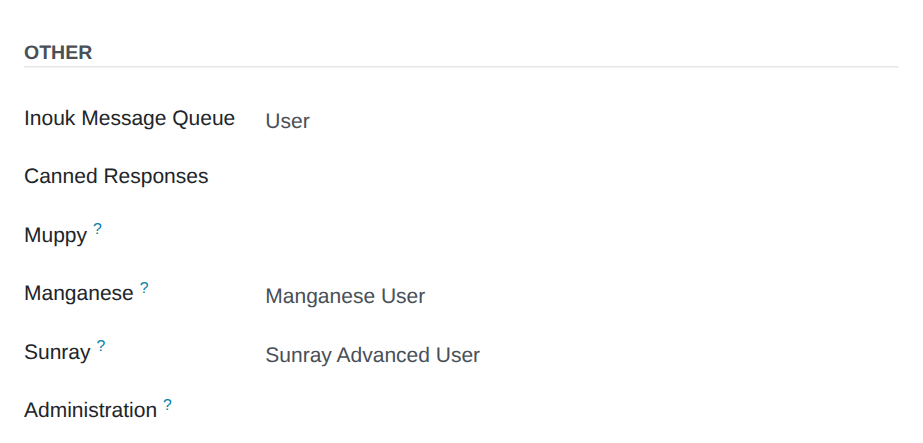
Allow access from everywhere and Public Paths are reserved to the Sunray Advanced User group, because both bypass Zero Trust. Grant it in Settings ▸ Users, section Sunray; only members of Administration ▸ Access Rights can. Other users see them read-only.
Muppy publishes an entry's rules in order: the CIDR rule first, then the public paths as a second rule without CIDRs — a Public rule for Sunray. The Code Server's entry carries the rule of its own list alone.
{
    "fqdn": "myapp-main-prod-acme.acme.muppy.cloud",
    "rules": [
        {"sequence": 1, "allowed_path_regexes": ["^/.*"], "allowed_cidrs": ["203.0.113.0/24"]},
        {"sequence": 2, "allowed_path_regexes": ["^/web/health(\\?.*)?$", "^/api/v1/[^?]*"]}
    ],
    "allowed_users": ["ops@acme.example"]
}
Sunray tries the rules in order: the first one that opens wins, and one that does not open closes nothing. So the CIDR list never narrows the public paths.
Rotating the token
Generate Token mints a token into an empty box only. It refuses while one is set:
writing a new token over a live one locks your Sunray Server out, and it finds out by
starting to get 403s.
To rotate on purpose:
- Clear the Bearer Token box of the Manganese App. Servers Proxy block and save.
- Press Generate Token.
- Carry the new token to your Sunray Server's Configuration Proxy.
Between steps 2 and 3, your Sunray works from the configuration it last read. Keep the window short.
What each side controls
| Control | Where | Effect |
|---|---|---|
| Activate ForwardAuth | Traefik Application Definition | whether the application is guarded at all |
| Default ForwardAuth Middleware / URL | Traefik Server | which Sunray Worker answers, for every application of that server |
| Use a distinct proxy for App Servers, and its token | Settings ▸ Sunray Proxy (SCP) ▸ Manganese App. Servers Proxy | whether /inouk-scp/v1/manganese/ answers, and to which token |
| the Configuration Proxy: URL, Bearer Token, FQDN Regex Pattern | your Sunray Server ▸ Protected Systems ▸ Configuration Proxies | which Muppy instance your Sunray reads, and which of its names it takes |
| Application Allowed CIDRs | each App Server, Access tab | the application's bypass list |
| Code-Server Allowed CIDRs | each App Server, Code-Server tab | the IDE's bypass list |
| Allow access from everywhere, Public Paths | each App Server, Access tab, Sunray Advanced User only | the application open to everyone, or some of its paths |
| the Sunray Advanced User group | Settings ▸ Users, section Sunray | who may write the two controls above |
| Owner, the Manganese admin role | each App Server, and Manganese users | who may sign in |
Troubleshooting
| Symptom | Where to look |
|---|---|
/inouk-scp/v1/manganese/ answers 404 |
Use a distinct proxy for App Servers is unchecked |
the whole answer is 401 |
no Bearer token on the request, or none in the Manganese App. Servers Proxy block |
the whole answer is 403 |
your Sunray presents a token that no longer matches — see Rotating the token — or the token of another endpoint |
| a name is missing from the answer | its application is inactive, or its Definition has no Activate ForwardAuth, or the reverse proxy was not reconfigured |
| an App Server's name is missing while its application is active | another application serves the same name and has a lower id: see Shared Names |
| a Custom Domain is refused as the Muppy instance's name | it is the name of web.base.url, reserved to the Muppy instance |
400 protected_host_fqdn not found for one name |
no active guarded application serves it; check the name's spelling and the application's Custom Domain |
| an edited CIDR list has no effect | its line is refused — read its Validation Result — or your Sunray applies it at its next read |
| a public path still asks for a sign-in | its line is refused — read the Validation Result beside Public Paths — or the change has not propagated yet |
Names are matched leniently
A Custom Domain is stored in lower case. A name Sunray asks for is compared in lower
case and without a trailing dot, so ERP.Acme.com. finds the application of
erp.acme.com.