Restore & Recovery
Target server prerequisites
A PITR restore rebuilds the cluster onto a target server. Muppy builds it entirely — it installs the locale, the PostgreSQL version and WAL-G, then recreates the cluster. You install nothing beforehand.
Three requirements on the target Host:
- It exists in Muppy in state Managed.
- It runs Ubuntu 20.04 or newer (WAL-G binaries exist for these releases, amd64 and aarch64).
- The data and WAL directory paths recorded in the backup are usable on it, with enough disk space. If the original cluster kept them on dedicated volumes, mount equivalent storage at the same paths before restoring.
Why the paths must exist
A restore puts back a binary copy of the cluster into the exact pgdata and WAL directory
paths the backup recorded (they are visible on the Cluster Backup form).
Launching a restore
A restore starts from a Cluster Backup (WAL-G) — the base the WAL Segments are replayed onto. Open the one you want, then click Restore in the form header.
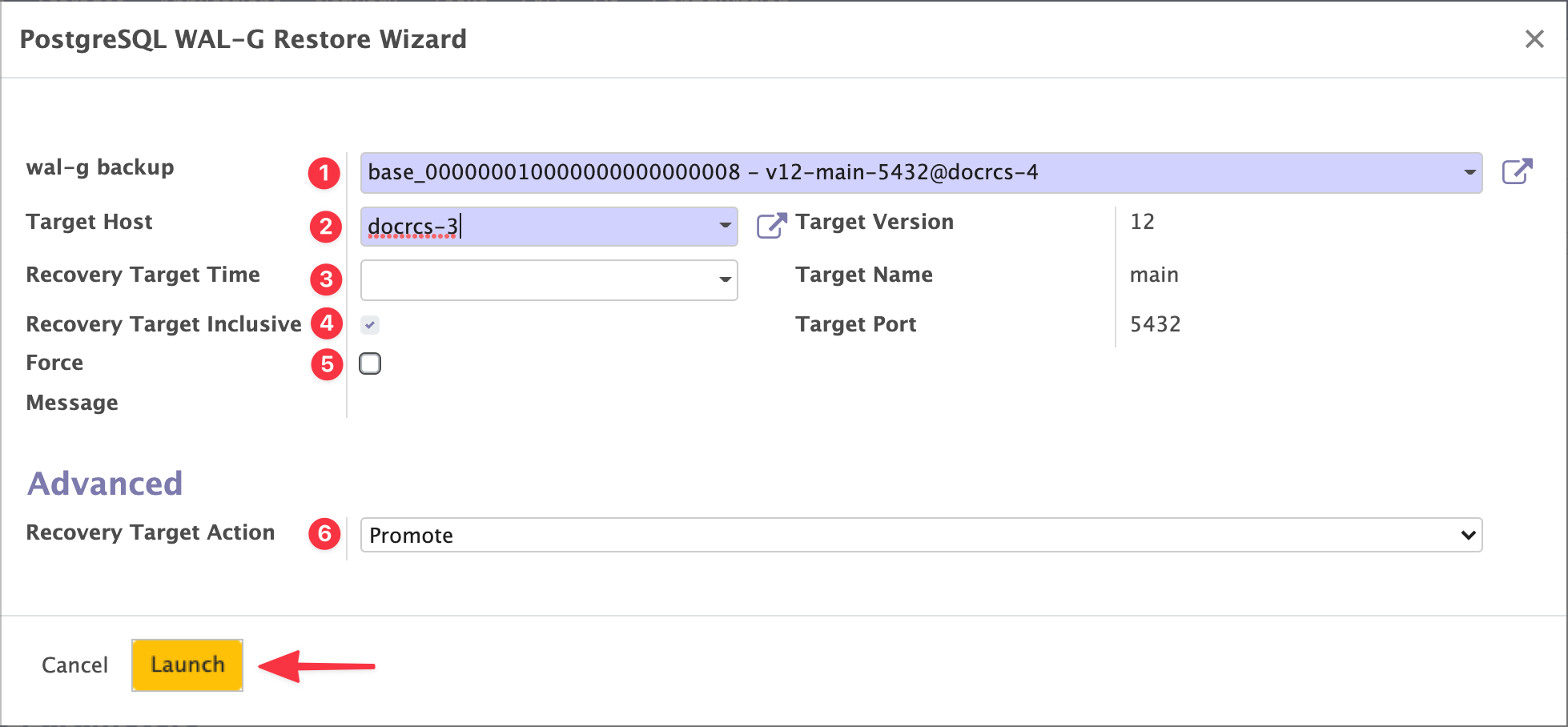
| # | Parameter |
|---|---|
| 1 | The Cluster Backup (WAL-G) the WAL replay starts from. |
| 2 | The Host to restore onto. It only needs to meet the prerequisites above. |
| 3 | The point in time to restore to. This is the PITR itself. Leave it empty to restore to the most recent state. You enter it in your own timezone; Muppy applies it to the cluster with an explicit UTC offset, so it is unambiguous whatever the server's timezone. |
| 4 | Whether to stop just before or just after that point in time. |
| 5 | Force flag. If a Muppy-managed cluster already exists on the target, the wizard says so and refuses to run. Tick this to overwrite it. A cluster that belonged to a Replicated Cluster Set leaves it: see Restoring over a member of a Replicated Cluster Set. |
| 6 | Recovery Target Action — the cluster's state once every WAL has been replayed: Promote (default), Pause or Shutdown. |
Pause is for experts
Pause leaves the cluster mid-recovery, and you have to finish the restore by hand. Use Promote unless you know exactly why you want otherwise.
Every parameter has detailed inline help.
Fill them in and click Launch.
Following the restore
Muppy creates a walg_restore_cluster message. Open it to follow execution and read the
logs — go to the last log page.
The Task finishing does not mean the restore finished
When walg_restore_cluster completes, the cluster is in state online,recovery. The
restore is still running.
In online,recovery the cluster is downloading and replaying WAL Segments. It already accepts reads, but it is not caught up. That can take minutes or hours, depending on how many segments there are.
Info
online,recovery is also the normal state of a standby in an RCS — also replaying WAL Segments. Only the source differs.
Follow the recovery in the PostgreSQL log, as described in PostgreSQL cluster log.
When the recovery ends, the cluster moves to the state set by Recovery Target Action. The default, Promote, gives you a standalone cluster in state online.
Restoring over a member of a Replicated Cluster Set
A restore with Force replaces the cluster on the target host by a standalone cluster. When the cluster it replaces was a standby or the primary of a Replicated Cluster Set, Muppy takes it out of the set at the same time, and the restore log says which set it left:
- a former standby no longer appears in the set's list of clusters;
- a former primary with no standby left leaves the set without a primary.
The primary of a set that still has standbys is refused: the wizard names the set and its standbys, and nothing is dropped. Its standbys would otherwise keep following a server whose history has changed. On the set, use Set as Primary on one of its standbys first: the old primary becomes a standby, and the restore can then replace it.
To make a restored standby a standby again, open the Replicated Cluster Set and click Add Standbys: pick its host, and Muppy rebuilds it from the primary. The data the restore brought back is replaced by the primary's.