Installing PostgreSQL
PostgreSQL is installed on a Host from the Installation group of the PostgreSQL tab of the Host form. It holds two buttons:
| Button | Installs |
|---|---|
| Install PostgreSQL Server and Client | The PostgreSQL server of the chosen version, with the client of that version. pgvector comes with PostgreSQL 15 and later. |
| Install PostgreSQL Client | The PostgreSQL client of the chosen version alone: psql, pg_dump, pg_restore and the other client programs. |
Under the buttons, two fields list the PostgreSQL versions installed on the Host:
| Field | Lists the versions whose |
|---|---|
| PostgreSQL Client versions | client is installed: psql, pg_dump, pg_restore… |
| PostgreSQL Server versions | server is installed. pgbench ships with it |
Muppy reads them from dpkg, the Host's package manager, as Facts. A third Fact,
POSTGRESQL_INSTALLED_VERSIONS, lists the versions whose client and server are both installed.
Update Facts refreshes all three. A Task that depends on what is installed reads them again
first, then decides: installing PostgreSQL, creating a cluster, running pgbench from another
host.

You can install PostgreSQL manually, or let Muppy install it automatically when you create a cluster. This page covers the manual route.
- Open the Host form.
- On the PostgreSQL tab, click Install PostgreSQL Server and Client or Install PostgreSQL Client. The PostgreSQL Installation Wizard opens.
- Pick a version and click Launch.
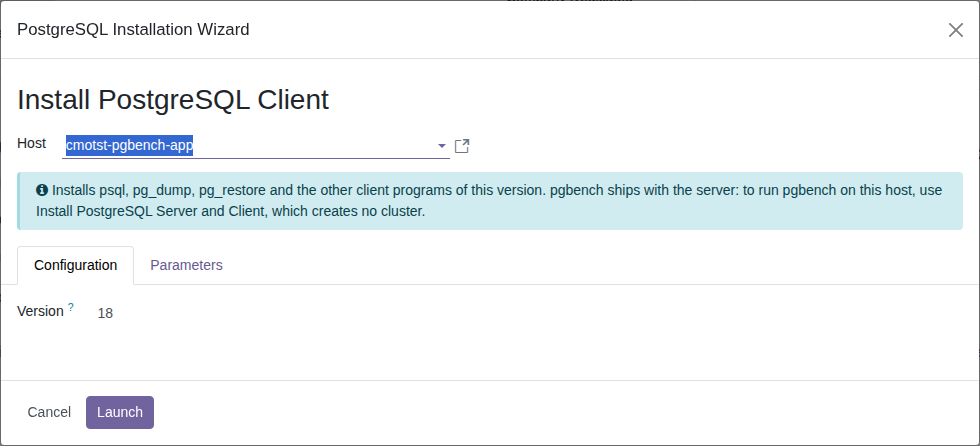
The installation runs in the background, as a message named
Install PostgreSQL client 18 on host '<host>' or
Install PostgreSQL server and client 18 on host '<host>'. Follow it in the
Muppy / Qs / Messages menu. When it finishes, click Refresh on the Host. PostgreSQL
Client versions lists the new version; after Install PostgreSQL Server and Client,
PostgreSQL Server versions lists it too.
No cluster is created
Neither button creates a cluster. Before it installs the server or the client, Muppy sets
create_main_cluster = false in /etc/postgresql-common/createcluster.conf, which stops the
server package from creating its default main cluster. Creating a cluster is the next step.
A client installed alone is listed in PostgreSQL Client versions only. Clicking Install PostgreSQL Server and Client for that version installs the server, still without a cluster. Create Cluster does the same when the cluster's version is not in PostgreSQL Server versions.
pgbench
pgbench ships with the server package. To run pgbench on a Host, use Install PostgreSQL Server and Client: the Host gets pgbench and no cluster.
Versions
Muppy installs PostgreSQL 9.5 through 18. The wizard defaults to the version set in
Settings / PostgreSQL / PostgreSQL version, stored in the system parameter
muppy_postgresql_base.default_postgresql_version. It ships as 18.
Success
You can also skip this page and create a cluster straight away — Muppy installs whichever PostgreSQL version that cluster needs.