Data Flows
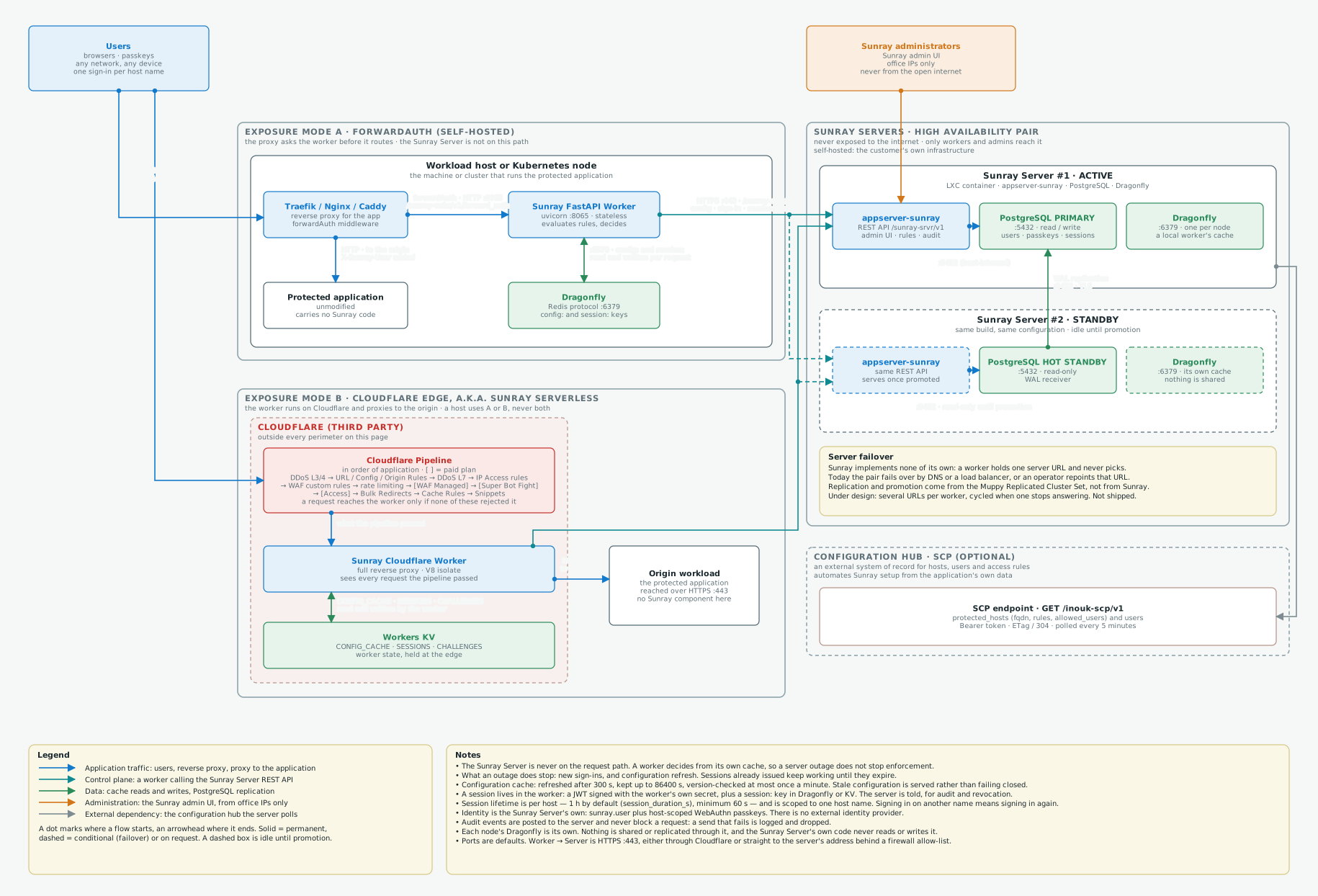
The logical data flows of a Sunray Zero Trust deployment: which components exist, which trust boundary each one sits in, and which protocol and port carries each flow. The central fact is that the Sunray Server is not on the request path. A Worker sits in front of each protected application and decides from configuration it has already cached, so a request is answered without the server being consulted. The topology drawn is the high-availability one: two Sunray Servers, each an LXC container carrying PostgreSQL and Dragonfly, and one Worker on each protected workload. Both exposure modes are shown — a ForwardAuth worker beside the application, and a Cloudflare Worker at the edge — because a workload uses one or the other, never both. It describes the application's own flows, not a given customer's network topology, which is settled during the architecture phase.
Download this diagram as a draw.io file
Reading the diagram
Solid arrows are permanent flows; dashed arrows are conditional (a failover path). Colours: blue application traffic, teal the control plane between a worker and the server, green data (cache, replication), orange administration, grey the external configuration hub. Every arrow carries its protocol and port. Click the diagram to open it full size.
What the diagram shows
A Worker decides; the Server is asked beforehand. This is the one thing to take from the drawing. A worker holds the configuration of every host it protects in its own cache, and a request is answered from that cache: the rules are evaluated locally, the session cookie is a JWT the worker signed itself, and the lookup that confirms it is a local key read. Nothing on the request path crosses to the Sunray Server. The server is called when the worker needs something it does not have — a configuration refresh, a passkey to verify a sign-in against, a session to report, an audit event to file.
That is also what makes an outage survivable. If the server cannot be reached, cached configuration is served rather than failing closed, for as long as 24 hours. What stops is what genuinely needs the server: new sign-ins, and picking up a configuration change. Sessions already issued keep working until they expire.
Two exposure modes, and a workload uses one of them. A protected host is bound to exactly one worker, so the two rows of the diagram are alternatives rather than layers:
| Mode | How the request reaches the worker | What the worker does |
|---|---|---|
| A — ForwardAuth, self-hosted | The proxy in front of the application (Traefik, Nginx, Caddy) asks the worker before it routes | The worker answers GET /sunray-wrkr/v1/forward_auth on port 8065 and returns 200, 302, 401, 403 or 503. The application is never modified |
| B — Cloudflare edge, a.k.a. Sunray Serverless | The worker is itself the reverse proxy, running on Cloudflare's network | Every request and response passes through the worker, which proxies allowed traffic to the origin |
Both speak the same server API and are configured from the same records. The difference that matters for a threat model is where the enforcement point runs: in mode A it is a process on the workload's own host or cluster; in mode B it runs on Cloudflare's network, outside every perimeter on the page.
Where a person signs in. Against the Sunray Server's own directory — sunray.user records
and WebAuthn passkeys scoped to one host name — not an external identity provider. The sign-in
pages are served by the worker, under /sunray-wrkr/v1/, on the protected host's own name. The
worker verifies the WebAuthn assertion, mints the session itself, and reports it to the server
so it can be listed and revoked. Sessions are per host name: signing in on a custom domain and
then following a link to another name means signing in again.
The two servers. One is active and holds the writable database; the second is a standby with the same build. PostgreSQL replication carries the state between them, opened by the standby. Dragonfly does not: each node has its own, it holds no server state, and nothing is shared through it. Sunray itself implements no failover — see the note on the drawing.
The configuration hub is optional, and Sunray pulls it. Where an external system already knows which applications exist and who may reach them, a Sunray Configuration Proxy (SCP) can be that system of record. The direction is worth being precise about: the hub exposes a read-only endpoint and the Sunray Server polls it every five minutes. The hub never calls Sunray. Muppy is one such hub, publishing every name a protected application answers to along with its allowed users and allowed CIDRs.
What Cloudflare runs before the worker
In mode B the Sunray Worker is not the first thing a request meets. Cloudflare's own pipeline runs first, and the worker only ever sees what that pipeline did not reject — which is worth knowing when you reason about what Sunray can and cannot see, and about what is already filtered before any Sunray rule is evaluated.
The order is Cloudflare's, not Sunray's. It is documented in Traffic Sequence: Which Product Runs First?, enumerated in the Ruleset Engine phases list, and the security interactions are set out in Security features interoperability. Square brackets mark what needs a paid plan or an add-on.
| Stage | Feature | Phase | Plan |
|---|---|---|---|
| Network | DDoS protection, L3/4 | ddos_l4 |
All plans, unmetered |
| Network | Network Firewall (Magic Transit / Magic Firewall) | magic_transit* |
[Enterprise] |
| HTTP 1 | Single Redirects | http_request_dynamic_redirect |
All plans |
| HTTP 2 | URL normalization | http_request_sanitize |
All plans |
| HTTP 3 | URL Rewrite Rules (Transform Rules) | http_request_transform |
All plans |
| HTTP 4 | Waiting Room | internal | [paid] |
| HTTP 5 | API Shield, early | http_request_api_gateway_early |
[paid add-on] |
| HTTP 6 | Configuration Rules | http_config_settings |
All plans |
| HTTP 7 | Origin Rules | http_request_origin |
All plans |
| HTTP 8 | HTTP DDoS protection | ddos_l7 |
All plans, unmetered |
| HTTP 9 | WAF custom rules | http_request_firewall_custom |
Zone-level: all plans · [account-level: Enterprise] |
| HTTP 10 | Rate limiting rules | http_ratelimit |
All plans, limited · [Enterprise needs application security on contract] |
| HTTP 11 | API Shield, late | http_request_api_gateway_late |
[paid add-on] |
| HTTP 12 | WAF Managed Rules | http_request_firewall_managed |
Cloudflare Free Managed Ruleset: all plans · [Cloudflare Managed Ruleset and OWASP Core Ruleset: Pro and above] |
| HTTP 13 | Super Bot Fight Mode | http_request_sbfm |
[Pro / Business] · Bot Fight Mode is free · [Bot Management: Enterprise add-on] |
| HTTP 14 | Cloudflare Access application check | internal | Zero Trust · [beyond the free user tier] |
| HTTP 15 | Bulk Redirects | http_request_redirect |
All plans, limited |
| HTTP 16 | Managed Transforms | internal | All plans |
| HTTP 17 | Request Header Transform Rules | http_request_late_transform |
All plans |
| HTTP 18 | Cache Rules | http_request_cache_settings |
All plans |
| HTTP 19 | Snippets | http_request_snippets |
All plans |
| HTTP 20 | Cloud Connector | http_request_cloud_connector |
All plans |
| Then | The Sunray Cloudflare Worker runs here | — | Workers run before the cache |
| After | Cache lookup, then the origin | — | the Worker's fetch() reads through the cache · [Argo Smart Routing, Tiered Cache, Load Balancing] |
Three things do not appear as phases and are evaluated on their own, before the worker: IP Access Rules, the Browser Integrity Check, and Bot Fight Mode on the Free plan, which cannot be skipped by a rule. A terminating action anywhere in the list — block or challenge — ends the request there, and nothing further down runs.
Note where the worker sits: after every security layer, and before the cache. A
request that reaches the Sunray Worker has already passed Cloudflare's filtering, and the
worker's own fetch() to the origin is what reads through the cache. Cache Rules (stage
HTTP 18) configure that lookup beforehand; the lookup itself happens after the worker.
Flows
| # | From → To | Protocol / port | Direction | Purpose |
|---|---|---|---|---|
| 1 | Users → Traefik / Nginx / Caddy on the workload (mode A) | HTTPS :443 | inbound | Application access |
| 1b | Users → Sunray Cloudflare Worker (mode B) | HTTPS :443 | inbound, through the Cloudflare route | Application access; the worker is the reverse proxy |
| 2 | Reverse proxy → Sunray FastAPI Worker, GET /sunray-wrkr/v1/forward_auth | HTTP :8065 | host-internal or intra-cluster, per request | The access decision: 200 with X-Sunray-* headers, 302 to the sign-in page, 401, 403 or 503 |
| 3 | Reverse proxy → protected application | HTTP, proxy-internal | host-internal, only once flow 2 returned 200 | The request reaches the unmodified application, carrying X-Sunray-User and X-Sunray-Session |
| 3b | Sunray Cloudflare Worker → origin workload | HTTPS :443 | outbound from the edge | The same pass-through, with the same identity headers added |
| 4 | Worker ⇄ Dragonfly (mode A) or Workers KV (mode B) | Redis protocol :6379, or the KV binding | worker-internal, every request | config: and session: keys, one per host name and per session — this is what keeps the server off the request path |
| 5 | Worker → Sunray Server #1, /sunray-srvr/v1/* | HTTPS :443, Bearer API key, X-Worker-ID | outbound, always opened by the worker | Host configuration, worker registration, passkey and setup-token lookup, email OTP, session reporting, audit |
| 5b | Worker → Sunray Server #2 | HTTPS :443 | outbound, after a failover | The same calls. The worker holds one server URL; what changes is where that name points |
| 6 | appserver-sunray → PostgreSQL (each server) | TCP :5432 | host-internal | Users, passkeys, sessions, access rules, audit log (read-only on the standby) |
| 7 | PostgreSQL standby → PostgreSQL primary | TCP :5432, TLS | internal, opened by the standby | Streaming replication (WAL). Supplied by Muppy, not by Sunray |
| 8 | Administrators → Sunray admin UI | HTTPS :443 | inbound, office IPs only | Managing hosts, users, passkeys, access rules and workers |
| 9 | Sunray Server → configuration hub, GET /inouk-scp/v1 | HTTPS :443, Bearer token, ETag / 304 | outbound, every 5 minutes, opened by the server | Pulls protected_hosts (fqdn, rules, allowed_users) and users. Sunray polls the hub; the hub never calls Sunray |
Trust boundaries
- The protected workload. The reverse proxy, the ForwardAuth worker, its Dragonfly and the application share one host or cluster. The flows between them never leave it, which is why the forwardAuth hop is plain HTTP on port 8065 and must not be reachable from anywhere else.
- The Sunray Servers. Never exposed to the open internet. Only two kinds of client reach
them: workers, which call nothing outside
/sunray-srvr/, and administrators from known office IPs. In a self-hosted deployment this is the customer's own infrastructure; in a managed one it is the operator's, and the workloads are then in a different perimeter again. - Cloudflare, in mode B only. The enforcement point runs there, which means the worker code, the session secret and the cached configuration of every protected host sit on a third party's platform. In mode A, Cloudflare is absent from the diagram entirely.
- The configuration hub, when one is used: a separate system, reached outbound over HTTPS with a bearer token, and never granted a way in.
Notes
- The Sunray Server is never on the request path. A worker decides from its own cache, so a server outage does not stop enforcement.
- What an outage does stop: new sign-ins, and configuration refresh. Sessions already issued keep working until they expire.
- Configuration cache: refreshed after 300 s, kept up to 86400 s, version-checked at most once a minute. Stale configuration is served rather than failing closed.
- A session lives in the worker: a JWT signed with the worker's own secret, plus a session: key in Dragonfly or KV. The server is told, for audit and revocation.
- Session lifetime is per host — 1 h by default (session_duration_s), minimum 60 s — and is scoped to one host name. Signing in on another name means signing in again.
- Identity is the Sunray Server's own: sunray.user plus host-scoped WebAuthn passkeys. There is no external identity provider.
- Audit events are posted to the server and never block a request: a send that fails is logged and dropped.
- Each node's Dragonfly is its own. Nothing is shared or replicated through it, and the Sunray Server's own code never reads or writes it.
- Ports are defaults. Worker → Server is HTTPS :443, either through Cloudflare or straight to the server's address behind a firewall allow-list.