Hardening your Traefik server with Muppy
A Traefik Server receives the HTTPS traffic of its applications. This page says what protects them, and what to set in Muppy, depending on how the server is exposed.
We recommend Cloudflare. Exposing a Traefik server directly to the Internet works, but you give up protections that Muppy cannot provide.
Behind Cloudflare (recommended)
Visitors reach Cloudflare's edge, and Cloudflare sends their requests to your server. Cloudflare:
- terminates TLS at the edge, with its own certificate;
- filters requests with its managed rules (WAF) and your own rules;
- absorbs denial-of-service attacks;
- limits request rates with rate limiting rules;
- bounds each request: an upload of more than 100 MB (Free and Pro), 200 MB (Business) or up to 5 GB (Enterprise) receives 413; an origin that does not answer within 125 s gives 524. Only Enterprise can change the 125 s.
Use at least the Pro plan. The Cloudflare Managed Ruleset and the OWASP Core Ruleset exist from Pro up; Free has the Free Managed Ruleset only. Pro also gives 20 custom rules instead of 5, and 2 rate limiting rules instead of 1, with periods up to one minute instead of 10 s. Pro changes neither the upload size (100 MB) nor the 125 s.
What to set in Muppy:
- Publish the application through a proxied DNS record (Preparing a Cloudflare Zone for Public URLs), or through a Cloudflare Tunnel, which opens no port on the host.
- Make the server accept Cloudflare only. Run it behind a Cloudflare tunnel, or, as a hardening
option, restrict each application's IP allow list to
CloudflareIPsV4andCloudflareIPsV6(Hardening tab of the application). Not both: behind a tunnel every connection comes from the tunnel's connector, and an allow list on Cloudflare's ranges would refuse it. - Filter visitors with Sunray (ForwardAuth): behind Cloudflare, Sunray decides who may visit.
- Attach
CloudflareIPsV4andCloudflareIPsV6to the server's trusted forwarding proxies when an application must see the visitor's own address.
The request limits of the server are not needed behind Cloudflare. If you set them anyway, keep them below Cloudflare's: the server then answers 413 or 504 itself, before Cloudflare answers 524.
Exposed directly (not recommended)
Visitors connect to the server's own address. What Muppy lets you set:
- a Let's Encrypt certificate for each application;
- the IP allow list of each application, to serve known visitors only;
- Sunray (ForwardAuth) in front of an application;
- the three request limits of the server.
What you lose without Cloudflare:
- managed filtering rules (WAF): nothing inspects the requests before your application;
- absorption of attacks: the server's own line and CPU take them;
- rate limiting: Traefik has
rateLimitandinFlightReqmiddlewares, and Muppy does not set them.
Limits of a Traefik server
The Hardening tab of a Traefik Server sets three limits, in the section Request limits. They hold for every application of the server: they are static configuration of Traefik.
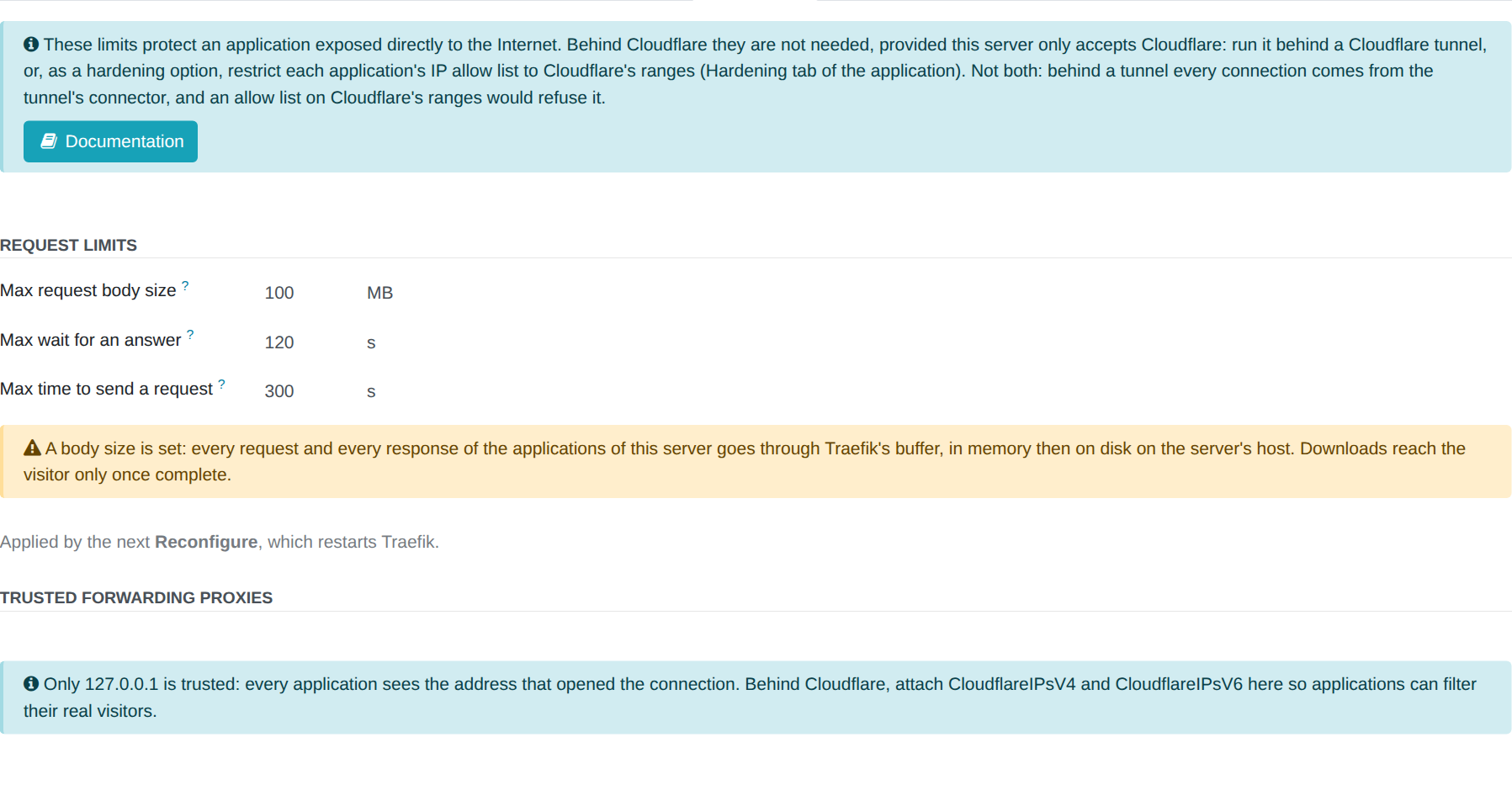
| Field | What it bounds | Past it | 0 (empty) |
|---|---|---|---|
| Max request body size (MB) | The body of one request: an upload, a submitted form | 413 | No limit |
| Max wait for an answer (s) | The time an application takes to start answering | 504 | No limit |
| Max time to send a request (s) | The time a visitor has to send a whole request, headers and body | The connection is closed | Traefik's default, 60 s |
A MB is 1,000,000 bytes: with 1 MB, a body of 1,000,000 bytes passes and one of 1,000,001 bytes receives 413.
The limits reach the server at the next Reconfigure, which restarts Traefik. The Reconfigure runs in the background; follow it in Qs (the task journal).
The buffer
Traefik bounds a request body with a buffer: once Max request body size is set, Traefik holds every request and every response of the server's applications in that buffer, in memory then on disk, before passing it on. Downloads then reach the visitor only once complete: a streamed answer no longer streams. The tab shows a warning while a size is set.
Longpolling and websockets
- Max wait for an answer is at least 60 s. Odoo before version 16 holds a longpolling request for up to 50 s before answering it; a shorter wait would answer it 504. A smaller value is refused when you save.
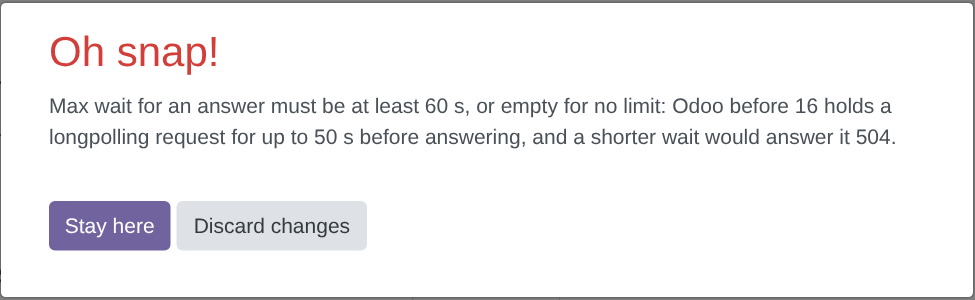
- Max time to send a request does not count an open websocket, nor the wait for a longpolling answer: it bounds the reading of the request only. A large upload on a slow line needs more than the default 60 s.
The main config template
Only the main config template Traefik2 Server Main Config v5 Default - Muppy renders the limits. A server keeps its own copy of its template body. When a limit is set and that copy does not render it, the tab warns, and the limit does not reach Traefik:
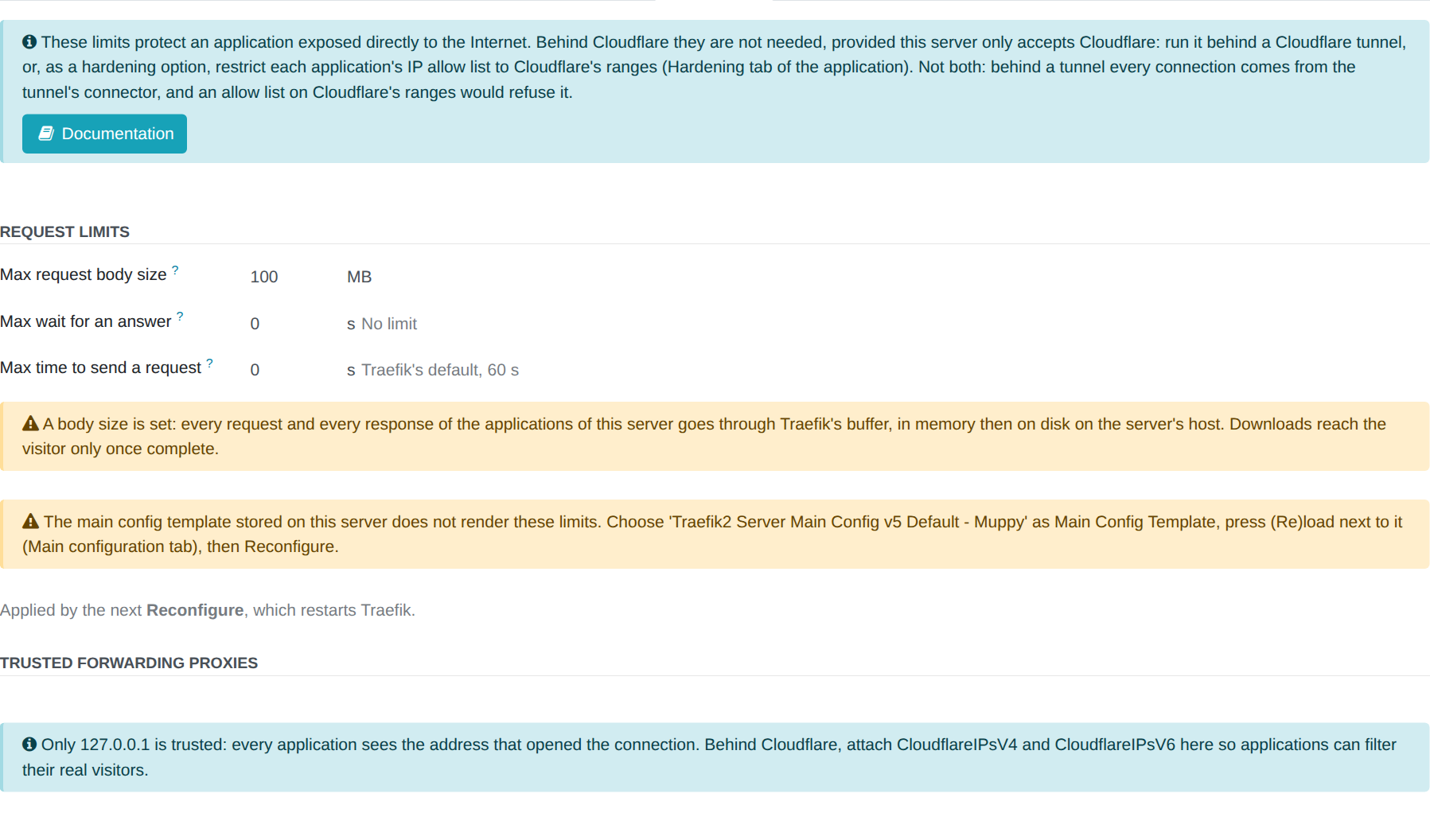
- Open the tab Main configuration, choose
Traefik2 Server Main Config v5 Default - Muppyas Main Config Template, and save. - Click (Re)load next to it.
- Click Reconfigure, then Launch.
What the Reconfigure writes
| Field | In the configuration of Traefik |
|---|---|
| Max time to send a request | entryPoints.web-secure.transport.respondingTimeouts.readTimeout |
| Max request body size | a buffering middleware (maxRequestBodyBytes) in /opt/muppy/traefik/dyna_conf/muppy-hardening.yaml, named on entryPoints.web-secure.http.middlewares |
| Max wait for an answer | serversTransport.forwardingTimeouts.responseHeaderTimeout |
The main configuration names the middleware only while a size is set, and never while its
file is missing: the Reconfigure writes muppy-hardening.yaml before it uploads the main
configuration, and removes it after the restart once the size is cleared. Regenerate the application files
keeps that file.
Trusted forwarding proxies
The Trusted forwarding proxies of a Traefik Server, in its Hardening tab, are the
addresses whose X-Forwarded-For header Traefik believes: a proxy writes there the address of
the visitor it forwards. From any other address, Traefik drops that header. Trusted proxies
refuse nobody.
- Empty (the default): only
127.0.0.1is trusted, and every application sees the address that opened the connection. - Behind Cloudflare's proxy: attach
CloudflareIPsV4andCloudflareIPsV6, so an application can filter its real visitors. - Behind a WAF or a load balancer of yours: attach its ranges.
Whoever can send traffic through a trusted proxy chooses the address Traefik attributes to them: list nothing there but a proxy you own or pay for. The list is static configuration: press (Re)load next to the main config template (tab Main configuration), then Reconfigure the server.
The IP allow list of an application
Two settings decide which address reaches an application. They are set in two places and do different things.
- Trusted forwarding proxies (the Traefik Server): the addresses whose
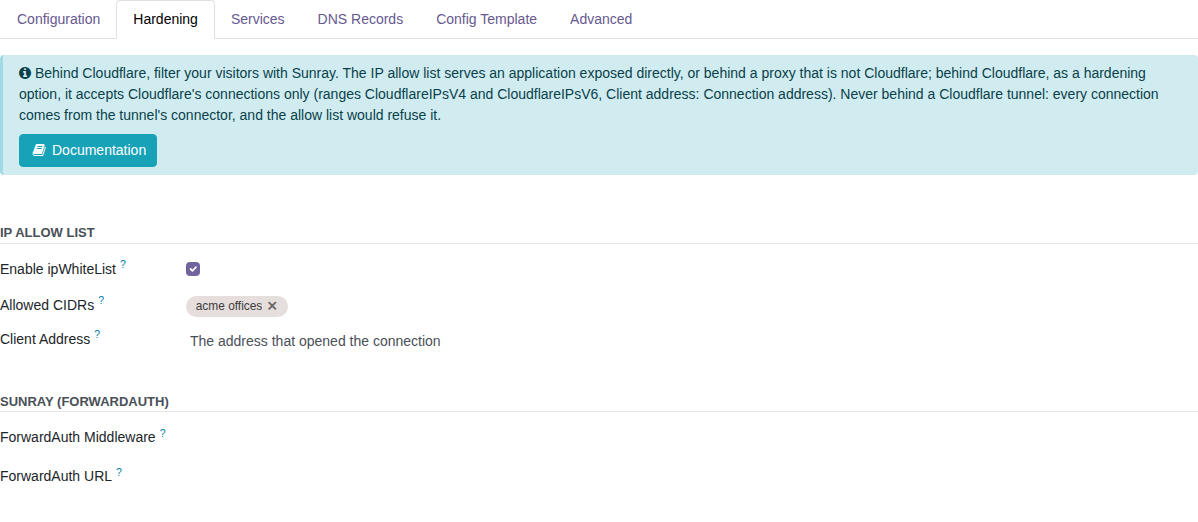
X-Forwarded-Forheader Traefik believes. From any other address, Traefik drops that header. They refuse nobody. - Allowed CIDRs (the application): the addresses the application serves. Every other
address receives 403. The address compared depends on Client address:
- Connection address: the machine that opened the connection to Traefik. It is the visitor when the application is exposed directly, Cloudflare's edge behind its proxy, and the connector behind a tunnel.
- Forwarded address: the address written by a trusted proxy, read at the Proxy depth you set.
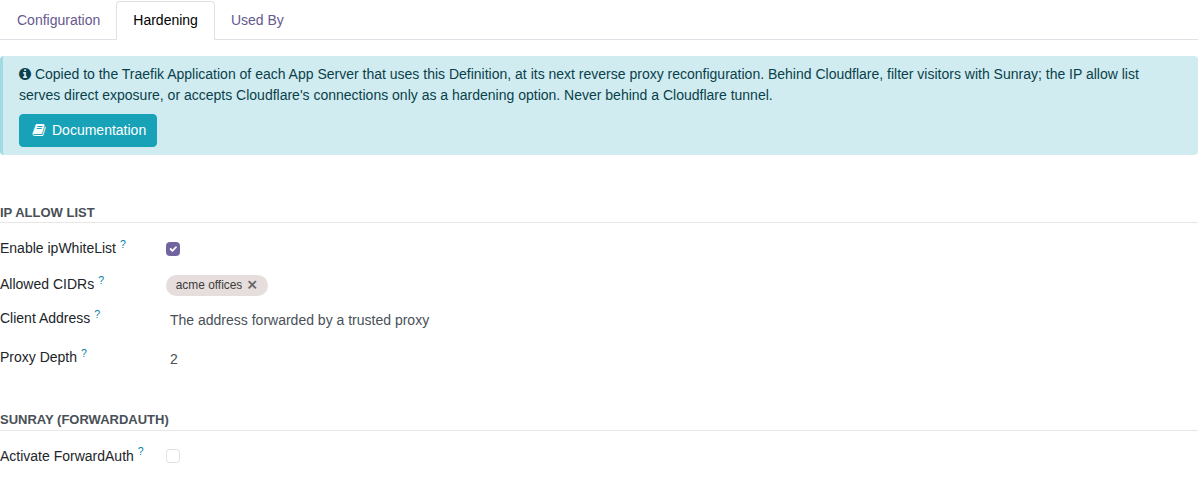
The IP allow list and Sunray are in the Hardening tab of the Traefik Application and of the Traefik Application Definition. A Definition gives its values to the application of each App Server that uses it, at the next reverse proxy reconfiguration.
What to set, by exposure
| Exposure | Trusted forwarding proxies (server) | Client address | Allowed CIDRs | Visitors are filtered by |
|---|---|---|---|---|
| Direct | none | Connection address | those of your visitors | the allow list |
| Behind Cloudflare's proxy | CloudflareIPsV4, CloudflareIPsV6 |
Connection address | CloudflareIPsV4, CloudflareIPsV6 (hardening option) |
Sunray |
| Behind a Cloudflare tunnel | none | no allow list | none | Sunray |
| Behind a WAF or a load balancer | the ranges of the WAF | Forwarded address, depth N | those of your visitors | the allow list |
Behind Cloudflare, Sunray decides who may visit. The allow list is then a hardening option: it accepts Cloudflare's connections only, so nobody reaches the server around Cloudflare.
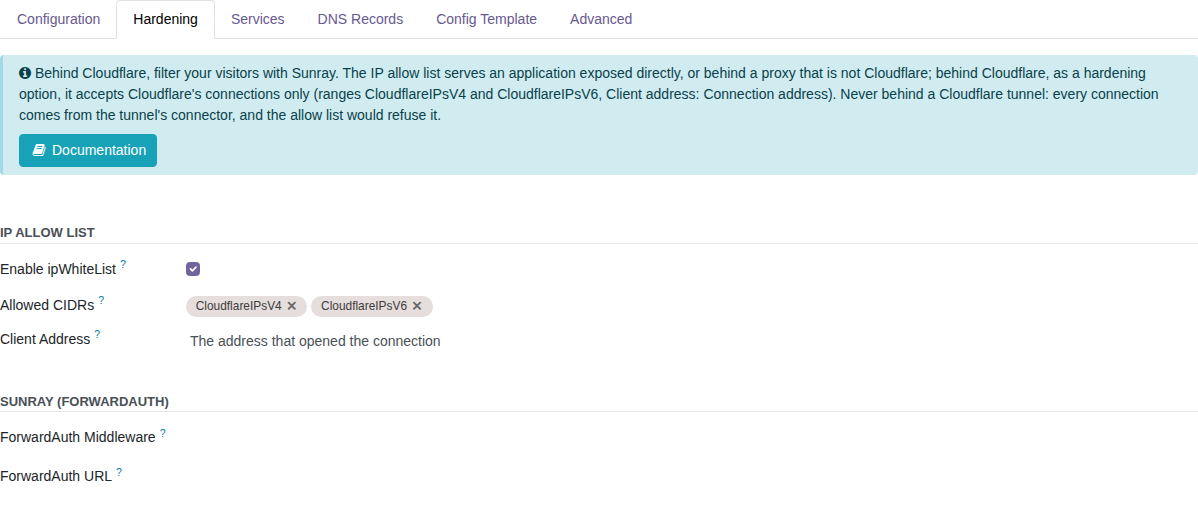
Never an allow list behind a tunnel
Behind a Cloudflare tunnel, every connection comes from the tunnel's connector, on the
host itself. An allow list refuses the connector, and so every visitor. The same holds for
anything that relays on the host, such as tailscale serve: the connection comes from the
relay, not from the visitor. Filter visitors with Sunray.
Proxy depth
Proxy depth appears when Client address is Forwarded address. It counts the entries of
X-Forwarded-For from the right:
1(the default): the last entry, written by the trusted proxy that received the request.2: the entry before it, written by the proxy that sits in front of the trusted one.
Set the depth to the number of proxies between the visitor and Traefik, when each of them
appends the address it received. With two proxies in a row, the outer one writes the visitor's
address and the inner one, trusted by Traefik, writes the outer proxy's: the request carries
X-Forwarded-For: 203.0.113.7, 198.51.100.9, the visitor first. At depth 1 Traefik compares
198.51.100.9, at depth 2 it compares 203.0.113.7.
The entries further left are written by the visitor and can be forged: a depth larger than the number of trusted proxies lets a visitor choose the address Traefik compares.
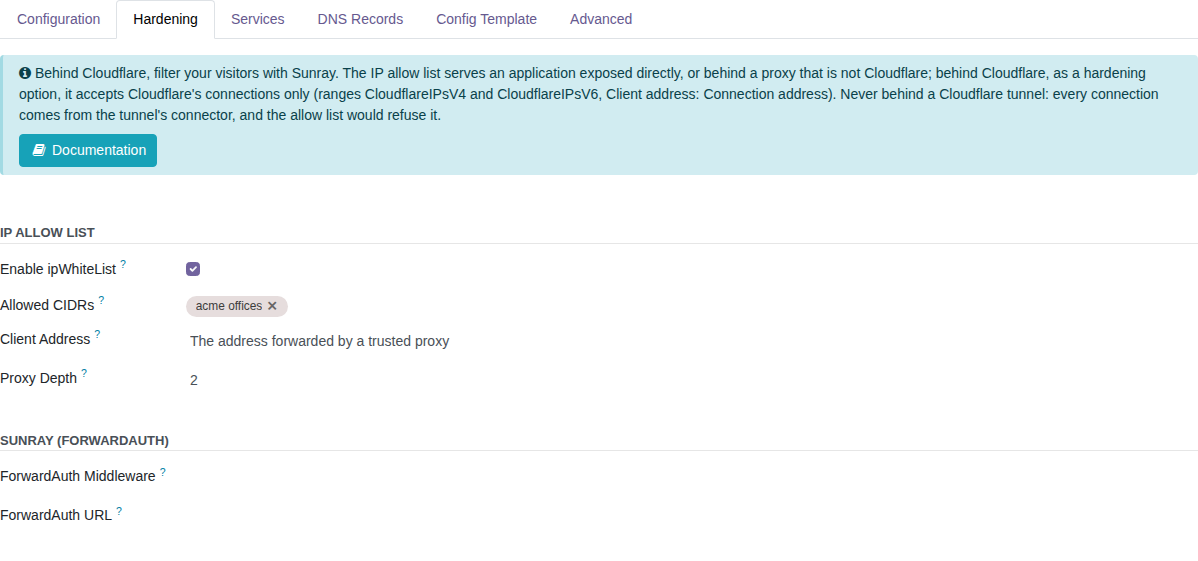
Attach the ranges of the WAF to the Trusted forwarding proxies of the server first, and Reconfigure the server. Without it Traefik drops the header and the application refuses every visitor: the Traefik Application shows a red banner while that is the case. A change of the allow list is applied when you click Reconfigure Application. Until you do, the application form shows a Settings not applied warning: the configuration its settings now produce is no longer the one the Traefik server carries for it.

The warning also covers a change of range, of Client address or of ForwardAuth. It goes when Reconfigure Application has rendered the configuration again and sent it. The Refresh button of the form renders and stores the configuration without sending it: the warning stays, since Traefik keeps the configuration it had until the next Reconfigure Application.
Muppy compares with the file the server carries, not with the last one it rendered. See The configuration on the host.
The depth is rendered by Generic Application v8, Odoo Application v9 and Code-Server Application v5. Press (Re)load next to the Template Body of an application that predates them.
Kubernetes behind a Muppy TCP router
A TCP router is a Traefik Server of setup type TCP Router, which Muppy installs in front of a Kubernetes cluster. It relays the connections of ports 80 and 443, and of the cluster's control plane, to the cluster's nodes, without reading HTTP. The request limits above do not apply to it, and its Hardening tab shows a text only:

The router passes the address of each visitor to the cluster's Traefik with the PROXY
protocol (version 2): a header at the start of each connection carries the address the
connection came from. The cluster's Traefik believes that header only from the addresses listed
in ports.web.proxyProtocol.trustedIPs and ports.websecure.proxyProtocol.trustedIPs of its
Helm values (Traefik in a cluster):
the public address of the node.
An IP allow list in the cluster compares the address the cluster's Traefik records. Before you set one:
- Enable the access log of the cluster's Traefik.
- Send a request to an application of the cluster from each network your visitors come from: the Internet, and every private network or VPN that reaches the cluster.
- Read, for each request, the client address the access log records. That is the address the allow list compares.
- Allow only addresses that stand for the visitors you mean. An address that several visitors share, such as a NAT gateway, a VPN exit or a proxy, admits everyone behind it.
Check again after any change of the router, of the node's address, or of the way a network reaches the cluster.