Scheduled Backups
Muppy can run database backups on a schedule.
Backup Tasks
All PostgreSQL backup, restore and copy operations run as Muppy Tasks defined in the script
odoo.addons.muppy_postgresql_base.scripts.pg_dump, listed under Muppy / Tasks / Scripts.
Two of them are the ones you schedule:
mpy_pg_backup— back up the databases of a cluster.mpy_pg_copy_database— copy databases between clusters.
A third Task, mpy_pg_backup_single_db, backs up one database. You rarely run it directly:
mpy_pg_backup runs it for you.
How mpy_pg_backup dispatches the work
mpy_pg_backup selects the databases to back up (from db_names / excluded_db_names), then
dispatches:
- One database — runs inline.
- Several databases, run as a job — spawns one independent
mpy_pg_backup_single_dbchild task per database. They run in parallel, and each one is followed and can be relaunched on its own. - Several databases, run synchronously — loops over them in the parent task.
So a scheduled backup of a ten-database cluster produces one parent message and ten children. Follow them under Muppy / Qs, from the parent.
Setting up a scheduled backup
The steps are the same as for any scheduled Task:
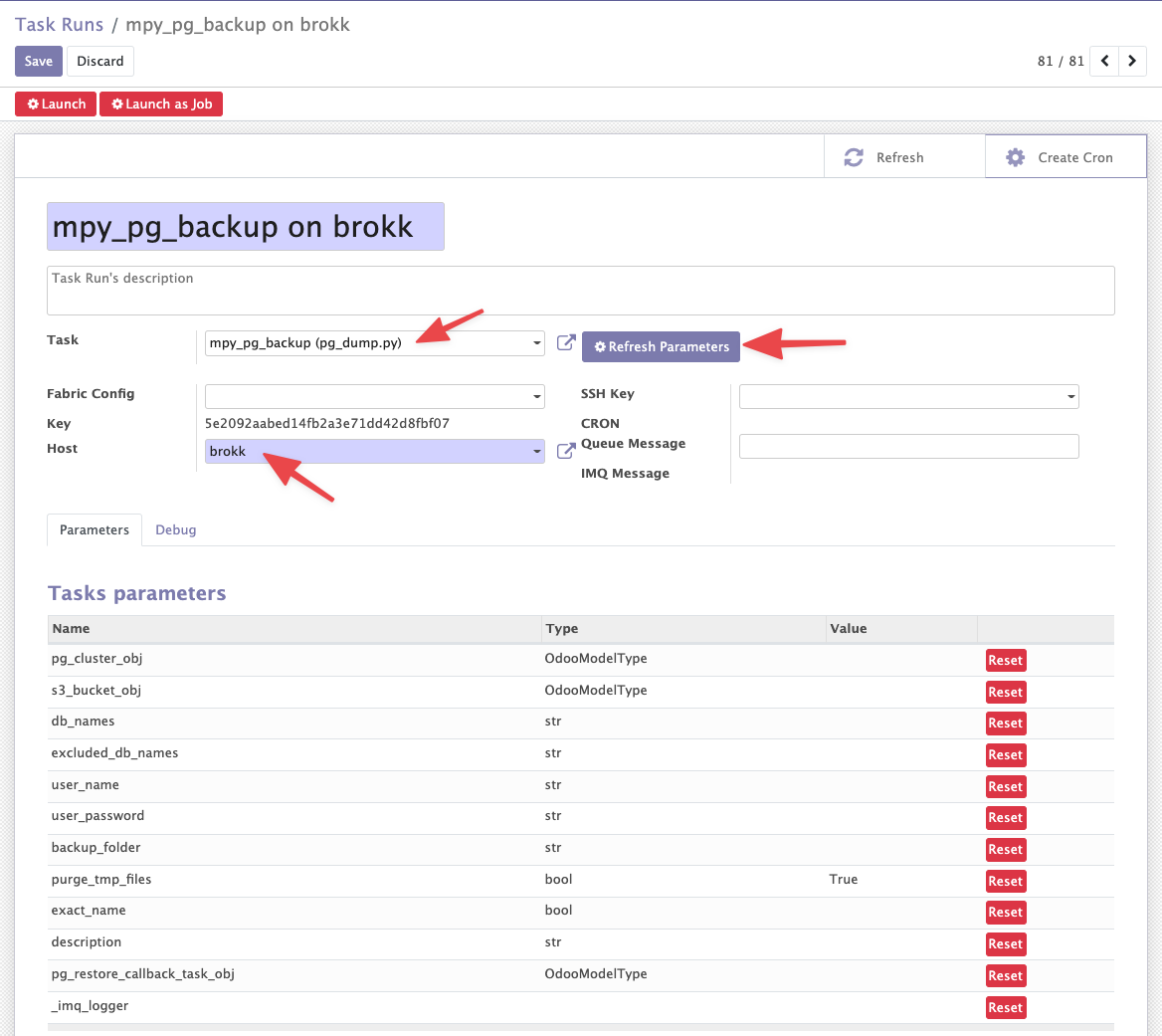
- Create a Task Run (Muppy / Tasks / Task Run).
- Select the Task —
mpy_pg_backupormpy_pg_copy_database. - Select the Host running the PostgreSQL cluster that holds the databases.
- Click Refresh Parameters to list the parameters to fill in.
The Task Run should look like this:
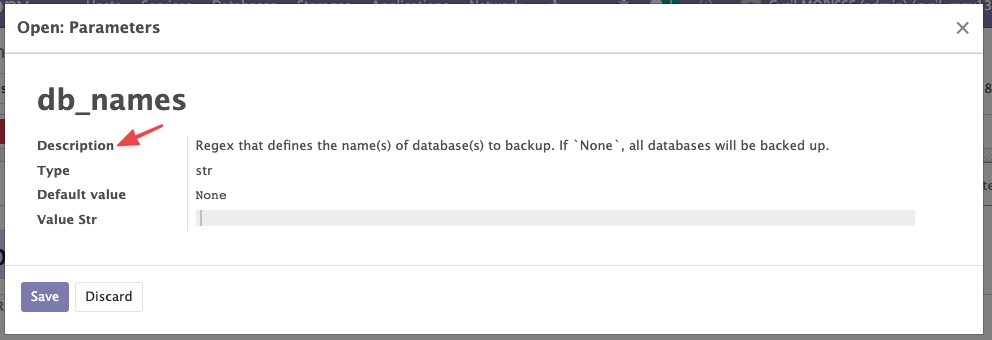
- Fill in the parameters. Each Task parameter form shows its own description.
- Test the configuration with Launch as Job.
- Click Create Cron, then open the CRON from the link at the top right of the Task Run.
- Configure the CRON.
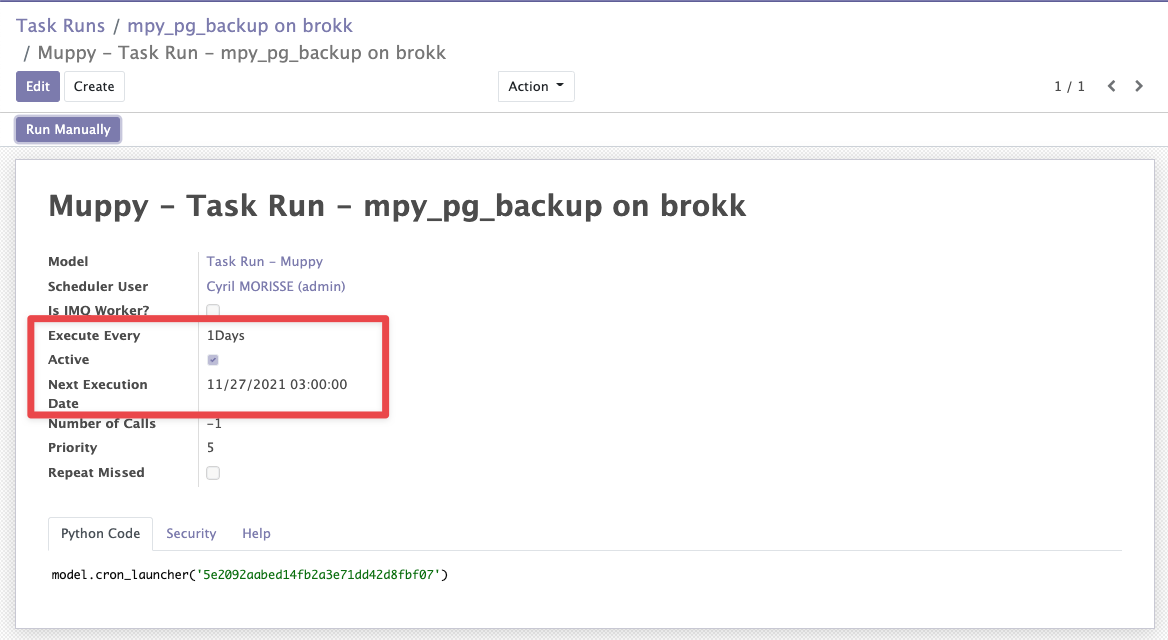
Two fields matter (circled in red above):
- Execute Every — the recurrence interval.
- Next Execution Date — when the next run happens. Later runs are scheduled by adding Execute Every to it.
Don't untick Active
To stop a scheduled Task, use the Remove Cron button on the Task Run rather than the CRON's Active flag.
mpy_pg_copy_database is set up the same way. Only the parameters differ.
Avoiding a catch-up burst: the execution debounce
When the IMQ worker has been down, every queued parent replays its whole fan-out on return. On 2026-08-09 thirteen stale parents drained in one day and produced around 350 dumps where 24 were wanted.
The execution debounce stops that. Enable it with the dedup_backup_from_cron parameter
on mpy_pg_backup: a database is then skipped if it already has a backup younger than half
its PG Dump Max Age.
It is a debounce, not deduplication
Nothing is deduplicated. Every message is still enqueued and still consumed — it just returns without dumping. Refusing to enqueue a message while an equivalent one is queued would be deduplication; that is a different mechanism and it is not built. The parameter name predates the distinction.
It measures the artifact, not the message history, so it stays correct after a queue purge, a lost message or a reinstalled worker.
The threshold is half the ceiling on purpose: it sits far below a daily cadence, so it never
fires in normal operation, and it can never push a database past the PG Dump Max Age its own
monitoring alerts on.
It is opt-in, per Task Run
dedup_backup_from_cron defaults to False, so every backup launched by hand — the
wizards, a database's Backup button, the backup taken before a deploy — always dumps.
A backup produces: a skipped run is a recovery point that does not exist.
Set it to True on the Task Run bound to the backup cron, and nowhere else.
PG Dump Max Age is set per database, on its Monitoring tab — see
Backup Monitoring.