Data Flows
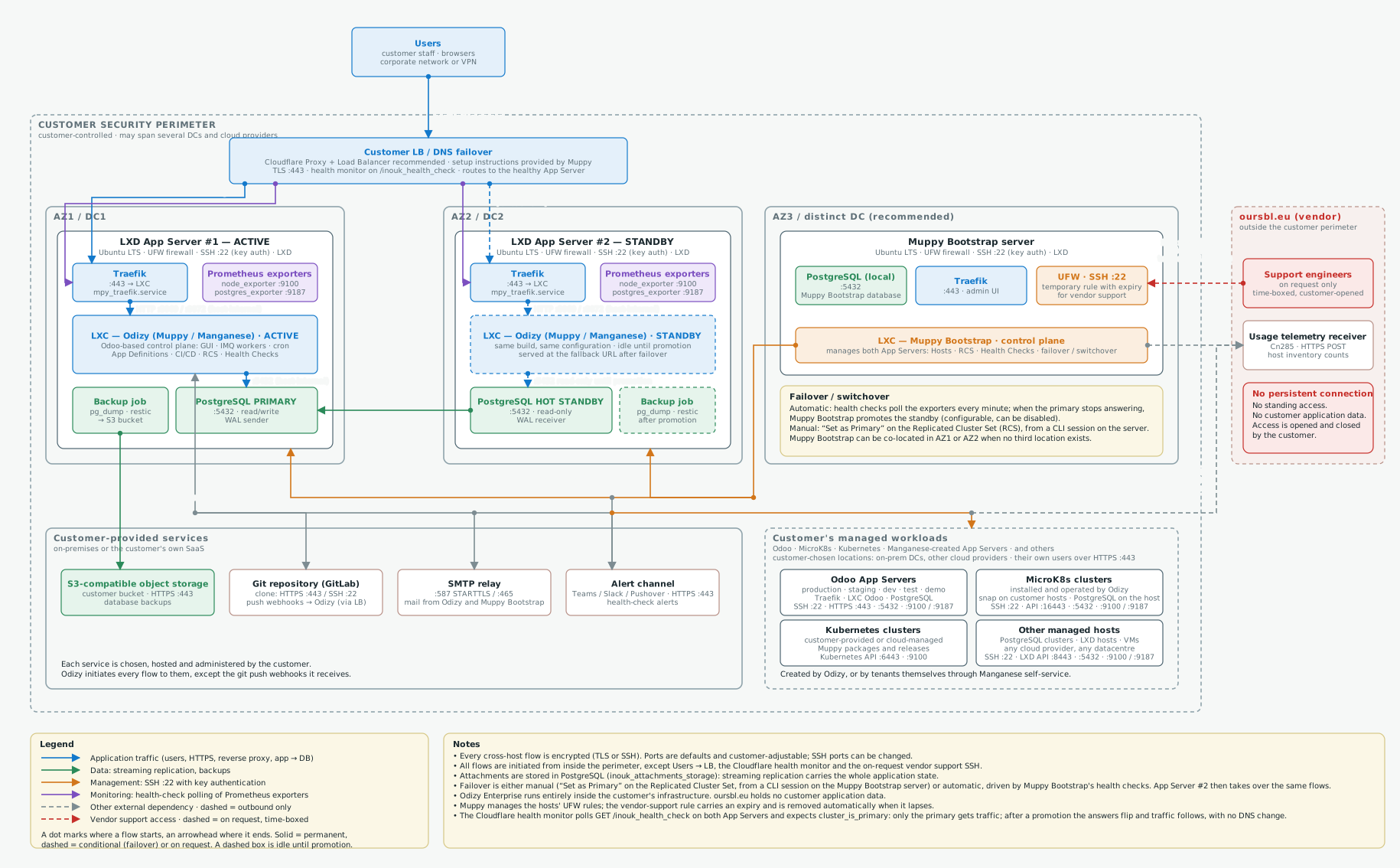
The logical data flows of an Odizy / Muppy Enterprise deployment: which components exist, which trust boundary each one sits in, and which protocol and port carries each flow. Everything runs inside the customer's own infrastructure. The topology drawn is the high-availability one: two LXD App Servers in two availability zones with PostgreSQL streaming replication, and a Muppy Bootstrap server that manages both and drives the failover. The diagram also shows the workloads Odizy manages beyond itself, and the external services it depends on. It describes the application's own flows, not a given customer's network topology, which is settled during the architecture phase.
Download this diagram as a draw.io file
Reading the diagram
Solid arrows are permanent flows; dashed arrows are conditional (failover) or opened on request. Colours: blue application traffic, green data (replication, backups), orange management over SSH, purple monitoring, red vendor support, grey other external dependencies. Every arrow carries its protocol and port. Click the diagram to open it full size.
Recommended: deploy Odizy / Muppy Enterprise behind Sunray Zero Trust
The flows drawn here are Odizy's own, which is why no access-control layer appears in front of them. We recommend deploying Odizy / Muppy Enterprise with Sunray Zero Trust in front, so that every name the application answers to asks who a visitor is before the request ever reaches it. What that adds — the workers, the trust boundaries and the flows between them — is drawn in Sunray Zero Trust — Data Flows.
What the diagram shows
Users reach the application through a load balancer the customer provides. Cloudflare Proxy
and Load Balancer are the recommended pair, and Muppy supplies the setup instructions. The
load balancer polls /inouk_health_check on both App Servers and sends traffic only to the
one whose PostgreSQL cluster is primary.
Each LXD App Server carries the same stack: Traefik, an LXC container running Odizy, a PostgreSQL cluster, Prometheus exporters and a backup job. The cluster in AZ1 is the primary. The one in AZ2 is a hot standby, fed by streaming replication that the standby itself opens.
The Muppy Bootstrap server manages both App Servers as its own Hosts. It reaches them over SSH, and polls their exporters every minute. That polling is what raises the alerts and what decides an automatic failover. A switchover can also be run by hand, with Set as Primary on the Replicated Cluster Set.
Beyond itself, Odizy manages the customer's own workloads, on any datacentre or cloud provider the customer chooses. Each kind is reached differently, which is why the diagram draws them apart:
| Kind | Reached over | Notes |
|---|---|---|
| Odoo App Servers, production to demo | SSH :22, PostgreSQL :5432, exporters :9100 / :9187 | Each carries its own Traefik and serves its own users over HTTPS :443 |
| MicroK8s clusters | SSH :22, MicroK8s API :16443, PostgreSQL :5432, exporters :9100 / :9187 | Installed and operated by Odizy, as a snap on customer hosts |
| Kubernetes clusters, customer-provided or cloud-managed | Kubernetes API :6443, exporters :9100 | Odizy calls the API server directly to install its packages and releases |
| Other managed hosts: PostgreSQL clusters, LXD hosts, VMs | SSH :22, LXD API :8443, PostgreSQL :5432, exporters | Any cloud provider, any datacentre |
They are created by Odizy, or by tenants themselves through Manganese self-service.
oursbl.eu stays outside the perimeter. It receives outbound usage telemetry, which counts hosts and their size and carries no application data. It gets an SSH session into the Muppy Bootstrap only when the customer opens one, through a temporary firewall rule that expires on its own.
Flows
| # | From → To | Protocol / port | Direction | Purpose |
|---|---|---|---|---|
| 1 | Users → Customer LB / DNS failover (Cloudflare Proxy + Load Balancer recommended, setup instructions provided by Muppy) | HTTPS :443 | inbound (customer staff) | Application access |
| 1b | Cloudflare health monitor → GET /inouk_health_check on App Servers #1 and #2 (through Traefik) | HTTPS :443 | inbound, periodic | Automatic traffic failover: expects cluster_is_primary; the standby answers cluster_is_standby |
| 2 | LB → Traefik, App Server #1 | HTTPS :443 | internal | Active target |
| 2b | LB → Traefik, App Server #2 | HTTPS :443 | internal, on failover | Failover target (fallback URL) |
| 3 | Traefik → Odizy LXC (each host) | HTTP :8069 / :8072 | host-internal | Reverse proxy to the application |
| 4 | Odizy LXC → PostgreSQL (each host) | TCP :5432 | host-internal | Application database (read-only on the standby) |
| 5 | PostgreSQL standby → PostgreSQL primary | TCP :5432, TLS | internal, initiated by the standby | Streaming replication (WAL) |
| 6 | Muppy Bootstrap → App Server hosts #1 and #2 | SSH :22, key auth | internal | Provisioning, configuration, switchover / failover orchestration |
| 7 | Muppy Bootstrap → exporters on hosts #1 and #2 | HTTP :9100 / :9187 | internal, every minute | Health-check polling: alerts and failover decision |
| 8 | Odizy → the customer's managed workloads (Odoo, MicroK8s, Kubernetes, other hosts) | SSH :22 (key auth) · Kubernetes API :6443 · MicroK8s API :16443 · LXD API :8443 · HTTP :9100 / :9187 | outbound, customer-chosen locations | Build, deploy, health checks |
| 9 | Odizy ⇄ GitLab | HTTPS :443 or SSH :22 / HTTPS :443 via LB | outbound clone / inbound webhooks | Source code and push events (CI/CD) |
| 10 | Odizy, Muppy Bootstrap → SMTP relay, alert channel | SMTP :587 or :465 / HTTPS :443 | outbound | Mail and health-check alerts (Teams, Slack, Pushover) |
| 11 | Backup job on the PostgreSQL host → S3-compatible storage | HTTPS :443 | outbound, scheduled | pg_dump / restic backups |
| 12 | Odizy, Muppy Bootstrap → oursbl.eu | HTTPS :443 POST | outbound only | Usage telemetry: host inventory counts, no application data |
| 13 | oursbl.eu support → Muppy Bootstrap | SSH :22, key auth, allow-listed IP | inbound, on request, time-boxed | Vendor support through a temporary UFW rule with expiry |
Trust boundaries
- The customer security perimeter holds everything Odizy Enterprise runs on. The customer controls it. It may span several datacentres and cloud providers.
- The availability zones: AZ1 for the active App Server, AZ2 for the standby, and a third zone or a distinct datacentre for the Muppy Bootstrap. Co-locate the Bootstrap in AZ1 or AZ2 when no third location exists.
- The host boundary: Traefik, the Odizy container and PostgreSQL share one host. The flows between them never leave it.
- oursbl.eu, outside the perimeter. No persistent connection, no standing access, no customer application data.
Notes
- Every cross-host flow is encrypted (TLS or SSH). Ports are defaults and customer-adjustable; SSH ports can be changed.
- All flows are initiated from inside the perimeter, except Users → LB, the Cloudflare health monitor and the on-request vendor support SSH.
- Attachments are stored in PostgreSQL (inouk_attachments_storage): streaming replication carries the whole application state.
- Failover is either manual (“Set as Primary” on the Replicated Cluster Set, from a CLI session on the Muppy Bootstrap server) or automatic, driven by Muppy Bootstrap's health checks. App Server #2 then takes over the same flows.
- Odizy Enterprise runs entirely inside the customer's infrastructure. oursbl.eu holds no customer application data.
- Muppy manages the hosts' UFW rules; the vendor-support rule carries an expiry and is removed automatically when it lapses.
- The Cloudflare health monitor polls GET /inouk_health_check on both App Servers and expects cluster_is_primary: only the primary gets traffic; after a promotion the answers flip and traffic follows, with no DNS change.