Securing a direct application
An App Server's direct URL resolves to its host's own IP address. The Traefik of that host serves it, with nothing in front: no Cloudflare, no Sunray. Its public URLs go through Cloudflare, and Sunray decides who may visit. See The two URLs you are given.
This guide says who should reach a direct URL, and how to restrict it.
Five things to understand first
- A direct URL is for you, not for your visitors. It skips Cloudflare and Sunray. Reserve it to a small set of addresses that you control and that belong to you: your offices, your VPN exit, your CI runners, your own servers. Everyone else uses a public URL.
- The allow list is the only barrier. On a direct URL, an address of the allow list reaches the application with no other check. Every other address receives 403. Without an allow list, the whole Internet reaches it.
- An allow list is made of CIDR Dynamic Ranges. A CIDR Dynamic Range is a named list of
IP ranges, such as
CloudflareIPsV4ormuppy.io workers 2025. The same range can open the UFW firewall of hosts, the allow list of applications and the trusted proxies of a Traefik Server. Changing a range changes all of them. Read its Description before you attach it: it says whom the range admits. -
The muppy.io ranges admit muppy.io's machines, not yours. Muppy ships two of them:
muppy.io workers 2025: the machines of muppy.io's own infrastructure. They carry part of the support and of the monitoring of your Muppy.muppy.io SaaS workers 2025: the machines that run Muppy for muppy.io's SaaS customers, and Manganese.
You may decide that the applications and servers published by your Muppy must not be reachable by muppy.io. Leave out
muppy.io workers 2025only if you run the support and the monitoring yourself: without it, muppy.io's support and monitoring cannot reach them. Never leave outmuppy.io SaaS workers 2025while your Muppy is hosted by muppy.io as a SaaS: always attach it. 5. On a direct URL, filter on the connection address. The allow list compares the address that opened the connection to Traefik. On a direct URL, that address is your visitor's. The forwarded address is for an application behind a proxy you own: see What to set, by exposure.
Before you start
- List the addresses that must reach the direct URL: offices, VPN exits, CI runners, servers.
- Find a CIDR Dynamic Range that holds exactly those addresses. If none does, create one with
the format Static Text, your addresses as its text, and a Description that says whom
it admits:
Acme offices and VPN exit, for the direct URLs of acme's App Servers.
Restrict the direct URL
- Open the Traefik Application of the App Server's direct URL.
-
In the Hardening tab, tick Enable ipWhiteList, add your ranges to Allowed CIDRs, and keep Client address on the connection address.
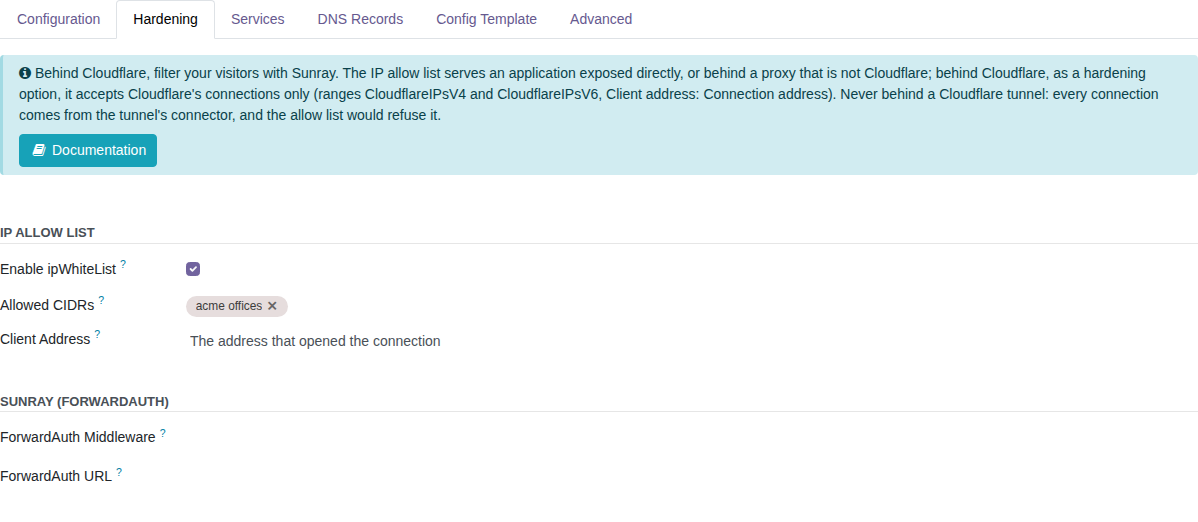
-
Click Reconfigure Application. Until you do, the form shows Settings not applied: Traefik still serves the previous configuration.
Check
- From an address of the list, the direct URL answers.
- From any other address, for instance a phone on its mobile network, it answers 403.
- If your own address receives 403, check that it belongs to a range of the list, and that Client address is the connection address.
When an agent does it
An agent can change the allow list of an application through the Muppy MCP. Which permission it needs, from the application or from the CIDR Dynamic Range, is on Muppy MCP permissions.
Not a direct URL?
Behind Cloudflare's proxy or a Cloudflare tunnel, Sunray filters your visitors, and an allow list is only a hardening option, or a trap behind a tunnel. See The IP allow list of an application.