Troubleshooting
The reflex: Run self-test
Whenever something looks off, click Run self-test on Vault ▸ Encryption. It is non-destructive, always safe, and answers the five questions that matter (is the holder reachable, does the envelope open, does a round-trip work, are all data keys present, are there orphans) in a readable verdict. Most "is it broken?" moments end there.
Unsealing fails — the message names the cause
When entering the master key fails, Muppy tells you which of the possible causes it is, because they call for opposite reactions. Read the message; it is written to be trusted.
"That is a different key — look again in your password manager."
Key identifiers are public, so Muppy can be precise: you supplied key X; this
database's envelopes need Y. Either you pasted the wrong entry, or the copy in your
password manager is damaged — a wholly different key and a corrupted copy of the right
one look identical here. Check the entry name (mpy-masterkey@<server>) matches this
server.
"The holder of the master key is not answering."
The mpy-masterkeyd process is not running or not reachable. The key is not at
fault — nothing was changed. Start the daemon (make masterkeyd-run on a dev box;
check the systemd service on a server) and try again.
"This database carries no keyring envelope." There is nothing for a key to open — typically a database restored from a backup that predates activation, or whose envelope rows were deleted. The key is not at fault: restore the database from a backup that contains its envelope. The same applies if the envelope is present but corrupt ("the keyring did not open with it"): restore the database rather than re-entering the key.
"N Muppy processes are connected to the holder." Not a failure — the unseal worked. Any process that was not connected at that moment picks the key up on its next use. If a process still behaves sealed minutes later, that process is the thing to look at.
"WARNING: N values are encrypted with data keys this keyring does not hold." The serious one. The vault opened, but some records reference a data key the keyring no longer contains. This is loss, not a seal — no ceremony recovers those values. It can only result from tampering with the envelope rows or restoring mismatched pieces of two databases. The message counts exactly which records are affected; everything else remains readable.
"The holder already carries a master key"
You tried to unseal a vault that is not sealed. Nothing was changed; close the wizard.
A divergence was reported
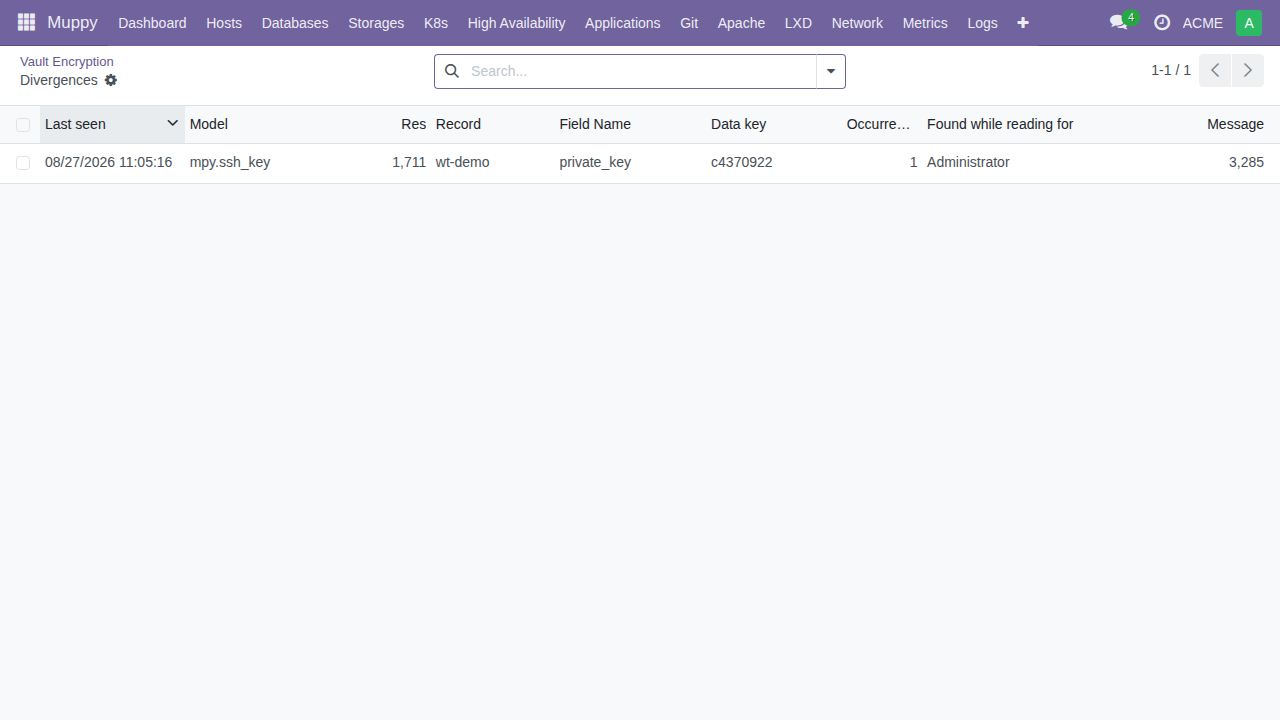
Keyring administrators are notified when a value does not survive the vault: a value the sweep just encrypted that does not read back equal, or — under the certification mode — a decrypted value that differs from its plaintext witness. Nothing is lost either way: the plaintext was kept and is the value served, and the divergence journal holds both sides' evidence. Open it from the notification (or the Encryption screen), identify which record and field diverged, and understand the cause before sweeping again or going further with the exit protocol. This is the verification doing exactly what it exists for.
Jobs failing with a sealed-vault error
Expected while sealed: any job that needs a secret fails cleanly rather than waiting. Find them all under the "Blocked by sealed vault" filter in the job queue, unseal, then use the replay button on the Encryption screen — it re-runs exactly those. See Day-2 Operations.
The truth about a lost master key
If encryption is active, the plaintext columns have been cleared by the sweep, and the master key is gone from both the holder's memory and your password manager: the encrypted values are unrecoverable. Not by Muppy support, not by anyone — that is the same property that makes a stolen backup worthless, pointed the wrong way.
This is why the activation ceremony forces the paste-back, why the suggested entry name exists, why the sweep verifies every value before clearing it, and why the certification mode keeps the plaintext until a new family of secrets has been certified. Two habits close the risk for good:
- keep the password-manager entry (
mpy-masterkey@<server>) where the team can reach it, not one person; - after activating, run a restore drill once: restore a backup on a scratch server and unseal it there with the key from the password manager. Ten minutes, and it proves the whole chain — backup, envelope, key — before anything depends on it.