Protect Your App Server with Sunray Zero Trust
Sunray asks who a visitor is before your application ever sees the request. It is switched on by the App Definition your App Server was created from, not from this screen. What is yours here are the lists of addresses allowed straight through — one for the application, on the Access tab, one for its IDE, on the Code-Server tab — and, when you hold the Sunray Advanced User right, the paths of your application opened to everyone.
Sunray protects a name, not a server
An App Server answers to several names, and each one is guarded on its own:
| Name | Example |
|---|---|
| its direct name | myapp-main-prod-acme.msa2-1.lair.ovh |
| its public name | myapp-main-prod-acme.acme.muppy.cloud |
| its IDE | codr-myapp-main-prod-acme.inouk-cloud.ovh |
| your Custom Domain | erp.acme.com |
Every name served by an application Sunray protects is covered, a Custom Domain you add later included — the name is guarded as soon as the application is reconfigured with it.
An application you deactivate leaves the list Muppy publishes, and Sunray drops the protected host at its next synchronisation.
One sign-in per name
Sessions are per host name. Someone who signs in on your Custom Domain and then follows a link to the Muppy name is asked to sign in again. This is the same rule as for the application's own sessions.
A Custom Domain behind Sunray
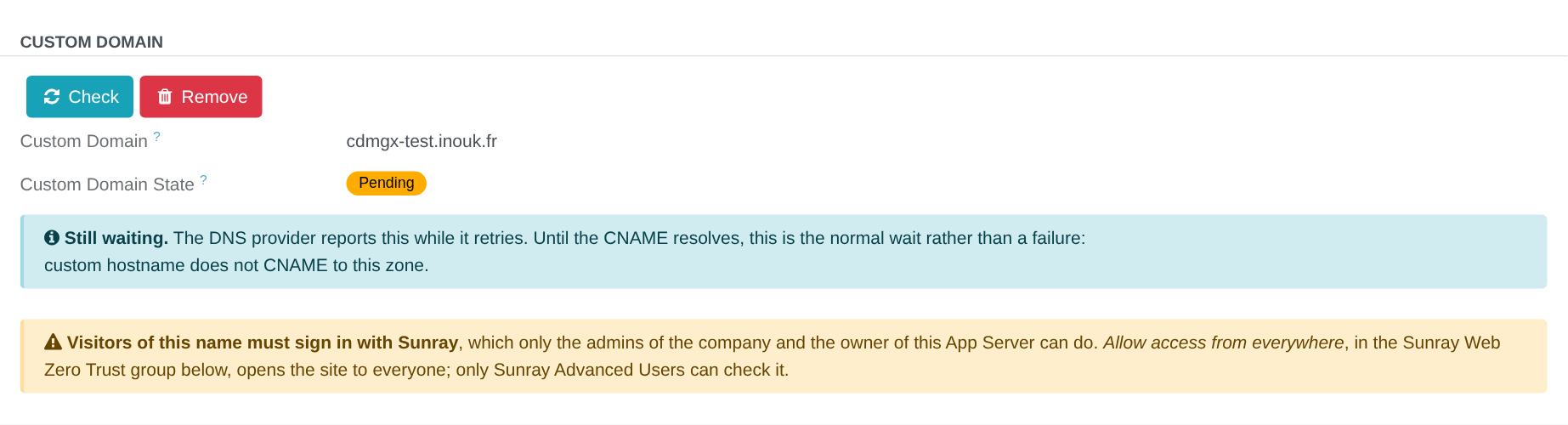
Your Custom Domain is guarded like the application's other names: its visitors must sign in with Sunray, and only your company's administrators and the App Server's owner can. That suits the weeks before a launch. It also closes the site to your customers, who have no Sunray account.
The Custom Domain group of the Access tab, which the Manganese administrators of your company see, says so when a name is set, the application is protected by Sunray, and Allow access from everywhere is off. Opening the site to everyone is that switch, below; only members of Sunray Advanced User can turn it on.
Who can sign in
Two groups, and you change both from Manganese rather than from this tab:
- The administrators of your company — every active Manganese user of the App Server's company who holds the admin role. Promote a user to admin and they gain access; demote them and they lose it.
- The App Server's owner — the user named in its Owner field.
Users who have never set a password, and accounts still waiting on their signup email, are not published to Sunray: an account nobody can sign in with is not an account that should open a door.
Allowed CIDRs — the control that is yours
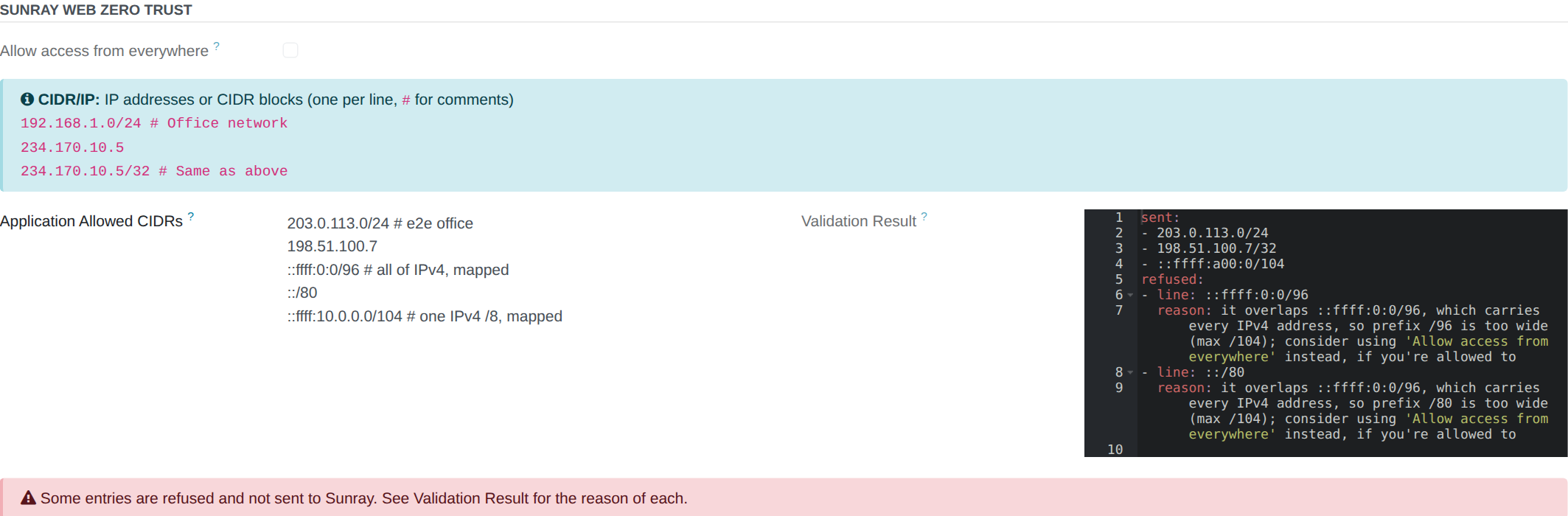
Application Allowed CIDRs sits on the Access tab. It lists the addresses and ranges that reach the application — its own names and its Custom Domain — without being asked to sign in: an office, a VPN, a monitoring probe. It does not open the IDE, which has its own list (below).
One entry per line, # opens a comment:
192.168.1.0/24   # Office network
10.0.0.0/8       # VPN
234.170.10.5     # A single address
234.170.10.5/32  # The same one, written as a range
Leave it empty and nothing is allowed through without signing in — which is the point of Sunray, and the right default.
Muppy refuses an entry, and never sends it to Sunray, when it is:
- not an IP address nor a CIDR network — a typo, a host name, two ranges on one line;
- an IPv6 address with a zone (
fe80::1%eth0) — a zone names an interface of one machine; - a range wider than
/8in IPv4 or/19in IPv6, such as0.0.0.0/0— a list opens a bounded range, not the whole Internet. To open the application to everyone, use Allow access from everywhere (below); - an IPv6 range that covers part of a range carrying IPv4 addresses, with a prefix wider
than the
/8of IPv4 written there:/104in::ffff:0:0/96(IPv4-mapped),::/96(IPv4-compatible) and64:ff9b::/96(NAT64),/24in2002::/16(6to4). Each of these ranges is the whole IPv4 Internet written in IPv6.::ffff:10.0.0.0/104or2002:a00::/24—10.0.0.0/8in each form — are accepted.
A red box under the list says when an entry is refused, so a typo costs you a warning
rather than an open door. The other entries still apply. Muppy also writes each address in
its canonical form: 234.170.10.5 is sent as 234.170.10.5/32, 10.0.0.5/24 as
10.0.0.0/24. The Validation Result beside the list shows, in YAML, what is sent
(sent) and each refused line with its reason (refused):
sent:
- 203.0.113.0/24
- 198.51.100.7/32
refused:
- line: ::ffff:0:0/96
  reason: it overlaps ::ffff:0:0/96, which carries every IPv4 address, so prefix /96 is too wide (max /104); consider using 'Allow access from everywhere' instead, if you're allowed to
Allow access from everywhere — opening the application to everyone
Some applications are meant for everyone: a public site, an API. Allow access from everywhere, at the top of the Sunray Web Zero Trust group of the Access tab, opens the application — its own names and its Custom Domain — to the whole Internet, without a Sunray sign-in. The application keeps its own authentication.
While it is on:
- a red box says so, on the form of everyone who opens the App Server;
- Application Allowed CIDRs and Public Paths stay as written, without effect — switch it off and they apply again;
- the IDE is not concerned: it keeps its own list.
Only members of Sunray Advanced User can switch it, and the switch takes effect at Save; other users see it greyed out. It is not carried when an App Definition is duplicated.

Code-Server Allowed CIDRs — the IDE's own list
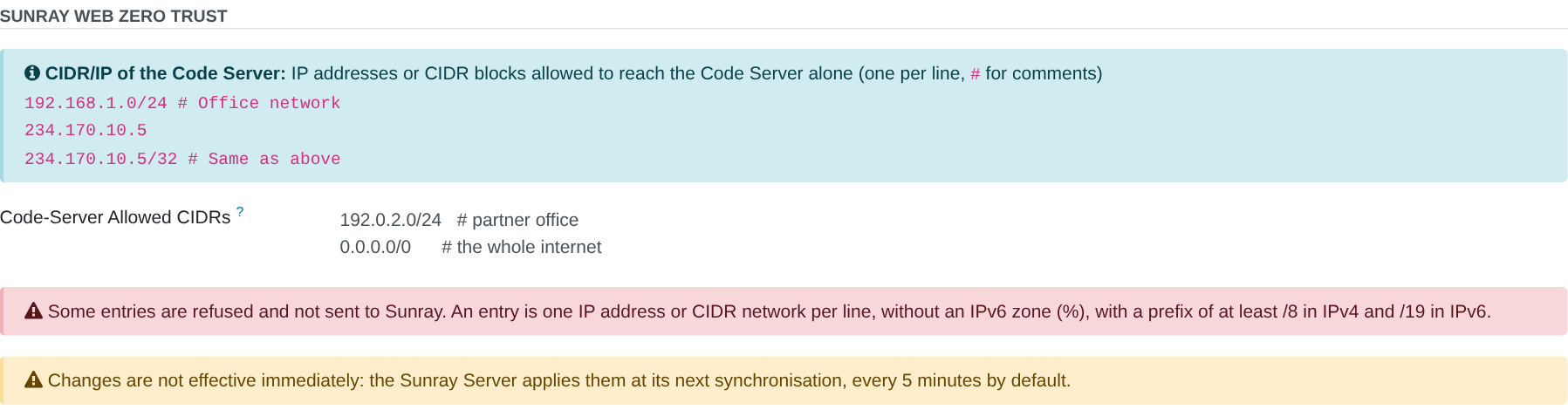
Code-Server Allowed CIDRs sits on the Code-Server tab. It lists the addresses that reach the IDE without being asked to sign in. It is written and checked exactly like the application's list, and the two are independent:
- an address in the application's list only reaches the application; on the IDE, it is asked to sign in;
- leave the IDE's list empty and the IDE always asks for a sign-in, whatever the application's list holds.
Open the IDE to an address only when that place needs it: the IDE gives a shell on the machine.
Changes are not immediate
Sunray applies the list at its next synchronisation — every 5 minutes by default. An immediate test measures the previous list.
Public Paths — parts of your application open to everyone
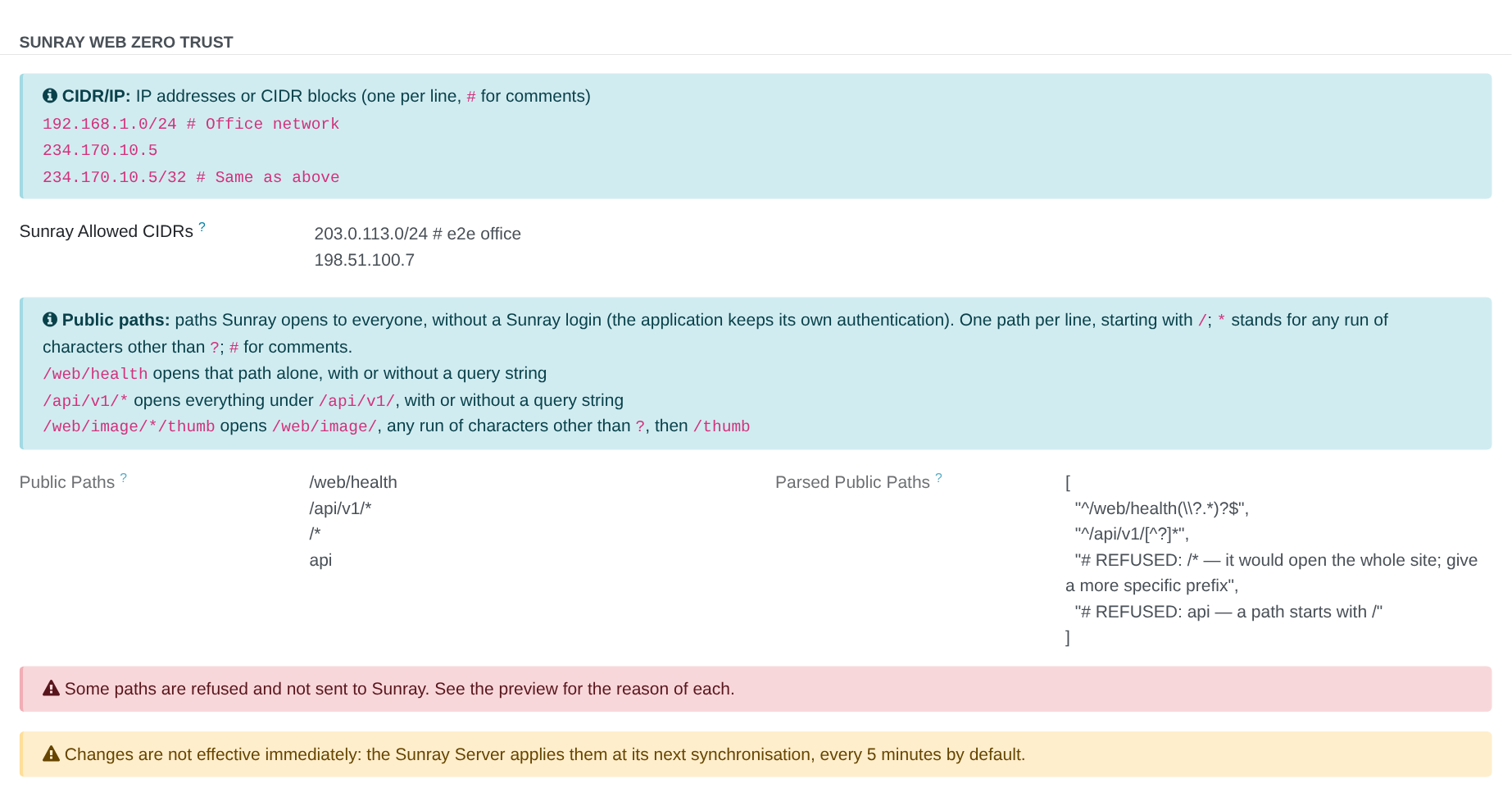
Public Paths sits under the CIDR list, on the same Access tab. It lists the paths of your application that anyone reaches without signing in to Sunray, from any address — a webhook a provider calls, a health check, a public API. Your application still applies its own authentication behind them: a Sunray-free path is not a login-free path.
Opening a path bypasses Zero Trust, so writing this list is a right of its own: only users holding Sunray Advanced User can change it. Everyone else who can open the App Server sees the list, read-only, so you always know what is open on your server. The right is granted per user by an administrator of the Muppy instance (Settings ▸ Users, section Sunray).
One path per line, * stands for any run of characters except ?, # opens a comment:
| You write | What is open |
|---|---|
/ |
the home page only |
/web/health |
that exact path, with or without a query string (/web/health?probe=1) |
/api/v1/* |
everything under /api/v1/, with or without a query string — but not /api/v1 itself |
/web/image/*/thumb |
/web/image/42/thumb, /web/image/a/b/thumb… |
A path without a trailing * opens that path only: /api does not open /apikeys. A *
never reaches into the query string: /web/image/*/thumb does not open
/web/image/42?x=/thumb.
Some lines are refused, and the Validation Result beside the field says why:
- a line that does not start with
/; - a line that would open the whole site, such as
/*; - a line that reaches
/sunray, which Sunray keeps for itself —/sunray/x, but also/s*or/su*, whose*would cover it; - a line with an empty segment, such as
//*; - a line with a space or a
?in it — query strings are always allowed after a path.
A refused line is never sent to Sunray; the others are, and a red box flags the refusals. The Validation Result shows exactly what Sunray receives, in the same YAML form as for the CIDR lists.
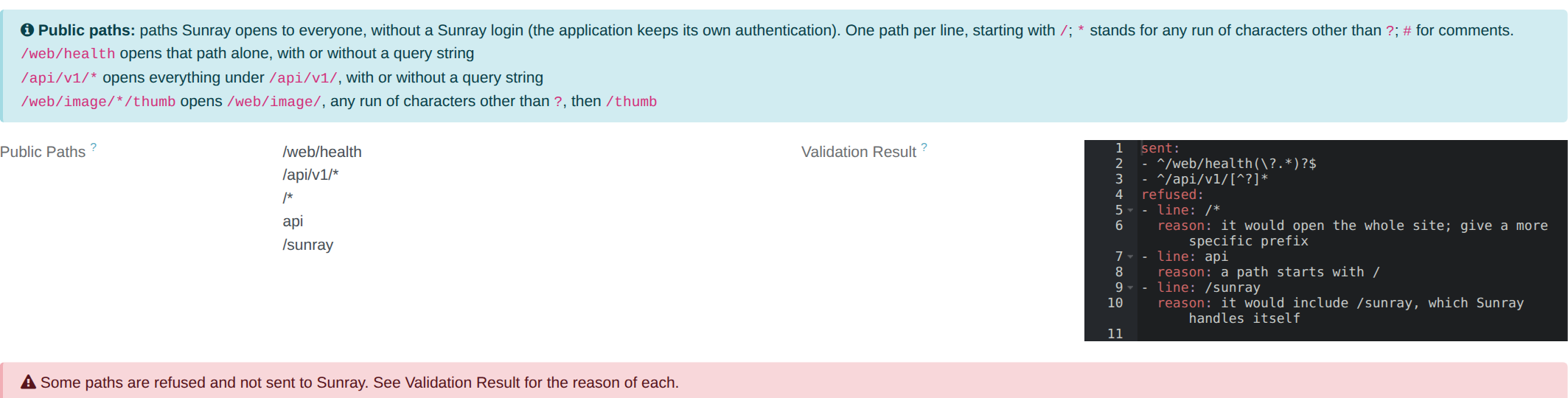
Without the Sunray Advanced User right, the same list is shown read-only:
The two lists only ever open
An address in Application Allowed CIDRs opens the application — its names and its Custom Domain — from that address; a public path opens that path from everywhere. Neither closes anything: filling the CIDR list does not restrict the public paths to those addresses.
Public Paths never apply to the IDE
They open your application — its own name and its Custom Domain — and never the Code Server, which gives a shell on the machine.
Like the CIDR list, a change reaches Sunray at its next synchronisation, every 5 minutes by default. Neither setting is carried by an App Definition: a new App Server starts with no public path.
When you cannot get in
| What you see | What it means |
|---|---|
| a sign-in prompt you did not expect | your address is not in the list of the name you open — Application Allowed CIDRs for the application, Code-Server Allowed CIDRs for the IDE — its line is refused (red box under the list), or the edit has not propagated yet |
| signed in, then refused | your account is neither an administrator of the App Server's company nor its owner |
| refused on your Custom Domain, fine on the Muppy name | the application serving your Custom Domain has not been reconfigured since you set the name |
403 on every name, for everyone |
an IP whitelist on the application itself, which is a different control — see Network Configuration |
| a public path still asks for a sign-in | the line is refused (see its Validation Result), the path is not the one written — /api/v1/* does not open /api/v1 — or the edit has not propagated yet |
| Public Paths is read-only for you | you do not hold Sunray Advanced User; ask an administrator of the Muppy instance |
Setting up Sunray in front of an App Server — the Traefik side, the shared token, the checks — is covered by Protect Your App Servers with Your Own Sunray.