Purging PITR Backups
WAL-G can delete old cluster backups and the WAL Segments tied to them. Muppy drives that purge two ways:
- from the PostgreSQL server, via the postgres crontab
- from Muppy, via a scheduled Task — the recommendation
From the PostgreSQL server
The purge is configured with the backups, in the Full Backups Configuration group of the cluster's Backup / WAL-G tab — see Via the postgres crontab.
Tick Activate WAL-G in CRONTAB and Muppy shows:
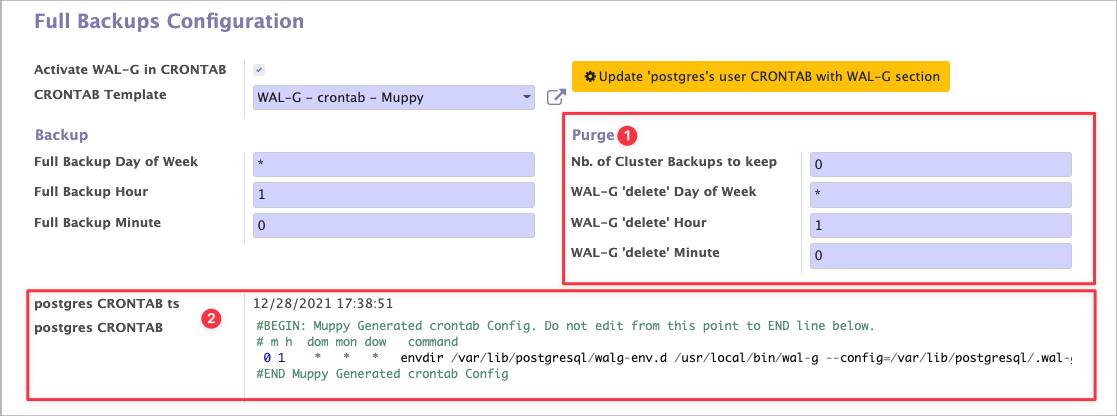
- Four fields:
- Nb. of Cluster Backups to keep — how many backups and WAL files to retain. Set it to 0 to disable the crontab purge.
- WAL-G 'delete' Hour, Minute and Day of Week — when the purge runs. See crontab.guru.
- The crontab file, with the timestamp of Muppy's last reconfiguration. ==When the purge is
enabled, the crontab contains a line with a
delete retain …command.==
Info
Muppy does not overwrite the postgres crontab. It injects a block with the commands needed for the WAL-G purge, generated from the CRONTAB Template. The same template covers both the backups and the purge.
Applying the configuration
Click Update 'postgres's user CRONTAB with WAL-G section to rewrite the crontab and enable, reconfigure or disable the purge according to Nb. of Cluster Backups to keep.
Muppy will not know what was purged
A purge run by the server's cron leaves Muppy's Cluster Backups list pointing at files that no longer exist. Schedule a refresh — see Refreshing the list.
From Muppy, via a Task
==Use a scheduled Muppy Task to purge WAL-G backup files.== It gives you:
- notifications on success and on failure
- execution logs
- an always-current Cluster Backups list
The Task walg_backup_delete purges the files and refreshes the Cluster Backups list
afterwards — which is exactly what the crontab route cannot do.
Setup
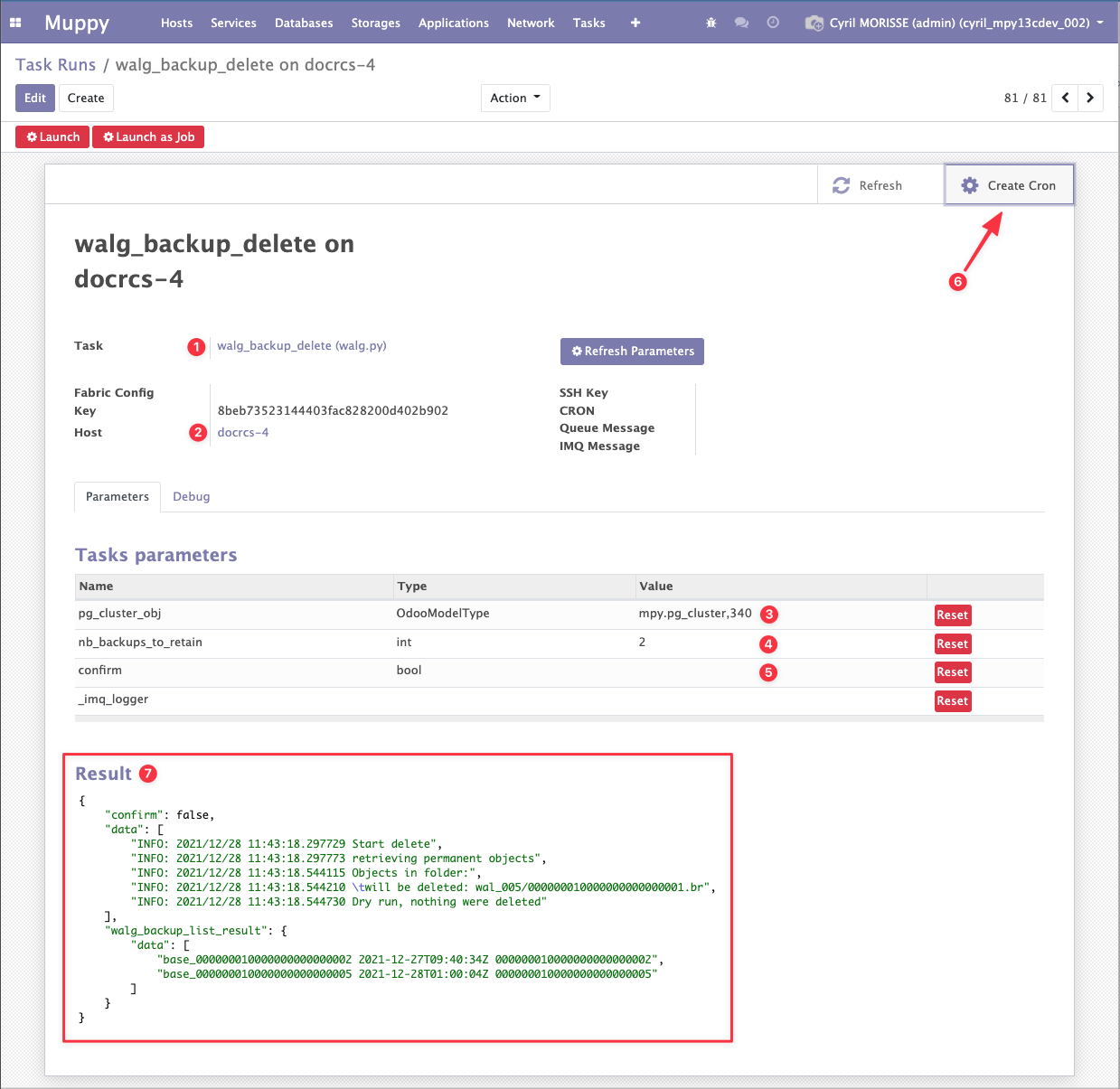
Create a Task Run with:
- the Task
walg_backup_delete - the Host running the cluster
- the Database Cluster to purge
- the number of Cluster Backups (WAL-G) to keep, and their WAL Segments (default: 20)
- confirm — left unticked, the purge runs as a dry run and deletes nothing. Tick it to actually delete.
- a Muppy CRON, via Create Cron, for the recurrence
When it finishes, the Task returns JSON (#7 on the screenshot below) containing:
data— the command's console output (stdout)walg_backup_list_result— the Cluster Backups list as refreshed after the purge
Reading a dry run
In dry-run mode (confirm unticked) walg_backup_list_result still lists the files, because
nothing was deleted. Read data to see what a real run would remove.