Custom Domains
Pointing your own name at an App Server is the easy half: a CNAME at your DNS provider does it, and Muppy will route the name to your application. The half that decides everything is who holds the TLS certificate for that name — because a browser asks for it before it ever sends the host name.
Muppy offers three levels of naming. They differ in one line only, the last one.
| The name comes from | You create | The certificate comes from | |
|---|---|---|---|
| 1. The name you are given | Muppy | nothing | Let's Encrypt, on the operator's zone |
| 2. Your name, in front of a public URL | you, by CNAME | one CNAME | the Cloudflare edge in front of your application |
| 3. Your own domain, managed by you | you | your own records | Let's Encrypt, on your zone |
Level 1 works out of the box and needs no reading. This page is about 2 and 3.
Level 2 — your name in front of a public URL
This is the usual answer. Your application keeps the public URL Muppy gave it — say
erp-prod.acme.muppy.cloud — and answers to erp.acme.com as well. Both names reach the same
application; the Muppy one stays valid and is worth keeping for support.
It works because your application is served through Cloudflare, and Cloudflare holds a certificate for your name. Nothing is installed on the server.
What the operator sets up first
Four things, none of them in the tenant's hands:
- a Cloudflare zone with Custom Hostnames (Cloudflare for SaaS) switched on — see Preparing a Cloudflare Zone for Public URLs;
- a custom hostnames quota above zero for the instance's domain, on the MBD Server — it defaults to 0;
- an App Definition carrying a Traefik Application Definition flagged Public Exposure, on a domain of that zone;
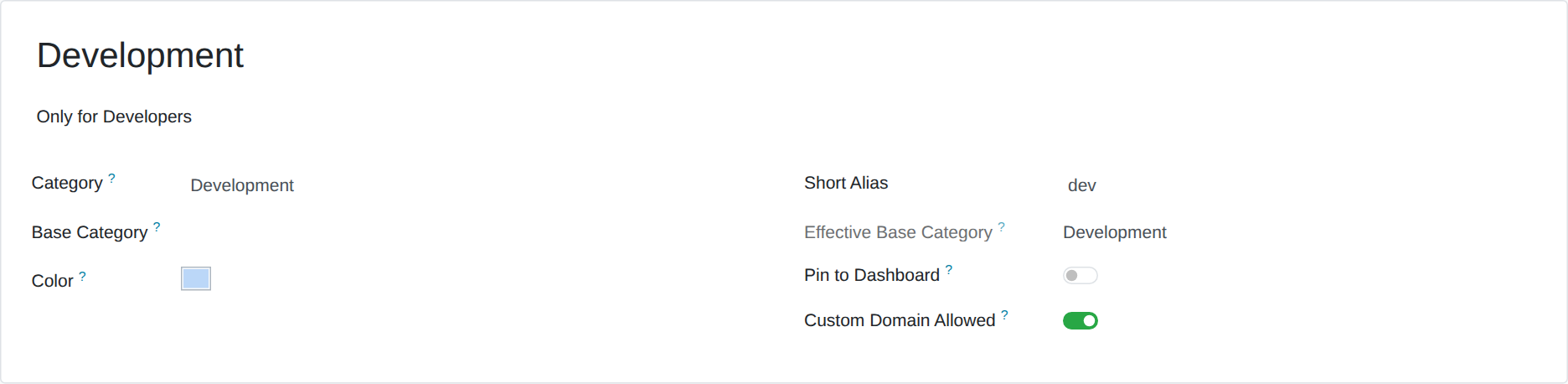
- Custom Domain Allowed checked on the qualifier of the offers that include the feature, on the qualifier's form. It only decides what Manganese shows: unchecking it removes no name.
From Manganese
Your App Server's Access tab carries a Custom Domain group, under Web Access. It is reserved to the Manganese administrators of your company: declaring a name incurs costs, and puts your customer's site under that name. A Manganese user who is not an administrator does not see the group; ask one of your administrators.
-
Type your name in Custom Domain and save. The group then shows the CNAME to create, pointing at your Application URL, and the same record as a line of a zone file.
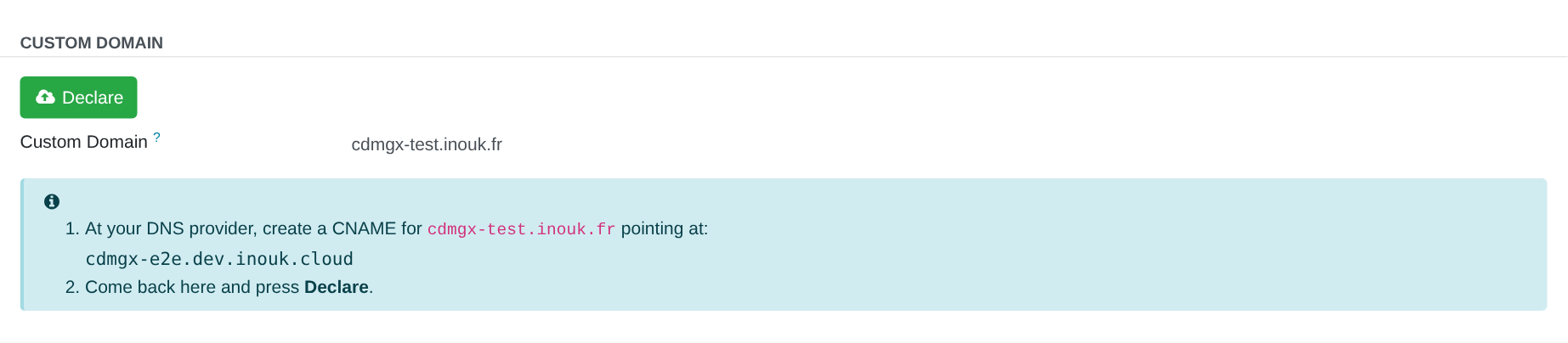 2. Create that CNAME at your DNS provider — the record is the same as in step 2 below.
3. Press Declare. The state shows Pending, then Active about two minutes after your
CNAME resolves. Press Check to read it again. The CNAME to create stays shown until the
name is Active. Once it is, Open Custom Domain, among the buttons at the top of the
form, opens your site under that name.
2. Create that CNAME at your DNS provider — the record is the same as in step 2 below.
3. Press Declare. The state shows Pending, then Active about two minutes after your
CNAME resolves. Press Check to read it again. The CNAME to create stays shown until the
name is Active. Once it is, Open Custom Domain, among the buttons at the top of the
form, opens your site under that name.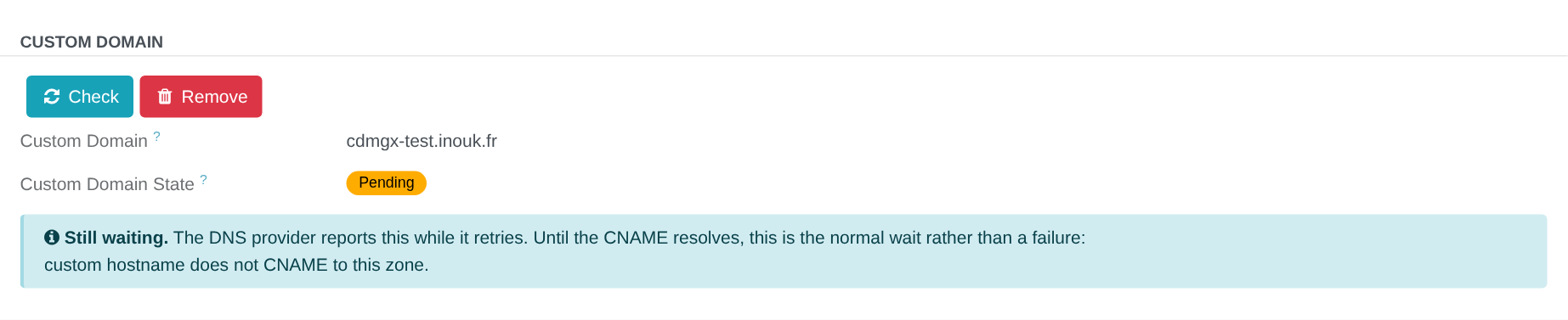
 4. Press Remove to take the name off: the declaration and its certificate are removed, the
name stops answering, and it stays in the field, editable again. When the DNS provider refuses
to delete the declaration, the field is editable all the same, but the name stays declared, and
served, at the provider until a Muppy / Manganese Administrator deletes it: a Custom Domain
still declared notification says so. Declaring the same name again fails until then.
4. Press Remove to take the name off: the declaration and its certificate are removed, the
name stops answering, and it stays in the field, editable again. When the DNS provider refuses
to delete the declaration, the field is editable all the same, but the name stays declared, and
served, at the provider until a Muppy / Manganese Administrator deletes it: a Custom Domain
still declared notification says so. Declaring the same name again fails until then.
| You see | The name | Buttons |
|---|---|---|
| the field empty | editable | — |
| the CNAME to create | editable | Declare |
| Pending or Error, with the provider's message and the CNAME to create | locked | Check, Remove |
| Active | locked | Check, Remove |
| Disabled | locked | — |
| Ask support to … | editable | — |
- The group appears only to a Manganese administrator, and only when your offer includes the feature: the App Server's qualifier allows it, your Application URL is a public one, and its domain can serve your name. If you are an administrator and do not see it, your offer does not include it: ask support.
- If one of these changes later, your name keeps answering. Only the group disappears from your form; ask support to change or remove the name.
-
Disabled means the application was deactivated: the name no longer answers. Ask support to activate it again, then press Declare.
 - Ask support to … means the application's configuration cannot carry your name yet. The
message names what to ask for; Declare waits until it is done.
- Ask support to … means the application's configuration cannot carry your name yet. The
message names what to ask for; Declare waits until it is done.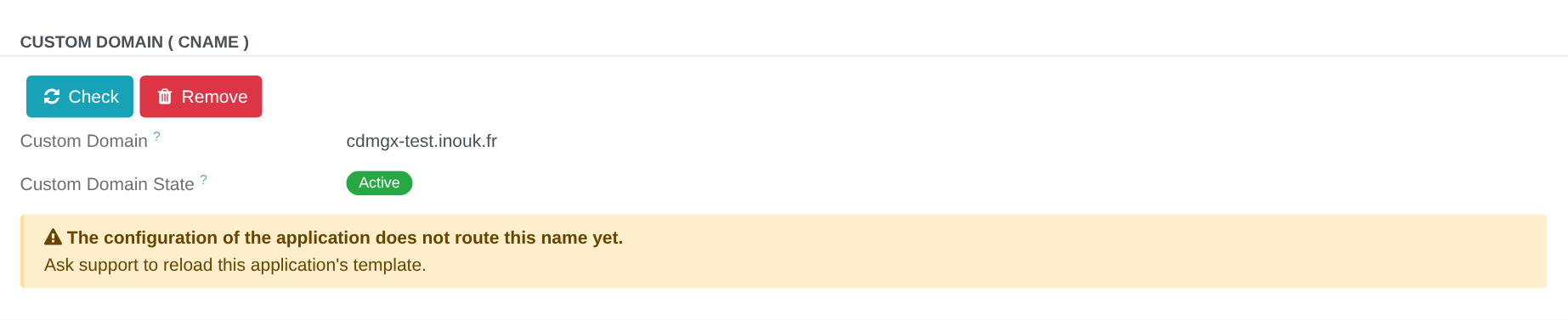 - Each declared name is billed on the operator's zone. A refusal — the quota reached, the
zone not ready — shows when you press Declare.
- When the application is protected by Sunray, the group warns that your visitors must sign in
with Sunray — see Sunray Zero Trust.
- Each declared name is billed on the operator's zone. A refusal — the quota reached, the
zone not ready — shows when you press Declare.
- When the application is protected by Sunray, the group warns that your visitors must sign in
with Sunray — see Sunray Zero Trust.
Through the Manganese MCP, an agent does the same with four methods on the App Server:
mgx_set_custom_domain(cname), mgx_declare_custom_domain(), mgx_check_custom_domain() and
mgx_remove_custom_domain(). The same conditions and refusals apply, the administrator rule
included: an agent acting for a user who is not a Manganese administrator is refused. On an App Server you have
not entrusted to an agent, Declare and Remove wait for your approval: a declared name incurs costs,
a removed one stops answering. The approval screen names the Custom Domain, the App Server and the
current state of the name.
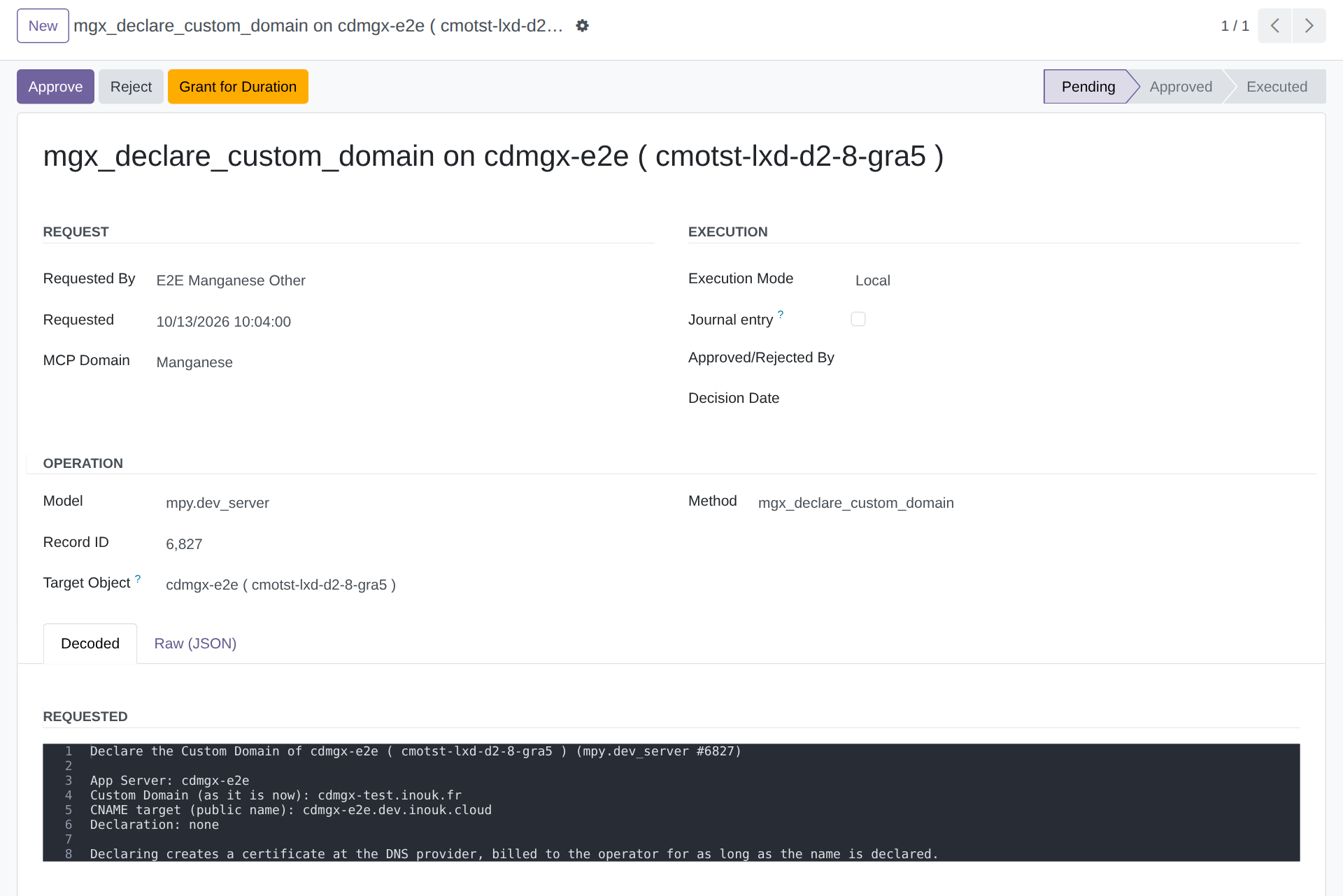
From the Traefik Application
The infrastructure side sets the name on the Traefik Application itself.
-
Fill Custom Domain (CNAME) on the App Server's Traefik Application and save. The name is recorded in lower case, not yet served — Declare, at step 3, is what puts it in the router. It cannot be the name of the Muppy instance itself.
-
Create one CNAME at your DNS provider:
erp.acme.com. CNAME erp-prod.acme.muppy.cloud.Note the trailing dot if your provider's form expects one. A short TTL — 60 seconds — makes the first minutes easier to observe; raise it once the name answers.
-
Come back to the Traefik Application and press Declare. Muppy registers your name on the zone that serves your applications and asks for its certificate. Declare is offered on an active application only: a name declared behind an application that serves nothing would incur costs for nothing. The form then shows the state next to the field, and the CNAME to create until the name is Active. It refreshes on its own while the certificate is being issued. Afterwards it stops: press Check whenever you want to know whether the name is still being served — that is also how you find out if your CNAME was changed or removed later. When the DNS provider cannot be asked, a red notification says so, with the provider's own message.
The certificate usually arrives about two minutes after your CNAME resolves. Until then the state stays Pending, and the message underneath is what the provider reports while it retries: it is the normal wait, not a failure.
Nothing happens until you press Declare
Filling the field records your name. Declare does both of the things that make it answer: it puts the name in your application's router, and it asks the provider for the certificate. Until you press it, the name is served by nobody.
Changing or removing the name. While a declaration exists the field is locked, so that a typo cannot leave a certificate behind with nothing pointing at it. Press Remove to withdraw the declaration — the certificate goes with it — and the field becomes editable again. The router keeps accepting the name until you clear the field and reconfigure, so between the two your visitors get a certificate error rather than a 404. A provider that refuses to delete the declaration keeps it: the field becomes editable all the same, and the declaration stays in the DNS Domain's Custom Hostnames (see Removing public access asks first below).
A declaration that is never validated is abandoned
If your CNAME never resolves to the name Muppy gave you, the provider retries for a while and then drops the declaration. Fix the CNAME and press Declare again. The retry schedule is the provider's; see Cloudflare's backoff schedule for the detail.
A CNAME cannot be set on the root of a domain
acme.com itself cannot carry a CNAME — the DNS standard forbids it, and most providers
refuse the record. Use a sub-domain: erp.acme.com, www.acme.com. Some providers offer
ALIAS or ANAME records that work around it; if yours does not, publish a sub-domain and
redirect the root to it at your registrar.
One name per application. If you need two — erp.acme.com and www.acme.com — create a
second Traefik Application and give it the second name. Each one then has its own routing and
its own security settings.
An application served through a Cloudflare tunnel
Some servers are not reachable from the Internet. Cloudflare joins them through a tunnel — see Cloudflare Tunnels — and the tunnel forwards only the names it has a route for. Your name needs a route of its own, beside the route of the Muppy name.
Muppy publishes it with the application:
- Declare reconfigures the application first, so the route is in the tunnel before the name is declared.
- The route goes to the same service as the Muppy name, with the same options. It has no DNS record: your CNAME is the name's DNS.
- It follows the router. Remove leaves it, as it leaves the name in the router. It goes when you clear the field and reconfigure, when the application is deactivated or deleted, and it changes with the name.
A name declared before the tunnel had its route answers with an empty 404. Press (re)Configure 'Traefik Applications' on the App Server, or Reconfigure on the Traefik Application: the route is published, and the name answers.
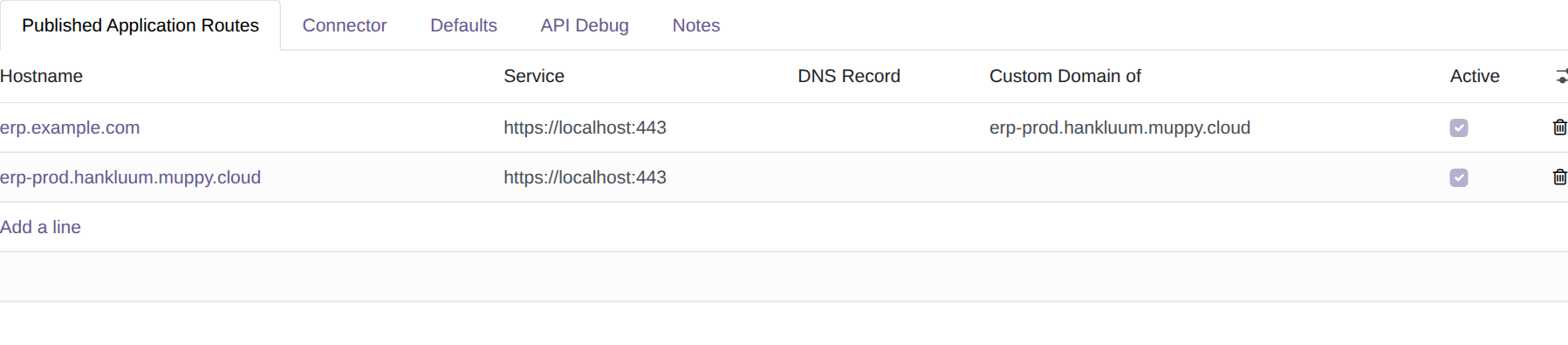
The tunnel's Routes show it, with the application in Custom Domain of.
Level 3 — your own domain, managed by you
If you want to name your applications freely rather than put one name in front of one application, connect your own domain to your Muppy instance. Muppy drives Cloudflare, OVH and Scaleway; a domain already registered elsewhere can be transferred or delegated to one of them, so this does not mean buying a new one.
Once the domain is connected, there is no CNAME at all: your applications are named
directly in your zone — erp.acme.com is the application's own name — and Muppy obtains the
Let's Encrypt certificate for it through the
DNS-01 challenge, because it can write in a zone
you have connected.
This is the level to choose when the naming is part of your product rather than a label on top of it.
Why the field is greyed out on some applications
Custom Domain is locked in two situations, for two different reasons.
While a declaration exists, so that changing the name cannot orphan its certificate. Press Remove first; see Changing or removing the name above.
On the direct route. An App Server is usually reachable by two routes: a public one through Cloudflare, and a direct one straight to the server. Custom Domain is available on the public one and locked on the direct one, with the reason shown next to the field.
The reason is the certificate. On the direct route the server obtains its own certificate from Let's Encrypt, and it can only do that for zones Muppy manages — your domain is not one of them. The name would be routed and the connection would then fail on the certificate, which is worse than not offering it. So the field is locked, and levels 2 and 3 are the ways through.
Removing public access asks first
Six gestures stop serving a public application. Each one cuts your customer's name with it:
| Gesture | Where |
|---|---|
| Remove Application | the Traefik Application form |
| Remove 'Traefik Applications', for the applications the App Server maintains | the App Server's Network tab |
| Unchecking Activate Reverse Proxy, then (re)Configure 'Traefik Applications' | the App Server's Network tab |
| Unchecking Activate Reverse Proxy, then Refresh Configuration | the App Server's header |
| Delete, on a row of Traefik Applications | the App Server's Network tab |
| (re)Sync All from Application Definition, when the App Definition no longer carries the application's Definition, and the link came from it | the App Server's CICD+ Config tab |
When an application the gesture touches carries a Custom Domain, Muppy asks before acting. The confirmation names each Custom Domain and says what follows:
- the name stops answering;
- its declaration and its certificate are removed;
- serving it again takes a new Declare.
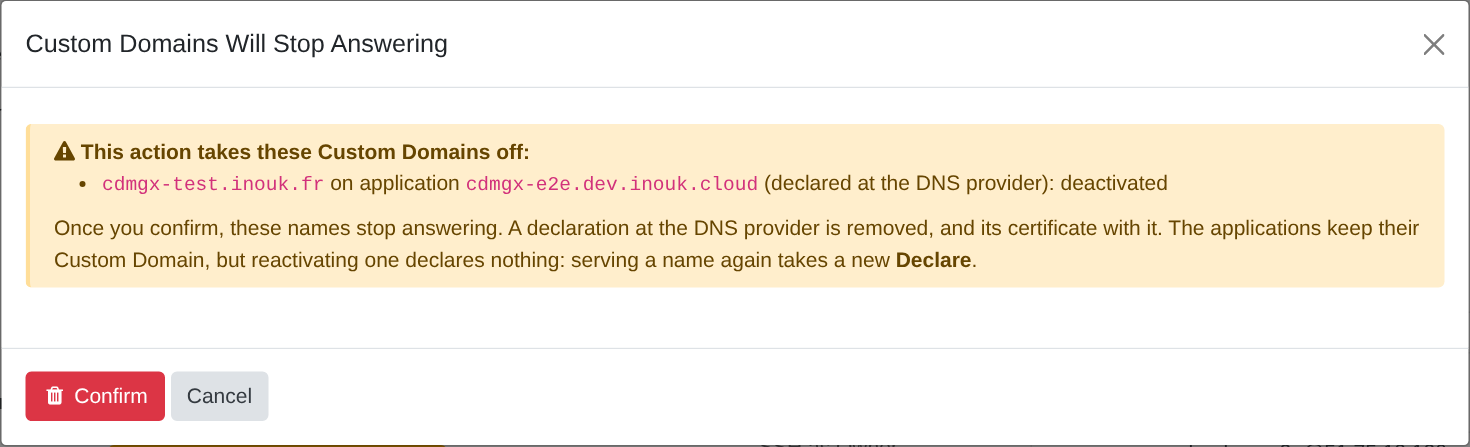
Cancel leaves everything as it was. Without a Custom Domain in play, the gesture runs as it always did, with no question.
These gestures are the App Server's. Custom Domains are not supported on Code Servers: a Code Server's (re)Configure and Remove 'Traefik Applications' neither ask nor remove a declaration, and its form warns when one of its applications carries a Custom Domain all the same.
Unchecking Activate Reverse Proxy warns you at once, and changes nothing yet: the applications go at the next (re)Configure 'Traefik Applications' or Refresh Configuration, which ask again. After (re)Sync All from Application Definition, the applications whose Definition left go at the next (re)Configure too.
(re)Configure 'Traefik Applications' and Refresh Configuration ask whenever they are about to cut a Custom Domain, the box checked or not: it deletes the public applications whose Definition is no longer attached to the App Server, however the Definition left. The confirmation lists each name with what happens to it: deactivated, deleted, or deleted at the next (re)Configure. Refresh Configuration records the applications inactive and removes their declarations; their routes go at the next (re)Configure 'Traefik Applications'.
A deactivated application keeps its name. Remove Application, Remove 'Traefik Applications' and the reconfiguration that follows an unchecked Activate Reverse Proxy keep the Traefik Application. Its Custom Domain stays in the field, marked Disabled, and Declare is not offered until the application is active again.
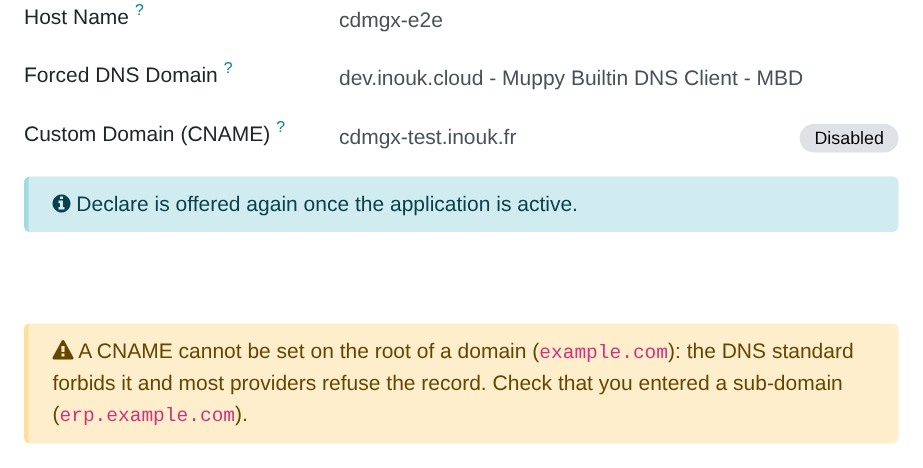
The Active switch of a Traefik Application is a test or tuning gesture, for instance while you change its settings: it keeps the declaration. The name stops answering after the next Reconfigure, and answers again once the application is active and reconfigured. Deleting the application is what removes the declaration.
A reconfiguration nobody confirmed asks nothing, and tells two people. Provisioning, the Setup wizard, a Task Run or a scheduled reconfiguration acts at once. Each lost name is then told, in its own notification:
- to the App Server's owner, who reads that the name no longer answers, that a Muppy / Manganese Administrator did it, and to contact them. An owner who did it themselves reads « You … »;
- to whoever launched it, who reads how to serve the name again. When nobody launched it (a scheduled run), or when whoever launched it cannot make that gesture (a Manganese user), the Muppy administrators receive it.
The notifications are:
- Custom Domain disabled — Activate Reverse Proxy is unchecked, so the application was deactivated. It keeps its Custom Domain; its declaration and certificate are removed.
- Custom Domain dropped — the application's Definition left, so the application was deleted with its Custom Domain.
When someone confirmed the gesture in its dialog, the owner is told, and whoever confirmed receives a copy of the owner's notification, titled [FYI]: the dialog already named the name. An owner who confirmed on their own App Server receives nothing.
Deprovisioning an App Server removes its Custom Domains with its applications: their declarations and certificates are removed at the DNS provider, then the applications are deleted. A DNS provider that cannot be reached does not stop the deprovisioning: the applications, the machine and the record go all the same, and the declaration stays in the Custom Hostnames of its DNS Domain, still incurring costs. Once the deprovisioning is done, a Custom Domain still declared notification names it: the owner reads that a Muppy / Manganese Administrator is taking care of it, and whoever launched the deprovisioning — or the Muppy administrators, when a Manganese user launched it — reads which DNS Domain to open to delete it, once the provider answers. The deprovisioning's journal names it too.
A declaration the DNS provider refuses to delete stays, detached. Whichever gesture asked — Remove, a reconfiguration, Remove 'Traefik Applications', a deprovisioning — the application lets go of it, so its Custom Domain field is free again, and the declaration stays in the Custom Hostnames of its DNS Domain with the date and the provider's answer. The Deletion Refused filter lists them. The name stays declared and served at the provider, and still incurs costs, until the row is deleted, and the same name cannot be declared again on that DNS Domain until then. A Custom Domain still declared notification tells the owner and whoever asked, as above. An MBD Server whose backend refuses keeps the name in its own Custom Hostnames the same way, and tells its client, which keeps it too.
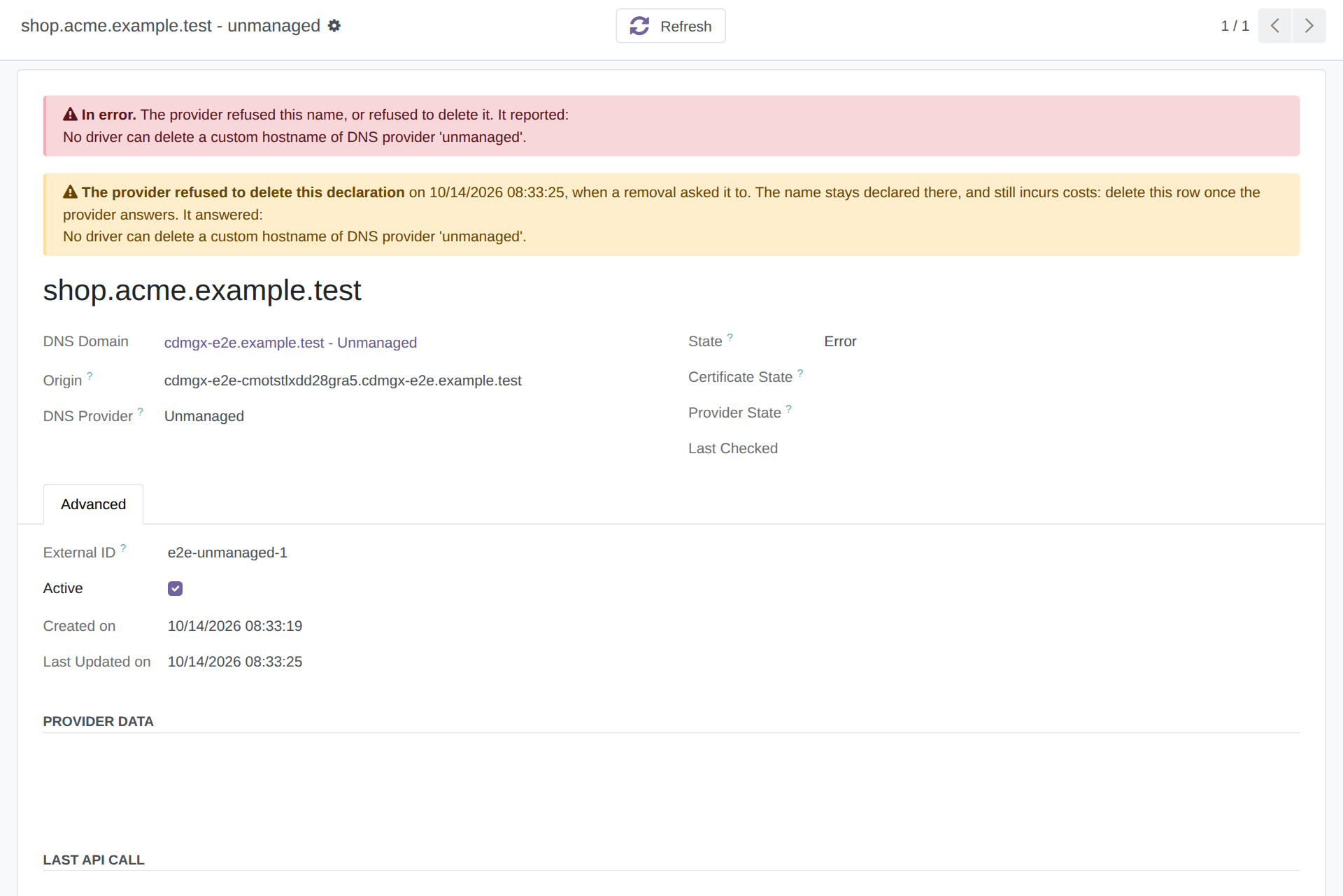
Delete on a Custom Hostname row is the cleanup. It asks the provider once more, then removes the row whatever the answer. When the provider kept the name, or could not be asked, a notification tells whoever clicked that it may stay declared there, and still incur costs.
What a custom domain does not change
Your application chooses the name it writes in its own links. Password-reset emails, portal invitations and report footers carry whichever URL the application is configured with, not necessarily the name your visitors typed. If those links must show your name, set it in the application's own configuration.
Sessions are per host name. Someone who signs in on one name and then follows a link to the other will be asked to sign in again. Publishing one name and keeping the other for support avoids the surprise.
What your application receives
Measured on a live custom domain. Your application sees the name your visitor typed, and the visitor's own address — but not where a web application usually looks for it.
| Header | Value |
|---|---|
Host |
your name — erp.acme.com, not the Muppy one |
X-Forwarded-Host |
your name |
X-Forwarded-Proto |
https |
X-Forwarded-For |
the visitor first, then the proxies — 203.0.113.7, 172.69.222.205 |
CF-Connecting-IP |
the visitor |
X-Real-IP |
⚠️ the edge, not the visitor |
Do not read X-Real-IP
It carries the address of the Cloudflare edge that forwarded the request, so an application
that trusts it logs every visitor as the same handful of addresses — and any rate limit or
geo rule built on it applies to Cloudflare rather than to your users. Read
CF-Connecting-IP, or the first entry of X-Forwarded-For.
Requests through the Muppy name and through your own name are identical in shape: only Host
and X-Forwarded-Host differ. An application that works on one works on the other.
Checking that it works
From anywhere:
dig +short erp.acme.com
curl -sS -o /dev/null -w '%{http_code}\n' https://erp.acme.com/
| What you see | What it means |
|---|---|
| the CNAME, then addresses | your DNS record has propagated |
| a TLS error, no certificate | the name is not declared yet, or its certificate is still being issued |
| 404 page not found | the request reached your application's server, but the router does not know this name — Custom Domain is empty on the application that serves it. When the field is filled and the router has not caught up, the application's own form says so and offers the button that fixes it |
| an empty 404, on a server joined through a Cloudflare tunnel | the tunnel has no route for your name — reconfigure the application; see An application served through a Cloudflare tunnel |
| 403 | the router accepted the name and an IP whitelist refused you — routing works |
| a sign-in prompt | the name reached your application and Sunray Zero Trust stands in front of it — routing works; see Protect Your App Server with Sunray Zero Trust |
| your application | done |
A 404 and a 403 are both good news about the DNS chain: they are answered by your application's server, which means the name travelled all the way there.