Serving a Release's public route through a Cloudflare Tunnel
A Release's public route whose Parts Config says
public_exposure: proxiedis served by Cloudflare's proxy. The proxy reaches the cluster at the address of its public load balancer — which a cluster on a private network, or behind NAT, does not have. A Cloudflare Tunnel closes that gap: a connector,cloudflared, runs in the cluster and opens an outbound connection to Cloudflare, and Cloudflare sends the visitors' requests down that connection to the cluster's Traefik.
This page sets that tunnel up by hand. Muppy publishes the names of a host's Traefik applications through a tunnel on its own — see Cloudflare Tunnels; for a Release, the tunnel, its route and its DNS name are created in Cloudflare, and Muppy is told to keep its hands off the public name.
When you need it
Muppy writes the public record of a proxied route as an A record, proxied, pointing at the
Release's Public Loadbalancer. When that address is private (192.168.x.x, 10.x.x.x, …),
Cloudflare refuses to proxy it, and the gesture that wrote it — Setup DNS Records, or the
installation of the Release — ends failed:
DNS record 'shop.example.com' (proxied) of Release 'shop' (id 11): Cloudflare DNS zone
'example.com': Cloudflare refused the creation of the A record 'shop' (9003 Target 192.168.1.172
is not allowed for a proxied record.). 192.168.1.172 is not a public address, and a proxy cannot
reach it: give the public load balancer of the Release a public address, or serve the route
through a Cloudflare tunnel (…).
The other records of the Release are written, and the installation goes on. Either give the public load balancer a public address, or follow this page.
What you need
- A Release whose public route is
public_exposure: proxied, on a Public DNS Domain that is a Cloudflare zone. - Access to the Cloudflare account of that zone.
kubectlon the cluster: on a single-node microk8s cluster,sudo microk8s kubectlon the node.-
The Service of the cluster's Traefik. A cluster installed with Install Single Node Infra. Package has it in the namespace
traefik-pack8s:sudo microk8s kubectl get svc -n traefik-pack8s traefik
1. Keep Muppy off the public name
In this setup, Cloudflare writes the public name itself, as a CNAME to the tunnel. Muppy must not write an A record beside it — Cloudflare refuses a CNAME next to an A record, and the reverse.
-
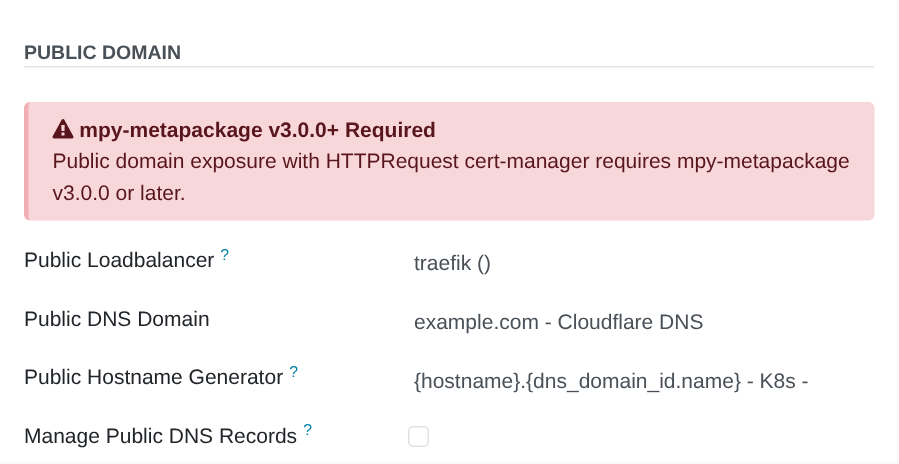
On the Release, open the Network tab and uncheck Manage Public DNS Records. Muppy no longer writes the public records of the Release, and no longer deletes them: Setup DNS Records, the installation and the Package Release Cleanup Wizard leave them alone.
-
If the public record is already there — written before you unchecked the box, or refused and absent — delete it: in the Release's DNS Records, the line of the public name, Delete. Read it again in the Cloudflare dashboard (DNS ▸ Records): no record under the public name.
The private routes keep their records, written by Muppy as before (Manage Direct DNS Records).
2. Create the tunnel in Cloudflare
- In the Cloudflare dashboard, open Zero Trust ▸ Networks ▸ Tunnels, and click Create a tunnel. Choose Cloudflared, name it after the cluster, and save. Create it in the account of the zone: Cloudflare routes a name to a tunnel of its own account only.
- The next page offers install commands. Do not run them: each one puts the token on a
command line. The token is the long string at the end of these commands, starting with
eyJ: you copy it in the next step.
3. Run the connector in the cluster
The connector runs as a Deployment in a namespace of its own. Its token lives in a Secret, created from the standard input: it appears on no command line and in no file of the node.
Create the namespace and the Secret. On the node, paste the token at the prompt of read:
sudo microk8s kubectl create namespace cloudflared
read -rs TUNNEL_TOKEN        # paste the token, then Enter: nothing is echoed
printf '%s' "$TUNNEL_TOKEN" \
  | sudo microk8s kubectl create secret generic cloudflared-token \
      -n cloudflared --from-file=token=/dev/stdin
unset TUNNEL_TOKEN
read and printf are built into the shell: the token never becomes the argument of a process,
so no other account sees it in the process list. kubectl reads it from its standard input.
Create the Deployment, which reads the token from the Secret, mounted as a file:
sudo microk8s kubectl apply -f - <<'EOF'
apiVersion: apps/v1
kind: Deployment
metadata:
  name: cloudflared
  namespace: cloudflared
spec:
  replicas: 2
  selector:
    matchLabels:
      app: cloudflared
  template:
    metadata:
      labels:
        app: cloudflared
    spec:
      # The image runs as the non-root user 65532: the token file is readable by its group.
      securityContext:
        fsGroup: 65532
      containers:
      - name: cloudflared
        image: cloudflare/cloudflared:2026.10.7
        args:
        - tunnel
        - --no-autoupdate
        - --metrics
        - 0.0.0.0:2000
        - run
        - --token-file
        - /etc/cloudflared/token
        readinessProbe:
          httpGet:
            path: /ready
            port: 2000
        volumeMounts:
        - name: token
          mountPath: /etc/cloudflared
          readOnly: true
      volumes:
      - name: token
        secret:
          secretName: cloudflared-token
          defaultMode: 0440
EOF
Take the image tag of a current cloudflared release
(github.com/cloudflare/cloudflared/releases)
and keep it pinned: --token-file needs a release of April 2025 or later. Two replicas keep the tunnel
up while one pod restarts.
Check that the connector runs, and that the token stays out of sight:
sudo microk8s kubectl get pods -n cloudflared                  # 2/2 Running, 1/1 Ready
sudo microk8s kubectl logs -n cloudflared deploy/cloudflared | grep -i 'registered tunnel connection'
sudo microk8s kubectl get deploy -n cloudflared cloudflared -o yaml | grep -c eyJ   # 0
In the Cloudflare dashboard, the tunnel shows Healthy.
4. Route the public name to Traefik
In the tunnel, open Published application routes (Public Hostname in older dashboards), and add a route:
- Hostname: the public name of the Release, as its Public FQDN shows it on the Network tab — the subdomain, and the zone;
- Service:
HTTPS,traefik.traefik-pack8s.svc.cluster.local:443— the Traefik Service of the cluster, by its in-cluster name; - Additional application settings ▸ TLS: No TLS Verify on, and Origin Server Name set to the public name. Traefik answers the public name of a proxied route with a certificate Cloudflare does not check; the server name makes Traefik select that route's TLS settings.
Saving the route makes Cloudflare write the DNS record: a proxied CNAME from the public name
to <Tunnel ID>.cfargotunnel.com. Read it in DNS ▸ Records.
Cloudflare's edge certificate covers the public name when it is one level under the zone
(shop.example.com); a deeper name (shop.eu.example.com) needs a certificate of its own at
Cloudflare.
Check it from outside:
curl -sI https://shop.example.com/web/login | grep -iE '^(HTTP|cf-ray|server)'
The answer carries a cf-ray header and server: cloudflare: the request went through
Cloudflare and the tunnel.
What Muppy does with the public name in this setup
- Writing: nothing. Manage Public DNS Records is unchecked, so neither Setup DNS Records nor the installation writes the public record. The private routes keep theirs.
- The copy of the zone: the CNAME Cloudflare wrote appears in the DNS Domain's records at the next Sync of the domain, created by nobody: Muppy did not write it, and no object of Muppy claims it.
- Deleting: nothing. Delete DNS Records and the Package Release Cleanup Wizard delete the records of the domains the Release manages, and of the types it writes; the CNAME of the tunnel is neither. When the Release goes, remove the tunnel's pieces by hand (below).
- The Release's links: the Public FQDN and the public URL of the Release still name the public name; they open through the tunnel.
Removing the setup
When the Release is deleted, or its public route moves elsewhere:
- In the tunnel, delete the route of the public name.
- In DNS ▸ Records, delete the CNAME of the public name: deleting the route does not delete it. Sync the DNS Domain in Muppy, so its copy follows.
- Remove the connector:
sudo microk8s kubectl delete namespace cloudflared(the Deployment and the Secret go with it). - In Zero Trust ▸ Networks ▸ Tunnels, delete the tunnel.
When the token leaked
- In the Cloudflare dashboard, open the tunnel and refresh its token. The old token stops working, and the running connectors stop with it.
- Replace the Secret with the new token, as in step 3 —
deletethe Secret first, thencreateit again from the standard input — and restart the connectors:sudo microk8s kubectl rollout restart -n cloudflared deploy/cloudflared.