Creating a Container or VM
The Create LXC wizard launches one container or one virtual machine on an LXD host, directly. Use it for a scratch box, a test guest, or anything the App Server pipeline would not produce — an App Server is created from Manganese or from the provisioning wizard instead, and takes its size from its plan.
Open it from the Host form of an LXD host: LXD tab → LXCs → Create LXC.

What you fill in
| Field | What it is |
|---|---|
| LXC Name | The guest's name, and the name of the Host record Muppy will create for it. Starts with a letter, then letters, digits and -, 50 characters at most. |
| LXC Host | The LXD host that will run the guest. Pre-filled with the host you came from. |
| LXC Profile | The LXD profile applied at launch: network mode, cloud-init user data, security.nesting. Pre-filled with the host's default profile. |
| LXC Image (Text) | An image as <remote>:<alias>, for example ubuntu:24.04. Pre-filled with the host's default image. The remote must be an allowed one: see Which images are accepted. |
| LXC Image | An image Muppy already knows, chosen instead of the text alias. Filling one clears the other. |
| Create SSH Proxy, SSH Proxy Port | Whether the guest gets an SSH proxy device instead of being reached through its LXD host as jump host. Pre-checked only when the host's pool asks for one. See Reaching the new guest. |
| Qualifier | The guest's environment (Development, Test, Staging, Production…), written on its Host record. Decommissioned and Template are not offered. Empty: the guest gets no qualifier. |
| Auto-Decommission Date | The date at which Muppy destroys the guest: it deprovisions the App Servers the guest carries by then, then deletes the guest on its LXD host — see Auto-decommission. Proposed by the qualifier, again each time it changes: Development and Test get now plus the default horizon (30 days unless your administrator changes it), any other category gets none. Editable, in the future only; clear it to keep the guest. |
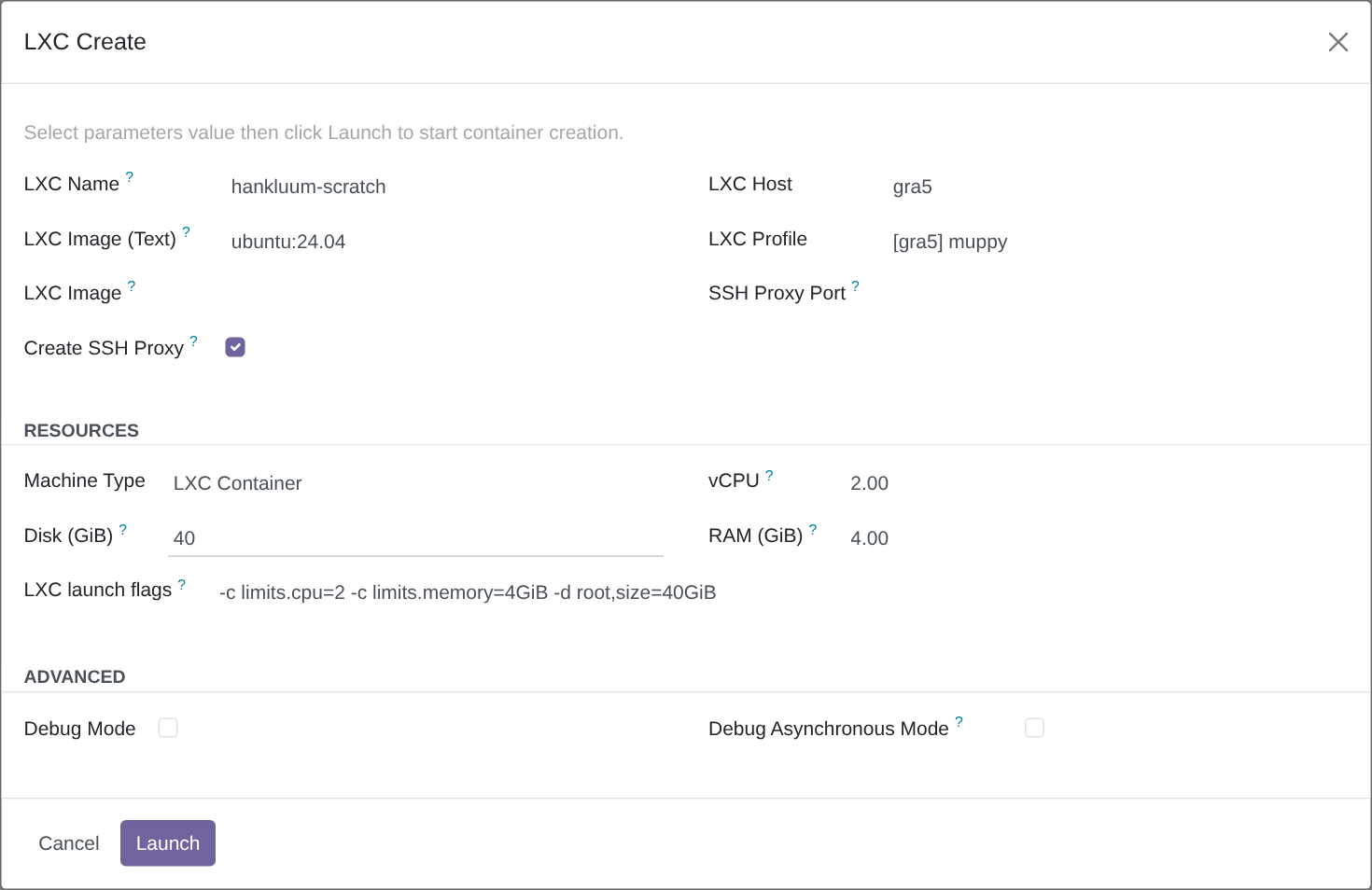
An agent creates a container through the Muppy MCP with create_lxc, this wizard in one
call: see Creating a container.
Which images are accepted
An image runs as root on the LXD host, so Muppy only launches images from sources you trust:
- An image from the LXC Image catalog (the LXC Image field) is always accepted: Muppy already knows it, and launches it by its fingerprint.
- A text image must name its remote,
<remote>:<alias>, and that remote must be listed in the setting Allowed LXC Image Remotes (Settings ▸ Muppy LXD ▸ Images). The default isubuntu, Canonical's official images:ubuntu:24.04is accepted,images:debian/12is not until you addimagesto the setting. - A text image with no remote, such as
24.04, is refused: LXD would otherwise look it up on the host's default remote, whatever that is.
The setting is a comma-separated list, for example ubuntu, images; spaces around each
name are ignored. Emptying the field restores the default ubuntu. Each remote you add
trusts whoever publishes on it with your LXD hosts: add one only when you trust its
publisher.
The same rule applies wherever Muppy creates a container — this wizard, the App Server
provisioning and the lxc_commission method of an LXD host — since they all go through the
same creation task. A refused image stops the creation before anything is done on the LXD
host: no container, no port reserved.
Sizing the guest
The Resources group holds four specifications, and they write the LXC launch flags for you:
| Field | Meaning |
|---|---|
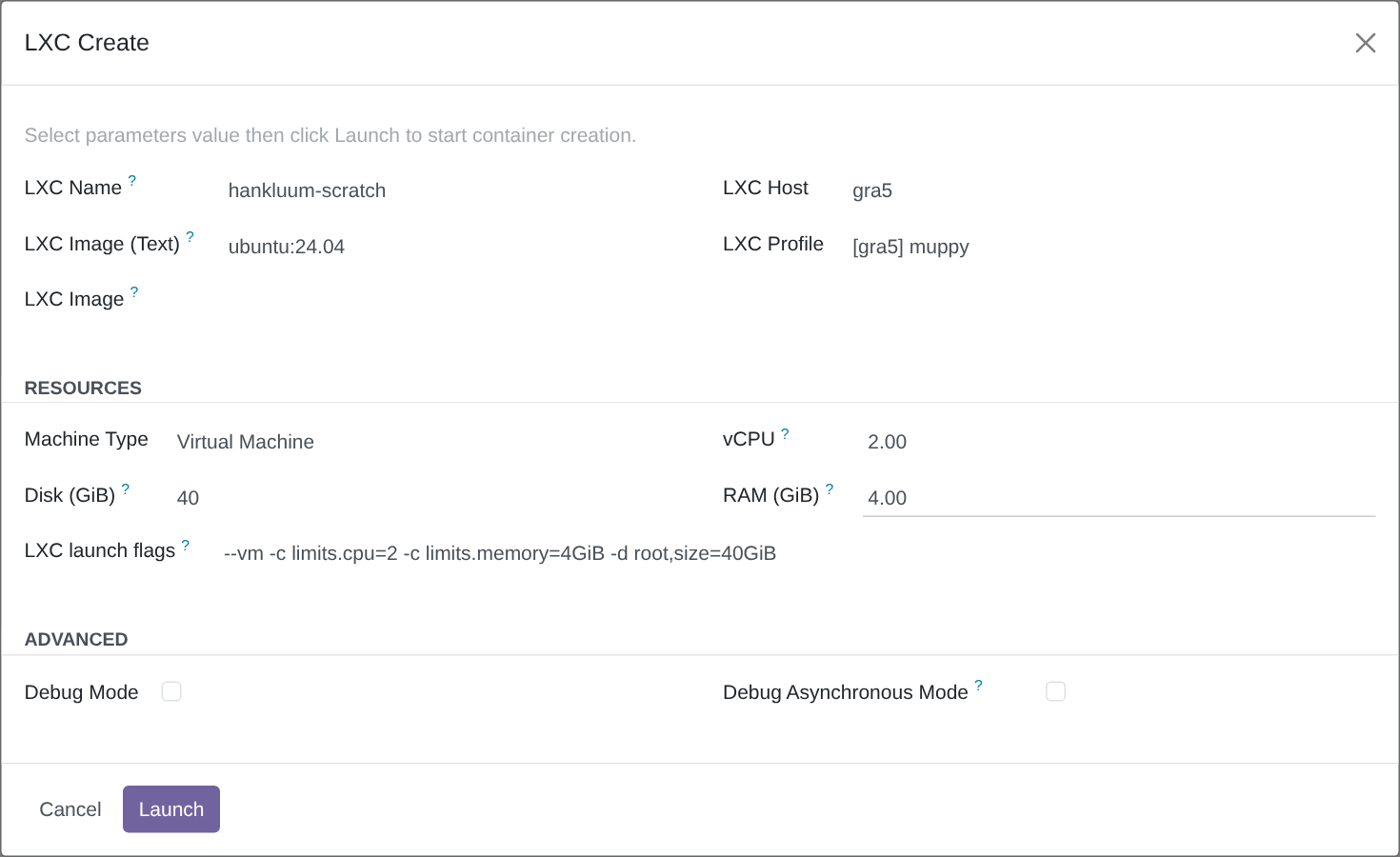
| Machine Type | LXC Container or Virtual Machine. |
| vCPU | A whole number pins that many cores. A fraction between 0 and 1 is a share of one core, containers only. |
| RAM (GiB) | Memory, fractions allowed: 0.5 is 512 MiB. |
| Disk (GiB) | Size of the root disk. |
Every change of one of the four rewrites the flags. The flags field stays editable, and a hand edit survives until one of the four changes again — so you can adjust the generated line, or write your own and keep it, as long as you leave the specifications alone.
Muppy reads the flags the way a shell splits words — quotes included, so
-c 'user.comment=two words' stays one value — then hands each one to lxc as a plain
argument. Nothing in them runs on the LXD host: a ;, && or $(…) reaches lxc as text,
and lxc refuses it as an unknown argument.
All sizes are GiB, the unit LXD reserves.
Zero means "no limit"
On a container, 0 in vCPU or RAM sets no cap at all: the guest uses the host's
capacity. 0 in Disk leaves the storage pool's own default size. Three zeros produce
empty flags, and a guest with no constraint of any kind.
A fraction of a vCPU
Containers only, between 0 and 1. 0.5 gives the guest one visible core and a 50%
share of it when the host is under load; on an idle host the guest uses that core fully.
This is what makes small guests dense on a modest host, rather than a hard ceiling.
A virtual machine is stricter
A VM boots with a fixed number of CPUs and reserves its memory at boot, so it needs a
whole vCPU count, at least 1, and an explicit RAM size. The "no limit" zero is a
container-only value, and a fraction is refused. The flags then start with --vm.
When the specifications are refused
The wizard empties the flags, shows an orange warning under them, and Launch refuses:
| What you asked for | What the warning says |
|---|---|
| A VM with a fractional vCPU | A virtual machine takes whole vCPUs; 0.5 is not one. |
| A VM with less than 1 vCPU | A virtual machine boots with a fixed number of CPUs: give it at least 1 whole vCPU. |
| A VM with no RAM | A virtual machine reserves its RAM at boot: set an explicit RAM size. |
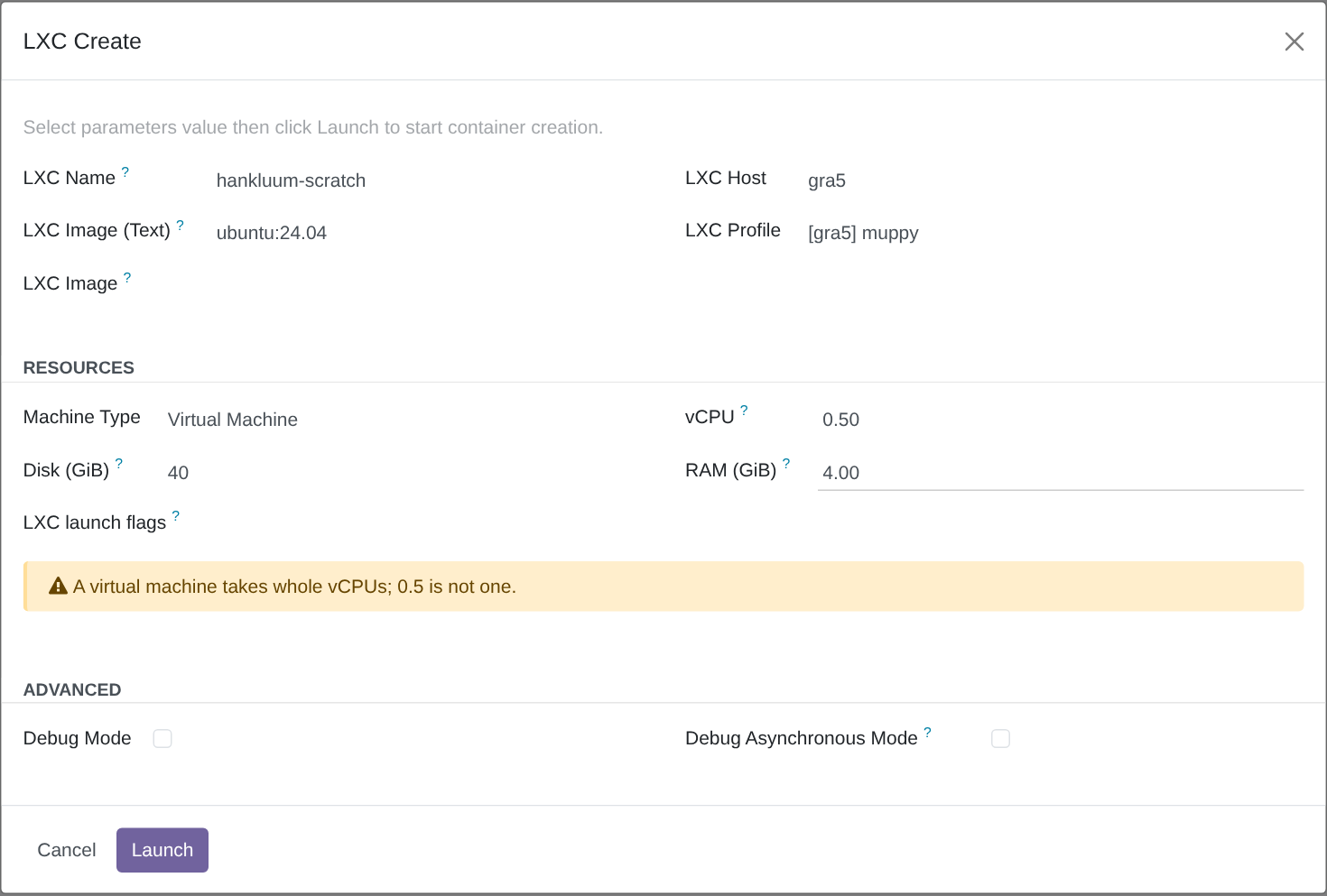
Launch is blocked on purpose
Empty flags on a virtual-machine specification would launch a container instead —
the --vm flag is what makes a VM a VM. Rather than create the wrong kind of guest,
the wizard refuses until the specifications are valid.
Correct the offending field and the warning disappears on the spot, with the flags regenerated.
Reaching the new guest
Muppy reaches a guest over SSH in one of three ways:
| The guest | Muppy reaches it |
|---|---|
| On a bridged LXD host | At its own address on your LAN, directly. |
| A virtual machine, or a container without a proxy device — the standard | At its own address, through its LXD host as SSH jump host. A container bridged by its profile is reached this way too. Nothing is opened on the LXD host. |
| A container with an SSH proxy device — the option | At the LXD host's address, on a port of the LXD host bound to the container's port 22. |
The jump host is the standard. A proxy device opens a port of the LXD host, on all its interfaces, to the container's SSH; a new container gets one only when something asks for it:
- its LXD host's pool — when the pool (Instances Allocator of the LXD host) has LXC SSH via Jump Host unchecked, every new container of that pool gets a proxy device;
- the Create SSH Proxy box of this wizard — it is pre-checked when the pool asks for a proxy, unchecked otherwise, and you can change it. Checked, the port comes from the host's Ports Allocator, or from the SSH Proxy Port you choose.
The two fields disappear when a proxy would be pointless: the host or the profile is bridged, or Machine Type is Virtual Machine — a VM has its own address, and LXD refuses a proxy device on it anyway.
After the launch, Muppy polls the host, creates the guest's own Host record and fills in its address and SSH path: through the proxy device when the container has one, through the jump host otherwise. The guest then appears in the LXCs list of the LXD host.
A container keeps its access
The access is chosen when the container is created, and Muppy never changes it afterwards. A container that has a proxy device keeps it, and keeps being reached through it, even if its pool later switches to the jump host; a container reached through the jump host stays so if the pool switches to proxies. Only new containers follow the pool.
The same rule applies to a container created by the App Server provisioning or by the
lxc_commission method of an LXD host: they follow the pool, as the box does by default.
After you click Launch
The creation runs in the background, as a job named
Create LXC '<name>' on host '<host>'. Follow it in the Muppy / Qs / Messages menu.
It is idempotent: a guest of that name already on the host is started, not created twice.
With a qualifier or a date, Muppy does so only for a guest it created itself: a guest of
that name it never registered — another Muppy instance may share the LXD host — is refused
and left as it is.
Troubleshooting
"LXC containers are not allowed on pool <pool>" — the host's allocator refuses
containers. Create a virtual machine instead, or pick a host whose pool allows them.
"Name must start with a letter, only letters, digits and '-', max 50 chars" — the name is cleared as soon as you leave the field. Rename and try again.
"'a;b' is not a valid LXC name: it must start with a letter, …" — the creation task checks the name again, whoever called it, and stops before anything is done on the LXD host. Rename and try again.
"LXC image 'images:debian/12' comes from the remote 'images', which the setting 'Allowed LXC Image Remotes' (Settings ▸ Muppy LXD ▸ Images) does not allow (currently: ubuntu)" — the job fails in Muppy / Qs / Messages before anything is done on the LXD host: no container, no port left behind. Choose an image from the catalog, or add the remote to the setting if you trust its publisher — see Which images are accepted.
"LXC <name> already exists on LXD host <host> and was not created by this
Muppy" — the LXD host already has a guest of that name, and this Muppy never registered
it: another Muppy instance sharing the LXD host may own it. The job fails in Muppy / Qs /
Messages before anything touches that guest: it is neither started nor registered, and
gets no qualifier and no date. Choose another name.
"LXC image '24.04' names no remote" — write the image with its remote, for example
ubuntu:24.04.
"LXC launch flags … cannot be read as shell arguments" — a quote in the flags is not closed. Close it, or regenerate the flags by changing one of the four specifications.
"Unable to create ssh proxy … no LXC Port Allocator is defined" — the container was asked for a proxy device, and the LXD host has no Ports Allocator to take its port from. Uncheck Create SSH Proxy: the container is then reached through the jump host, the standard. Or define a Ports Allocator on the LXD host.
The flags are not what you typed — changing any of Machine Type, vCPU, RAM or Disk rewrites them. Make your hand edit last.