How Muppy Exposes Your Application
TLS is terminated before your server. Your process serves plain HTTP, on one port, to a reverse proxy that already holds the certificate. Everything else on this page is about names: which ones your application answers to, and which one Muppy calls the URL.
Two readers come to this page, and they do not see the same screen.
| You are | You see | Read |
|---|---|---|
| a developer building the application | the App Server's Application URL, its IDE, and /etc/muppy.env |
The chain → The two URLs you are given |
| a developer administering the App Server | the full Network tab | all of it |
The chain
Visitor → Cloudflare → Sunray Zero-Trust → Traefik → localhost:${APP_HTTP_PORT}
- Cloudflare — optional, and only for a public URL. Anti-DDoS, WAF and cache, the origin IP hidden, and the edge holds the certificate.
- Sunray Zero-Trust — optional. A Traefik middleware that asks who the visitor is before your application ever sees the request.
- Traefik — the reverse proxy. It terminates TLS and matches the requested host name against its routers.
- Your process — plain HTTP on
${APP_HTTP_PORT}.
Your process binds one port
${APP_HTTP_PORT} is the only port that receives traffic from the outside. Read it
from /etc/muppy.env; Muppy resolves it from the App Server's Exposed Ports,
preferring the one whose Service is http-service, then odoo, then the first.
Do not serve HTTPS and do not install a second reverse proxy. Both are already upstream.
Several concerns share one URL by path routing — /api/*, /admin/*,
/webhooks/stripe. For a local port that only you need to reach, use the Code
Server proxy at <codr-url>/proxy/<N>/; it is reachable by the authenticated user
only.
The two URLs you are given
/etc/muppy.env carries two, and they are not the same thing.
| Variable | Filled from | What it means |
|---|---|---|
APP_PRIMARY_URL |
the direct application | the App Server's own URL. Empty when it has no direct application |
APP_LOADBALANCER_URL |
the public route | the public entry point: the Default LoadBalancer URL when someone has set one, otherwise the application of the first Public Exposure Definition. Empty when the server has neither, and consumers then fall back to APP_PRIMARY_URL |
The two answer different questions, so they routinely differ: one is the name the server answers to directly, the other is the name the public reaches it by.
Default LoadBalancer URL is yours. Nothing writes it automatically, so whatever you put there survives every reconfiguration — that is how you force the public URL. Leave it empty and the public route comes from the first Public Exposure Definition instead.
One name, one Traefik Application
A Traefik Application is one name, one configuration file on the Traefik server, one set of routers. Traefik watches that directory, so changing an application needs no restart.
An App Server usually has more than one:
- the direct application — always created, named from the Direct URL FQDN Generator, resolving to the host's own address;
- one public application per attached Traefik Application Definition — the route that goes through Cloudflare.
A definition keeps its application when its forced DNS domain changes but the name it serves and its DNS zone do not. The next (re)Configure updates that application, with its Custom Domain. A change that gives the definition another name, or another zone, creates a second application. The first one stays, with its Custom Domain.
The definition's Public Exposure flag is what makes an application a candidate for Default LoadBalancer URL, and what puts it ahead of the direct one when Muppy decides which URL is the App Server's.
How the name itself is built — the generators, and why a public name drops the host and the company — is in Tenants, Domains and Host Names. Putting your own name in front of it is Custom Domains.
Wildcard host
A Traefik Application whose host name is * serves every direct sub-domain of its
domain. On example.com, it answers to shop.example.com and crm.example.com; it does not
answer to a.b.example.com, nor to example.com itself.
- Traefik 3.7 or later. The Traefik Server must run Traefik 3.7 at least, the first
release whose
Host(`*.example.com`)rule matches a sub-domain. - The exact name wins, on every path. A domain can carry a wildcard and exact names side
by side. A request for
x.example.com, whenxhas its own Traefik Application, goes to that application — its pages, its/websocket, its/sunray— and never to the wildcard: the wildcard's routers rank below every router of an exact name. - An existing wildcard takes this ranking at its next reconfiguration. A Traefik Application renders its own copy of the template, and (re)Configure 'Traefik Applications' reloads that copy. Refresh on the application alone does not.
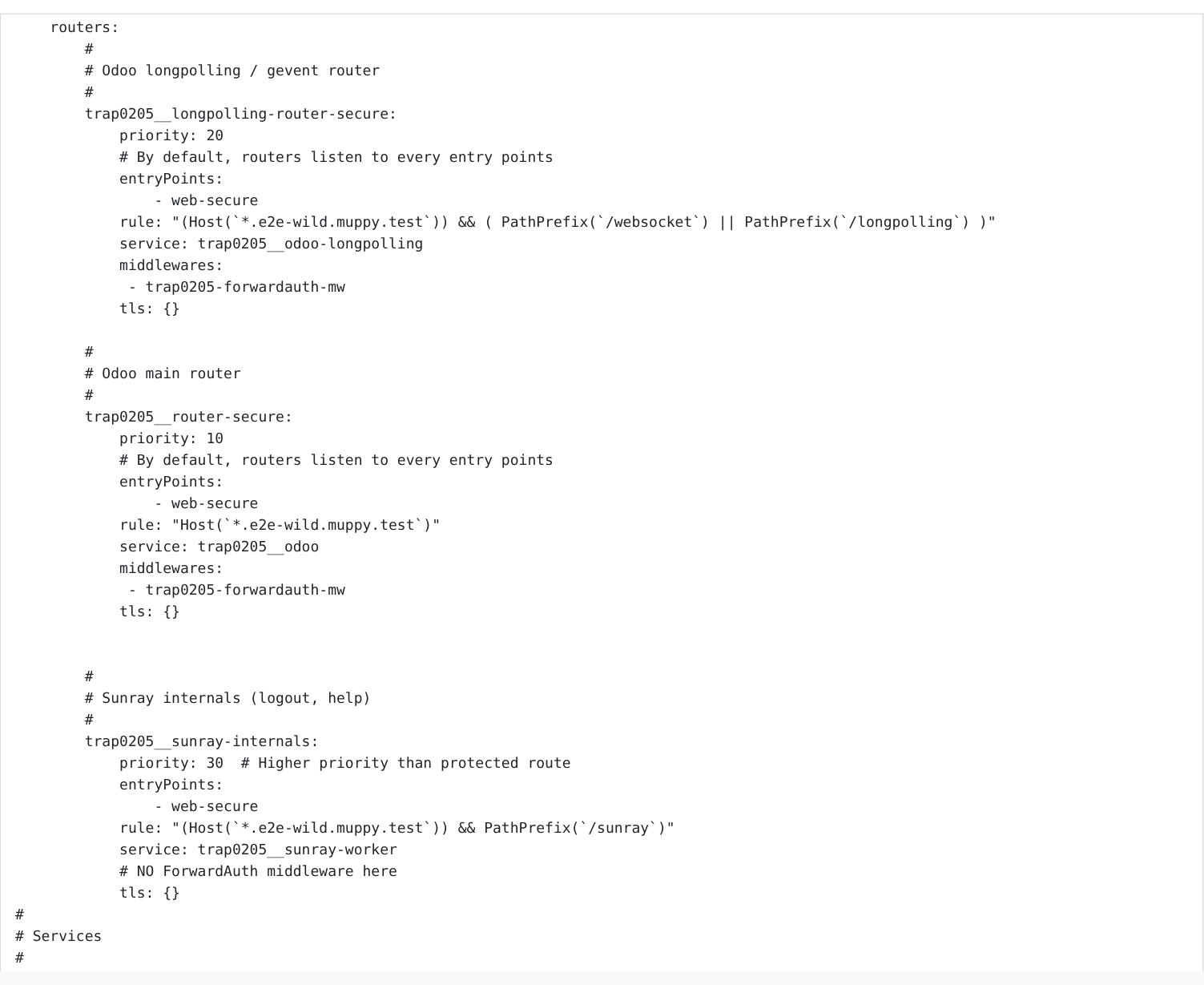
The routers of a wildcard application on e2e-wild.muppy.test rank at 20, 10 and 30, under
the 75, 50 and 100 of an exact name:
 - On an Unmanaged domain, the
 * record is yours to create. Muppy does not write to that
zone: add *.example.com at your DNS provider, pointing at the public address of the
Traefik Server. See Unmanaged DNS Domains.
The Network tab, control by control
| Control | What it does |
|---|---|
| Activate Reverse Proxy | Off means the next (re)Configure deactivates the applications this App Server maintains — its direct application and those of its Traefik Application Definitions — instead of maintaining them: their configuration files are deleted, the records stay. The applications made by hand are left as they are. Unchecking it warns you when an application carries a Custom Domain; nothing changes until the next (re)Configure. |
| Documentation | Opens this page. |
| (re)Configure 'Traefik Applications' | Reconciles the applications with the definitions, uploads each configuration to the Traefik server, and creates DNS records where the strategy asks for them. Run it after changing anything below. It deletes the public applications whose Definition is no longer attached; with Activate Reverse Proxy off, it deactivates the others. It asks first when either carries a Custom Domain. It leaves the applications made by hand as they are, except one that carries the name the App Server generates for its direct application, which it takes over as that direct application. With Activate Reverse Proxy on, a name another application already serves on the same Traefik Server stops it before any change: delete or rename that application, or detach the Definition, then reconfigure again. |
| Remove 'Traefik Applications' | Stops serving the applications this App Server maintains: their configuration files are deleted and the applications deactivated. The applications made by hand stay active, with their Custom Domain; an alert above the list says so. The records stay — only deprovisioning the App Server deletes them. A Custom Domain stays in its field, marked Disabled, but its declaration and certificate are removed; Muppy asks first. See Custom Domains. |
| Traefik Server | The reverse proxy that serves this App Server, and the source of the default DNS domain. |
| Traefik App Config Template | The template rendered into the direct application's configuration file. |
| Direct URL FQDN Generator | Builds the host name of the direct URL. See Network Configuration. |
| Default LoadBalancer URL | Your override of the public URL, set with Set as default LB and never written automatically. It wins over the Public Exposure Definition. Left empty, the public route falls back to that Definition — both for the button and for APP_LOADBALANCER_URL. |
| Traefik Applications | The applications of this App Server, read-only here, and in no order you set. Origin says where each one comes from: Direct (the App Server's own entry), Definition (one of its Traefik Application Definitions), or Made by hand. URL is the name served; Custom Domain (CNAME) is your own name in front of it; Use Let's Encrypt says who issues the certificate. |
| ↳ Set as default LB | Copies that row's URL into Default LoadBalancer URL. Nothing else — no Traefik, no DNS. Choosing a non-public application is allowed and warns you, because the next reconfiguration will not replace it. |
| ↳ Edit | Opens the application, where Custom Domain, the whitelist and the certificate live. |
| ↳ Delete | Removes the application from the Traefik server and deletes it, Custom Domain and declaration included; Muppy asks first when it carries one. What comes back depends on its Origin: the next reconfiguration creates a Definition application again, empty, while its Definition is attached, and the Direct one while Activate Reverse Proxy is on. One Made by hand is gone for good. |
| Traefik Application Definitions | The blueprints attached to this App Server, and the one list whose order you set — its drag handle is what "first" means everywhere on this page. Public Exposure marks the one that provides the default public URL. From App Definition marks the links (re)Sync All from Application Definition manages: it adds the App Definition's missing ones and removes those it no longer carries. A link you add here by hand stays. |
| Exposed Ports | The ports your services listen on. They feed both Traefik's routing and ${APP_HTTP_PORT}. |
| ↳ Sync Exposed Ports with App. Definition | Copies the ports declared on the App Definition onto this App Server. |
| ↳ Sync Exposed Ports with Host | Copies them onto the host, which is what Traefik reads. A reconfiguration does this for you. |
| DNS Records | The records the Traefik Applications created, with their Proxied state. |
| ↳ Delete DNS Records | Deletes them. The next reconfiguration recreates them where the strategy asks. |
| SSH (with Tailscale) | The private SSH path to the box, independent of everything above. |
What the App Server maintains, and what is yours. The App Server maintains its direct application and the applications of its Traefik Application Definitions: (re)Configure creates, updates and deletes them, and Remove 'Traefik Applications' deactivates them. An application you create by hand on the App Server is yours: those gestures leave it as it is, and only deprovisioning the App Server deletes it. One exception: an application made by hand that carries the name the App Server generates for its direct application is taken over by (re)Configure as that direct application. An application you want the App Server to follow comes from a Traefik Application Definition attached to it.
Which button opens which URL
The App Server's button box carries two. Each has one source and one fallback, and disappears when it has neither — rather than offering a control that opens nothing.
| Button | Opens | Falls back to |
|---|---|---|
| Open App. Direct URL | the application the App Server generates for itself, from its Traefik App Config Template and its Direct URL FQDN Generator | the application of the first attached Definition that is not Public Exposure |
| Open Load Balancer URL | the Default LoadBalancer URL field | the application of the first attached Definition flagged Public Exposure |
These are the same two routes as the environment variables above: Open App. Direct URL opens
APP_PRIMARY_URL, Open Load Balancer URL opens APP_LOADBALANCER_URL.
"First" is the order of the Traefik Application Definitions list, which its drag handle sets.
The two are independent: on an App Server that has both a direct route and a public one, they open two different URLs, and that is the point.
The one URL a Manganese screen shows
The Network tab above is the administrator's view. On Manganese — the screen most people work from — an App Server carries a single Application URL, on its card and on its form, and the Open App button opens that one.
It is the public URL when the App Server has one, and the direct URL when it has none. So the two URLs above remain the whole picture; Application URL is simply which of them is shown where there is room for one. An App Server reachable only on its direct name still offers a working link rather than an empty field, and one published through Cloudflare shows the published name rather than the internal one.
If the URL you expected is not the one shown, the Network tab is where the answer is: set the Default LoadBalancer URL, or check which Traefik Application Definition is flagged Public Exposure.
Where to go next
- Network Configuration — name generation, and public URLs behind Cloudflare.
- Tenants, Domains and Host Names — how a host name is built.
- Custom Domains — serving the application under your own name.
- Designing Your mgx — what belongs on the server at all.
- services.yml Service Definitions Guide — declaring the process that binds the port.