Database Copy
Copying a database between clusters looks like a single operation. Under it, Muppy chains:
- Backup one or more databases on the source cluster.
- Upload the pg_dumps from the source Host to an S3 bucket.
- Download them onto the Host running the target cluster.
- Restore them there.
- Delete the temporary files.
Starting a copy
Three entry points:
- the Actions (⚙) menu of the database list (Muppy / Databases / Databases), once at least one database is selected
- the Databases tab of a Database Cluster, via Copy Databases
- a database form, via Copy
All three open the Copy Databases (using pg_dump) wizard:
- Pick the S3 bucket that will hold the pg_dumps.
- Adjust the list of databases to copy.
- Optionally pick a pg_restore Callback Task, applied to every database in the list.
- Click Launch.
The copy runs in the background as a Task. Follow it under Muppy / Qs.
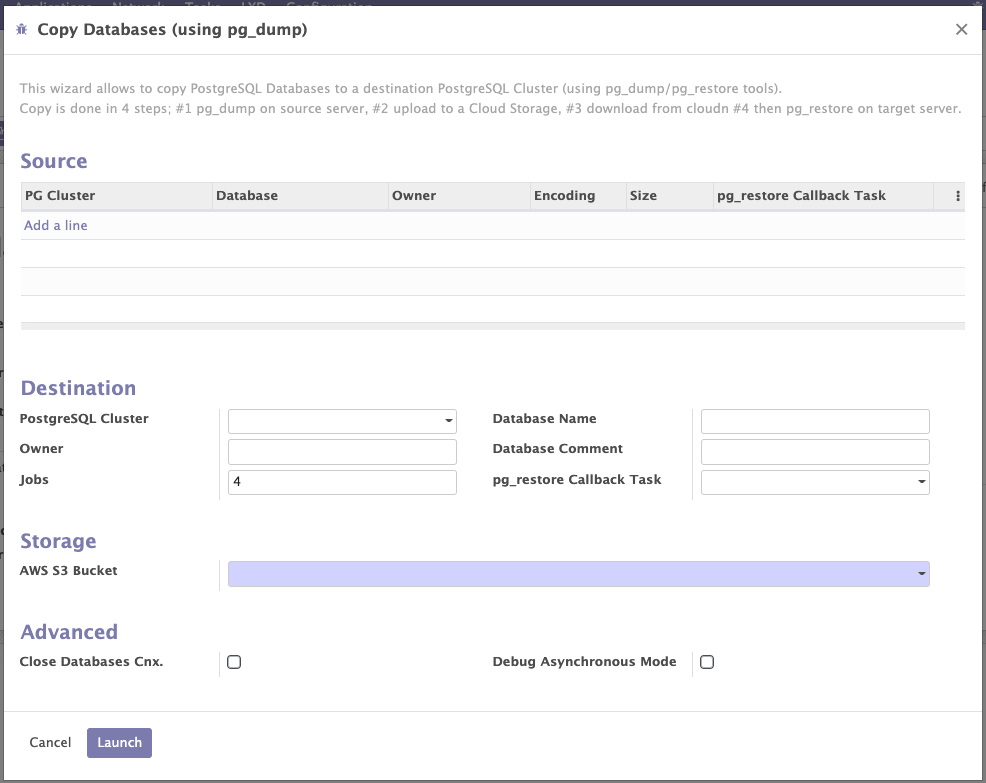
The available options are a mix of the backup and restore options.