pgbench — measuring a cluster
Reference: pgbench — run a benchmark test on PostgreSQL
pgbench, PostgreSQL's benchmark program, measures what a cluster delivers: transactions per second and average latency. Muppy runs it through two Tasks, each launched by a Task Run:
| Task | Launched on | Does |
|---|---|---|
pg_bench_setup |
the cluster's host | prepares the bench database |
pg_bench_run |
the application's host, or the cluster's host | runs the bench and returns pgbench's report |
Where pg_bench_run is launched decides what it measures:
- From the application's host, pgbench measures PostgreSQL as the application sees it: across the network, over an encrypted TCP connection, to the cluster's address. This is the measure to compare with what your users experience.
- From the cluster's host, pgbench goes through the local socket: it measures the server alone, without the network.
The difference between the two is what the network costs your application.
Before a run from the application's host
Three things must be in place, and Muppy changes none of them:
- the first one,
pg_bench_runchecks before it touches the cluster: its message names the button that installs pgbench; -
when the second or the third is missing, the run stops with PostgreSQL's own error, which names what is missing.
-
pgbench of the cluster's version on the application's host. pgbench ships with the PostgreSQL server package. On the application's host, open the PostgreSQL tab and click Install PostgreSQL Server and Client with the cluster's version — see Installing PostgreSQL. It installs the programs and creates no cluster, and lists the version in the host's PostgreSQL Server versions. Install PostgreSQL Client is not enough: its package has no pgbench.
-
A
pg_hba.confline that lets the application's host in over TLS, on the cluster — from its pg_hba.conf tab, see Configuration. The narrowest line that works, with the defaults of the two Tasks:hostssl pg_bench mpy_pgbench 192.168.1.183/32 scram-sha-256192.168.1.183stands for the application host's address. The connection always asks for TLS, so the cluster hasssl = on— the default of a cluster created on Ubuntu. 3. The cluster's port reachable from the application's host, through the cluster host's firewall rules.
1. Prepare the bench database — pg_bench_setup
Create a Task Run with the Task pg_bench_setup and the cluster's host as Host. Launched on
another host, it stops with a message that names the host to use.
| Parameter | Default | Meaning |
|---|---|---|
pg_cluster_obj |
the host's first cluster | the cluster to prepare |
db_name |
pg_bench |
the bench database |
scale |
100 |
pgbench's scaling factor (-s). The database weighs about 15 MB per unit: scale = 0.0669 × the size wanted, in MB |
other_opts |
— | other options, passed as they are to pgbench -i |
pg_bench_setup:
- creates the role
mpy_pgbench, withLOGINand no other privilege, and gives it a random password nobody keeps — each run from the application's host sets its own; - drops the database
db_name, then creates it again, owned bympy_pgbench; - fills it with
pgbench -i -s <scale>; - gives
mpy_pgbenchthe four tablespgbench_accounts,pgbench_branches,pgbench_tellersandpgbench_history: at the start of each run pgbench vacuums them and emptiespgbench_history, which only their owner may do.
It returns the report of pgbench -i, which ends like this:
creating primary keys...
done in 0.63 s (drop tables 0.00 s, create tables 0.01 s, client-side generate 0.40 s, vacuum 0.07 s, primary keys 0.15 s).
Danger
pg_bench_setup drops the database named db_name before creating it. Give it a name
no application uses.
Run it again for fresh data or another scale.
2. Run the bench — pg_bench_run
Create a Task Run with the Task pg_bench_run and, as Host, the application's host — or
the cluster's host for a measure without the network.
| Parameter | Default | Meaning |
|---|---|---|
pg_cluster_obj |
the host's first cluster | the cluster to measure. Required from the application's host, which carries no cluster |
db_name |
pg_bench |
the database pg_bench_setup prepared |
clients |
100 |
concurrent connections (-c). Keep it below the cluster's max_connections |
jobs |
4 |
pgbench threads (-j) |
time |
120 |
duration of the bench, in seconds (-T) |
other_opts |
— | other options, passed as they are to pgbench |
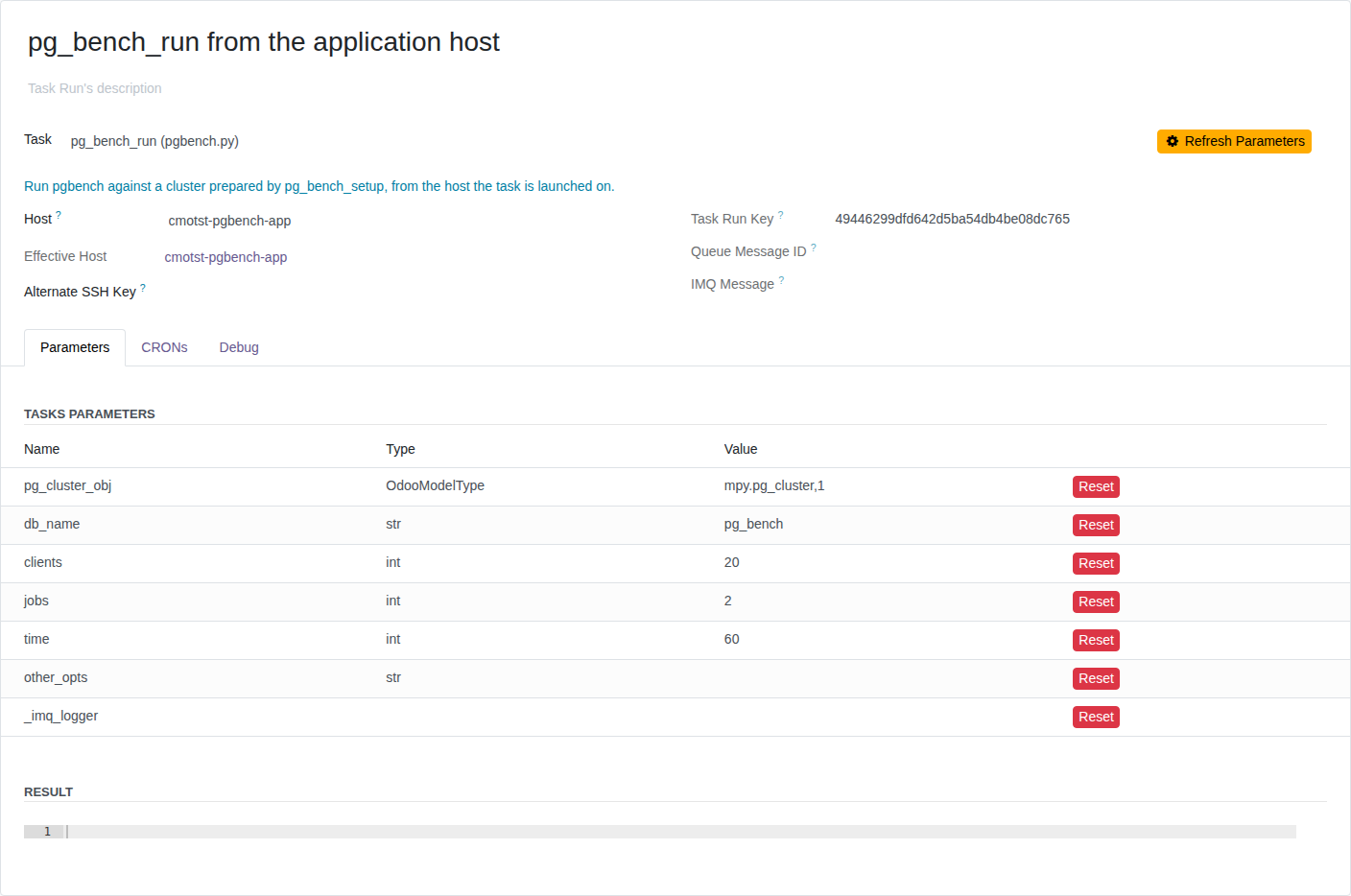
Click Refresh Parameters to list them, then set pg_cluster_obj to the cluster. This Task
Run benches the cluster from the application's host, with 20 clients and 2 threads for 60
seconds:
From the application's host, pg_bench_run:
- checks that the host has pgbench of the cluster's version. It collects the host's Facts, then looks for the cluster's version in PostgreSQL Server versions, on the host's PostgreSQL tab: pgbench ships with the server. Otherwise it stops with a message naming Install PostgreSQL Server and Client, and changes nothing;
- connects to the cluster's host and checks that
pg_bench_setupprepareddb_name: the database exists andmpy_pgbenchowns it. Otherwise it stops with a message asking you to runpg_bench_setupon the cluster's host, and changes nothing; - sets a new random password on
mpy_pgbench; -
runs pgbench to the cluster's address, encrypted, as
mpy_pgbench. The Task's log shows the command:env -u PGPASSWORD -u PGSERVICE PGSSLMODE=require PGPASSFILE=/var/tmp/.muppy/<id>.pgpass PGUSER=mpy_pgbench PGPORT=5432 pgbench --cluster=18/192.168.1.182:5432 -c 4 -j 2 -T 20 pg_bench < /dev/null--cluster=18/192.168.1.182:5432names the cluster's major version, address and port: the host runs the pgbench of that version.PGSSLMODE=requirerefuses any connection that is not encrypted.PGPASSFILEnames the file that holds the password;env -udrops the variables that would take precedence over it or point at another server.
Before any of these steps, pg_bench_run refuses other_opts that carry a password or an
sslmode. A refused run leaves the cluster as it was.
From the cluster's host, pgbench runs through the local socket as the cluster's owner, with no role and no password:
sudo su - postgres -c 'pgbench --cluster=18/main -c 4 -j 2 -T 20 pg_bench' < /dev/null
Reading the result
Launch the Task Run with Launch as Job. The run happens in the background, as an IMQ message: follow it in Muppy / Qs / Messages, or from the Task Run's IMQ Message field (see Async Execution).
Read the measure in the message's Log / Debug tab: it lists every command the run sent, pgbench's included, then pgbench's report. The Result tab holds the same report, as one JSON string.
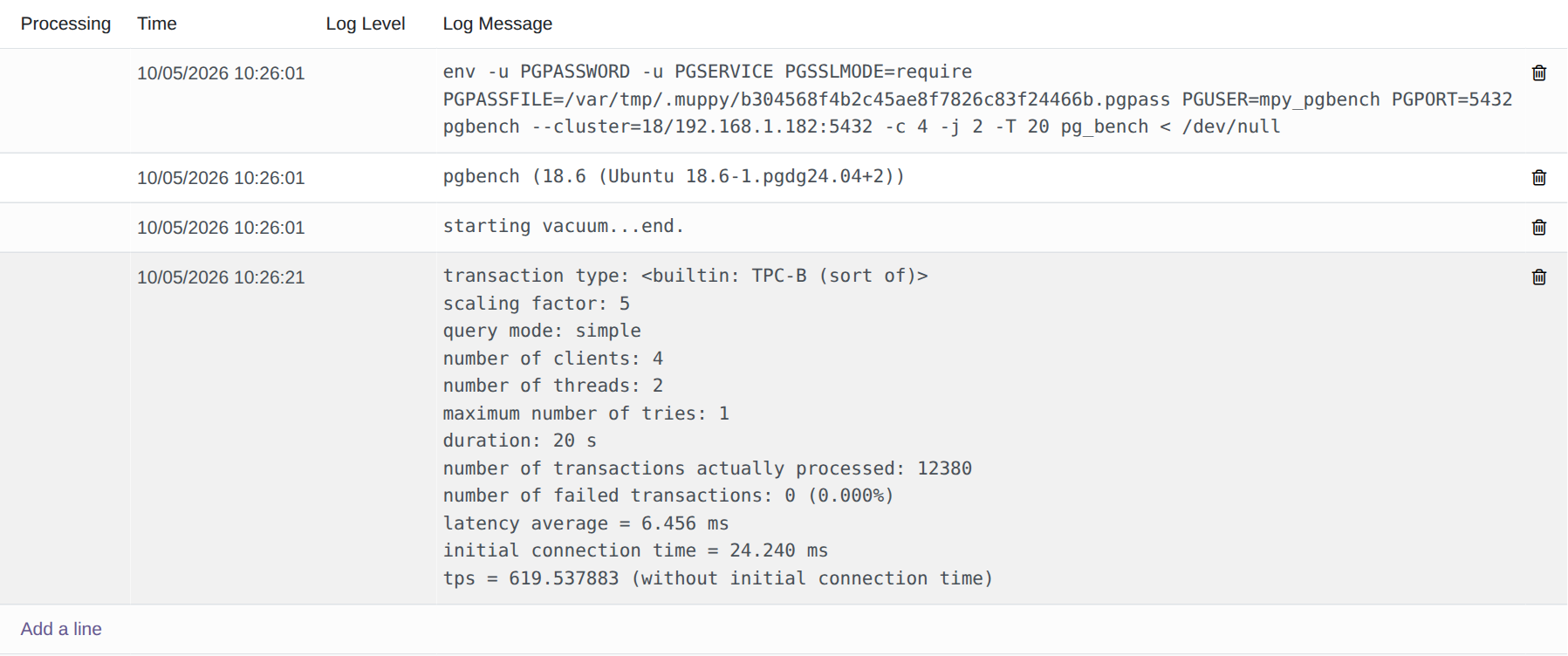
With Launch, the report shows in the Task Run's Result field.
The report, for a 20-second run from the application's host:
pgbench (18.6 (Ubuntu 18.6-1.pgdg24.04+2))
transaction type: <builtin: TPC-B (sort of)>
scaling factor: 5
query mode: simple
number of clients: 4
number of threads: 2
maximum number of tries: 1
duration: 20 s
number of transactions actually processed: 12358
number of failed transactions: 0 (0.000%)
latency average = 6.468 ms
initial connection time = 26.781 ms
tps = 618.421205 (without initial connection time)
Read tps (transactions per second) and latency average. initial connection time
includes the TLS handshake: from the application's host it is the larger of the two.
The role mpy_pgbench and its password
mpy_pgbench is a login role with no other privilege. It owns the bench database and its
tables, and nothing else.
Its password changes at every run from the application's host:
- the Task draws it at random and sets it on the cluster;
- pgbench reads it from a file only its owner can read, which the Task removes when the run ends;
- it is kept nowhere — not in Muppy, not in the Task Run's parameters, not in the log, not on a command line.
Between two runs, the role keeps the last password, which nobody knows.