Access to Your Muppy Instance
Who this page is for. You administer a Muppy instance that oursbl.eu operates. The instance sits behind the oursbl.eu Sunray Zero Trust. This page shows how to decide who reaches it, from your instance's own settings, without asking us. To protect your App Servers with Sunray, read Protect Your App Servers with Your Own Sunray.
How it works
Visitor → oursbl.eu Sunray ──── your Muppy instance
               │
               │ polls, Bearer token
               ▼
     your Muppy instance  /inouk-scp/v1/server/
Every visitor of your instance passes the oursbl.eu Sunray first. Sunray asks for a
sign-in, unless your settings let the visitor through. It reads those settings from your
instance itself: your instance publishes them as a Configuration Proxy, at
/inouk-scp/v1/server/. That endpoint returns your instance alone, under the name of its
web.base.url, with its internal users.
When oursbl.eu also protects your App Servers, its Sunray reads /inouk-scp/v1/ instead,
which adds them to your instance.
You change the settings; Sunray applies them. Nobody at oursbl.eu has to act.
The settings are in Settings ▸ Sunray Proxy (SCP), in three blocks: Connect a Sunray Server to this Sunray Configuration Proxy, Access without a Sunray login and Public Paths. The first block links to this page.
When a change takes effect
The oursbl.eu Sunray reads your instance every 5 minutes. A change you save is applied at the next read. Testing sooner measures the previous state.
Allowed CIDRs: addresses that need no sign-in
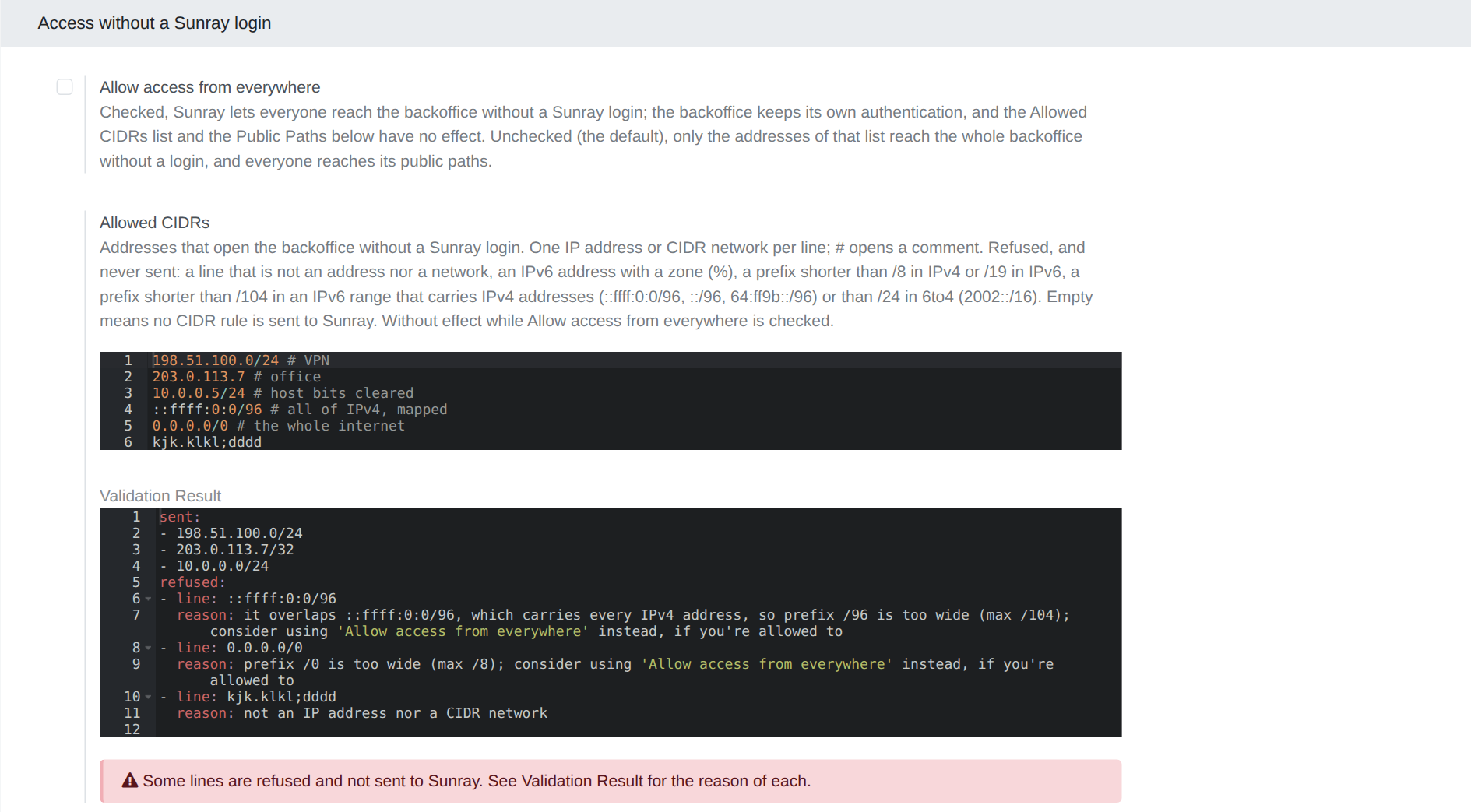
Settings ▸ Sunray Proxy (SCP) ▸ Access without a Sunray login ▸ Allowed CIDRs lists the addresses that reach your instance without a Sunray sign-in: your office, your VPN. Your instance keeps its own login.
- One IP address or CIDR network per line.
#opens a comment. - An address is sent in its canonical form, once:
198.51.100.7as198.51.100.7/32,10.0.0.5/24as10.0.0.0/24. - A line is refused, and never sent, when:
- it is not an address nor a network;
- it is an IPv6 address with a zone (
%); - its prefix is shorter than
/8in IPv4 or/19in IPv6 —0.0.0.0/0and::/0included; - it is an IPv6 range that covers part of a range carrying IPv4 addresses, with a
prefix shorter than
/104(::ffff:0:0/96,::/96,64:ff9b::/96) or/24(6to4,2002::/16).
- Validation Result, under the list, shows in YAML what is sent (
sent) and each refused line with its reason (refused). A red box says when a line is refused.
Allow access from everywhere
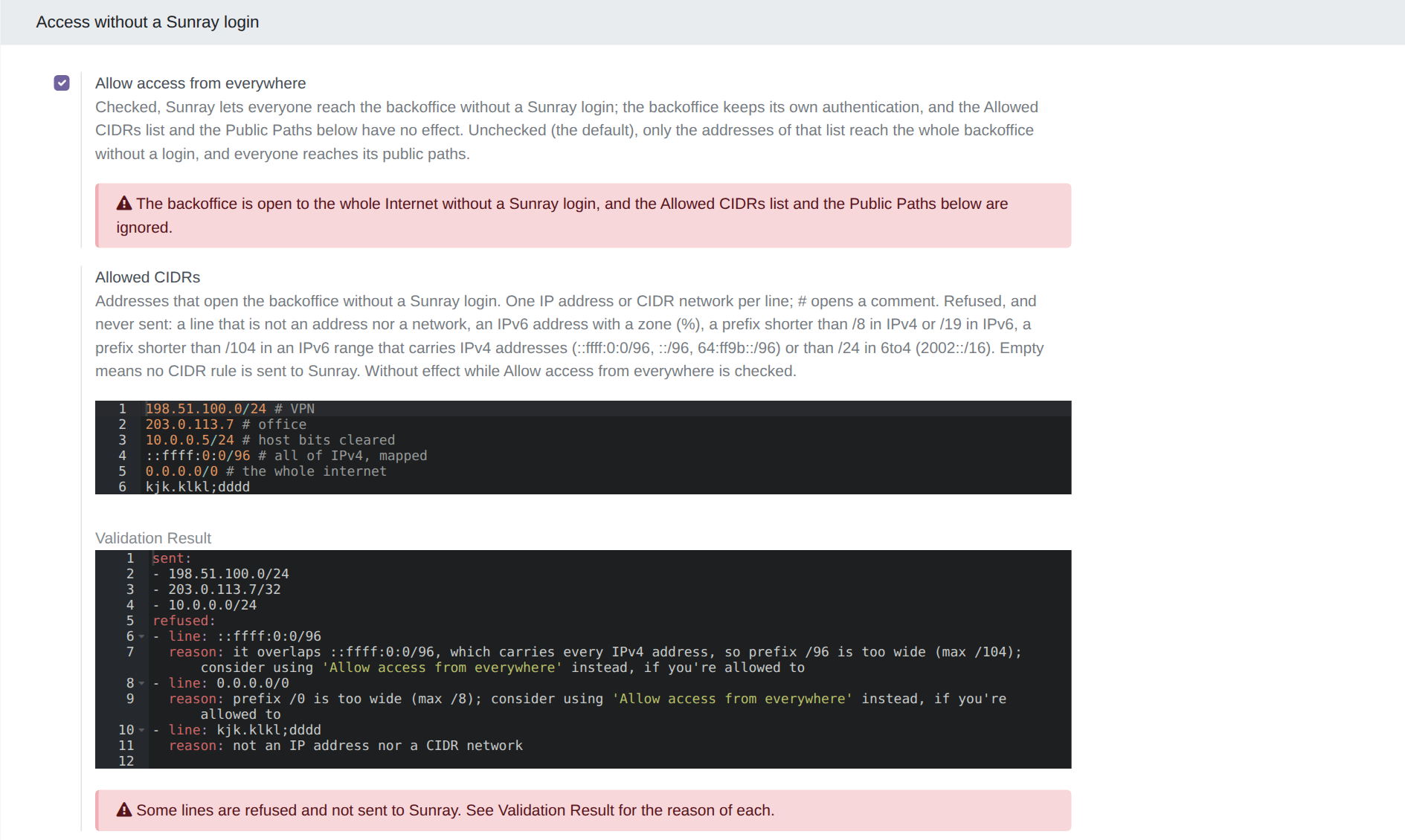
Settings ▸ Sunray Proxy (SCP) ▸ Access without a Sunray login ▸ Allow access from everywhere opens your instance to everyone, without a Sunray sign-in. Your instance keeps its own login. While it is checked, Allowed CIDRs and Public Paths have no effect, and a red box says so.
Public Paths: parts of your instance open to everyone
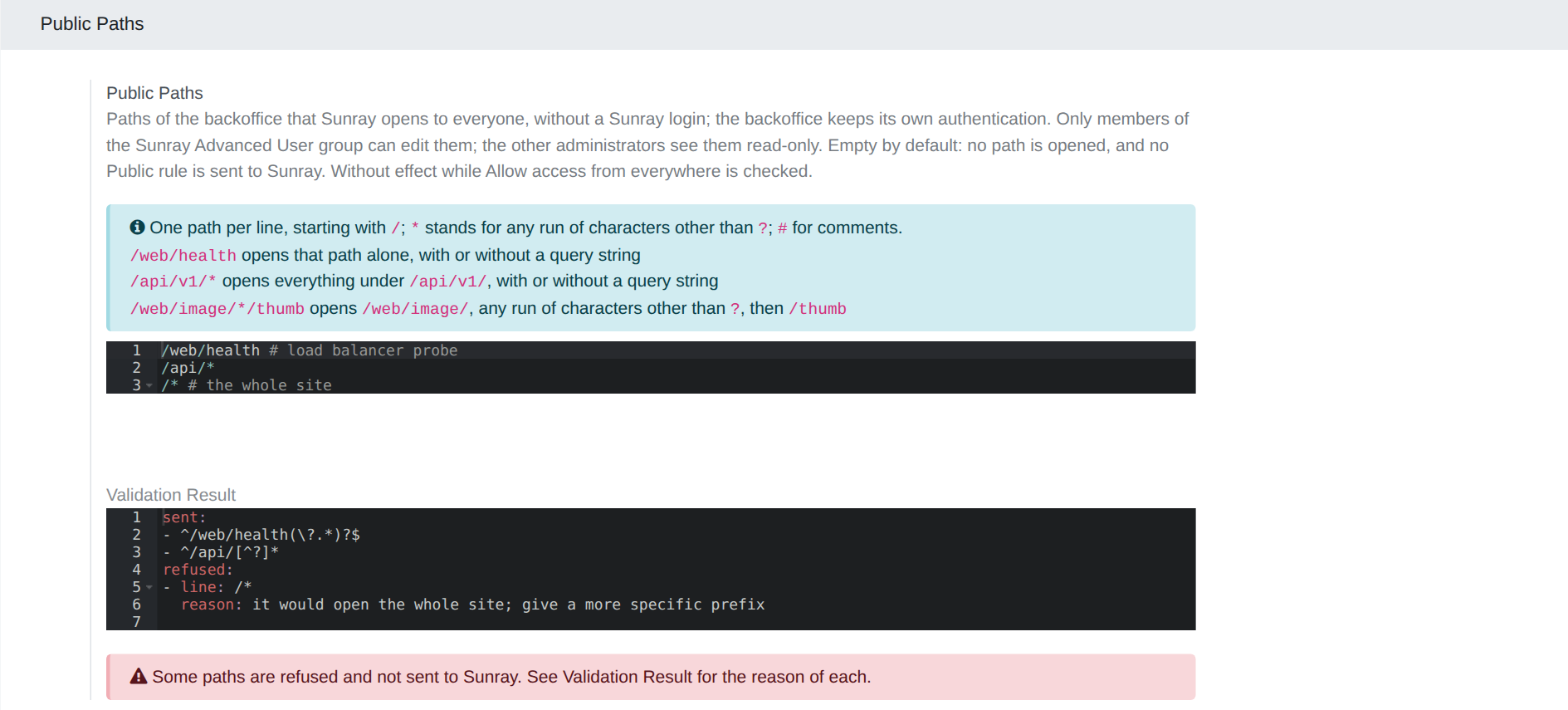
Settings ▸ Sunray Proxy (SCP) ▸ Public Paths ▸ Public Paths opens some paths of your instance to everyone, without a Sunray sign-in: a webhook, an API, a health check.
- One path per line, starting with
/.*stands for any run of characters other than?.#opens a comment. /web/healthopens that path alone, with or without a query string./api/v1/*opens everything under/api/v1/.- Validation Result shows the regular expressions sent to Sunray, and each refused line with its reason.
Writing them is reserved to the Sunray Advanced User group, because a public path bypasses Zero Trust. Grant it in Settings ▸ Users, section Sunray. Another administrator sees the list read-only, and saving the Settings never changes it on their behalf.
A list of paths opens what it enumerates, and nothing else:
- a public page also needs its assets —
/web/assets/*,/web/image/*— and each of its language prefixes; - it suits technical entry points (a webhook, an API, a health check) and a few pages, such as a landing page without a login;
- it does not suit a whole site. Opening a site except its back office would take exclusion rules, which Sunray does not have.
Check what your instance publishes
Settings ▸ Sunray Proxy (SCP) ▸ Connect a Sunray Server to this Sunray Configuration Proxy shows:
- Endpoint URLs:
/inouk-scp/v1/(everything your instance publishes) and/inouk-scp/v1/server/(your instance alone); - Bearer Token and Test Command, under Show credentials. The command is a
ready-made
curl. Run it to read exactly what Sunray reads.
The Bearer Token is shared with the oursbl.eu Sunray. Do not generate a new one on your
own: the oursbl.eu Sunray would get 403 from then on, and your instance would keep the
access rules it last read. To rotate it, contact oursbl.eu support.
Troubleshooting
| Symptom | Where to look |
|---|---|
| an edited list has no effect | its line is refused — read its Validation Result — or the next read has not happened yet (5 minutes) |
| a public path still asks for a sign-in | its line is refused, Allow access from everywhere is checked, or the next read has not happened yet |
| everybody reaches the instance without a sign-in | Allow access from everywhere is checked |
| you cannot edit Public Paths | you are not a member of the Sunray Advanced User group |